What if a fleet map could do more than show where a vehicle is? If you’re asking “what is telematics”, the key difference is that GPS tracking shows location, while telematics can bring together location and other vehicle data to help explain what’s happening across your operation.
The terms are often used interchangeably because both can involve connected devices and software. Telematics may also collect information such as journey history, vehicle use and driving behaviour, depending on the system. Its value comes from making relevant data useful: for example, reviewing mileage, overseeing grey fleet activity or understanding an event captured by a vehicle camera.
This guide explains the main components of a telematics system and how data travels from a vehicle to software. It covers practical uses for business fleets, including vehicle and asset tracking, mileage capture and safety, then sets out questions to consider about privacy, data quality and decision-making. Use it to identify which connected-vehicle information could support your day-to-day fleet management.
Key Takeaways
- Understand what is telematics and how it differs from vehicle tracking, so you can judge which information a system may provide.
- Follow how vehicle signals are captured, transmitted and displayed in software, remembering that the available data depends on the system and its configuration.
- Match questions about location, mileage, assets or safety events to relevant data. Vehicle cameras may add visual context.
- Assess data quality and responsible use before relying on dashboard information to guide operational decisions.
- Start with one clear business question, assign responsibility for reviewing the data and use the findings to decide what to do next.
What Is Telematics? A Clear Definition for Business Readers
Telematics combines telecommunications and informatics to collect, transmit and exchange data from remote devices or assets. For businesses, it can connect equipment in vehicles or on mobile assets with software that presents information for operational use. The term describes the broader process of gathering and communicating data, rather than one particular device or function.
Vehicle telematics is one application. A vehicle can send information to a central platform, where staff can view it alongside other fleet records. Depending on the system, that information might relate to location, mileage, vehicle use or other signals. Telematics can also connect mobile assets and support connected services. The combination of communications technology and computing is reflected in this broader What is Telematics? overview.
For a business reader asking what is telematics, the practical distinction is that it describes a connected data system, not simply a map showing a vehicle’s location. GPS data can be one input, while other information may add context for managing vehicles, journeys or assets.
How Is Telematics Different from GPS Tracking?
GPS is a positioning technology that helps determine where a device or vehicle is. Telematics is broader: it brings data together and communicates it to a platform for review. For example, a location update might show that a company van is near a customer’s site. The system could also present mileage or other configured vehicle information, helping a fleet manager consider the journey in its wider operational context. Available information varies by system, vehicle and purpose, so telematics doesn’t mean that every vehicle provides the same data.
This distinction helps when deciding what a business needs to understand. If the question is simply where a vehicle is, location tracking may answer it. If the aim is to review activity across a fleet, the system may combine location with other selected data. The information is useful when it matches the operational question, not simply because it appears on a dashboard.
Where Is Telematics Used?
Telematics is used with vehicles, mobile assets, transport operations and connected services. For business fleets, applications include vehicle tracking, mileage capture and asset tracking, each serving a different oversight need. Vehicle cameras can add visual context to fleet information, depending on the system and its configuration.
A fleet manager might use vehicle location to see where work vehicles are, while mileage information can support processes that rely on journey records. Asset tracking can provide visibility of mobile equipment beyond the vehicles themselves. These applications are related, but they address distinct operational needs. If your priority is location visibility, this business vehicle tracking guide explains how tracking can fit into fleet oversight.
How Telematics Works: From Vehicle Signals to Usable Data
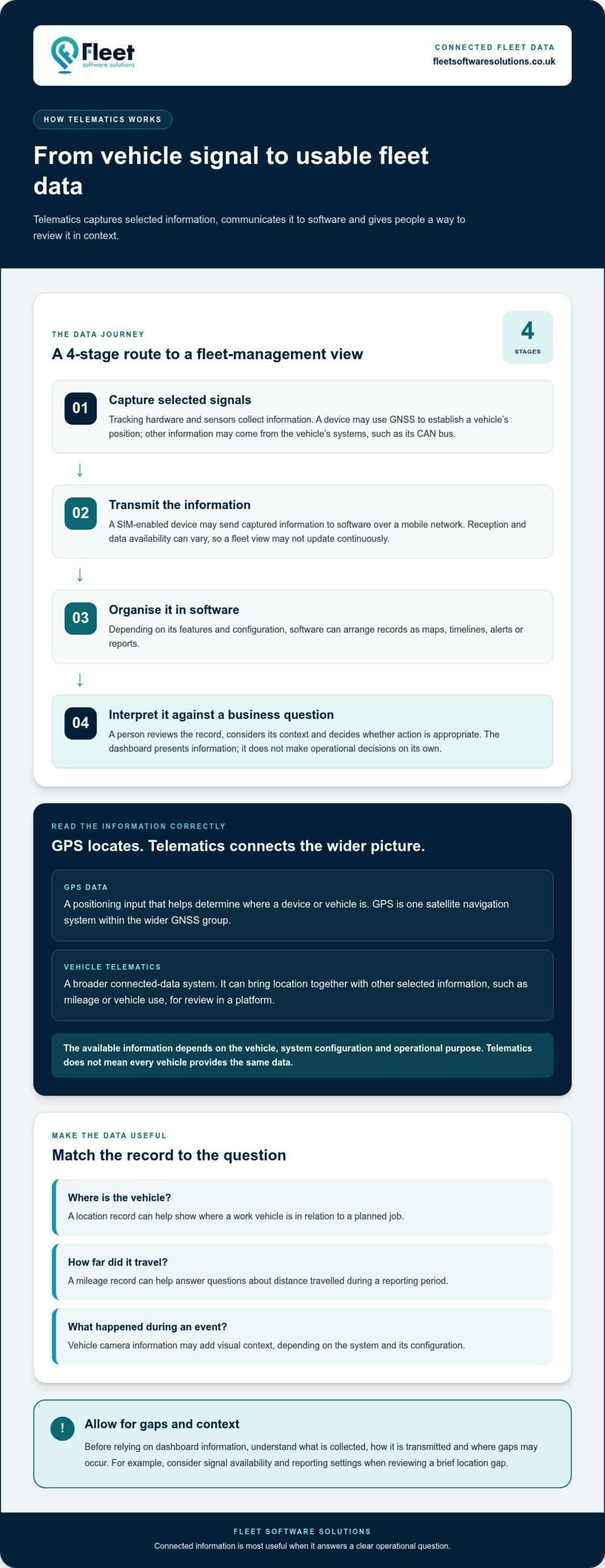
A telematics system turns selected information from a vehicle into records that fleet staff can review. The process has four stages: equipment captures signals, a connection transmits them, software organises the information, and someone interprets it in relation to a business question.
A connected-vehicle signal becomes a fleet-management view when hardware captures selected data, sends it to software and presents it in a form people can interpret. The equipment and information involved vary according to the vehicle, system configuration and operational purpose. A dashboard doesn’t automatically contain every possible type of data.
What Equipment and Connections Can a Telematics System Use?
Tracking hardware and sensors can capture information, but their role depends on the system. A device may use GNSS, short for Global Navigation Satellite System, to establish a vehicle’s position. GPS is one satellite navigation system within that wider group. Other information may come from a connection to the vehicle’s systems, such as its CAN bus, the network that allows electronic components to communicate.
Captured information may travel to software over a mobile network using a SIM-enabled device. Reception and data availability can vary, so a fleet view may not update continuously. Before relying on the information, understand what is collected, how it is transmitted and where gaps may occur. This helps set realistic expectations for live updates and later reporting.
How Does Telematics Software Present the Information?
Depending on its features and configuration, software can organise records into maps, timelines, alerts or reports. A location record might help a fleet manager see where a vehicle is in relation to a planned job. A mileage record can answer a different question, such as how far a vehicle travelled during a reporting period.
These views make information easier to review, but they don’t make operational decisions on their own. A person still needs to interpret the record, consider its context and decide whether action is appropriate. For example, understand a brief location gap in light of signal availability and reporting settings, rather than treating it automatically as evidence of a vehicle issue.
Fleet management software places telematics information within a broader operational picture, alongside other fleet processes. The fleet management guide explores this wider software context. For an overview of how businesses use connected data, see Forbes’ discussion of the benefits of telematics for businesses.
For businesses looking to improve fleet oversight, fleet management software and tracking capabilities can bring selected information together around practical operational needs.
What Can Telematics Help a Business Fleet Understand?
Telematics is most useful when it answers a clear operational question. Rather than treating every data point as an insight, focus on what the fleet team needs to know: where vehicles are, how business mileage is recorded, whether tracked equipment is in the expected place, or what information could help when reviewing a safety event.
Depending on the system and its configuration, telematics may help a business review vehicle locations, mileage records, asset whereabouts and safety-related events. This gives fleet teams information to investigate, not a guaranteed outcome. Data can support a decision, but it doesn’t on its own ensure lower costs, safer driving or improved compliance.
Vehicle, Mileage and Asset Visibility
Location information can help answer whether a work vehicle is near a job or how its movements relate to operational plans. Mileage capture can provide records for business processes that rely on journey information. Asset tracking can help staff check the reported whereabouts of equipment, while plant and machinery tracking supports oversight of mobile equipment used alongside vehicles.
Grey fleet management involves a different consideration: employees may use their own vehicles for work, so an organisation may need a suitable way to manage business mileage and oversight. Telematics-related tools can support this, with the relevant information and processes shaped by the employer’s needs. The grey fleet management guide explores this employer-specific context.
These applications shouldn’t be conflated. A vehicle location record doesn’t automatically provide a mileage record, and tracking an asset serves a different purpose from overseeing a journey. Define the question first to identify which information is relevant, rather than collecting data without a clear use.
Safety and Compliance Context
Vehicle cameras can add visual context to fleet information and may help a business review an event alongside other available records. What footage is captured and how it can be used depends on the camera system and its configuration. Footage can inform a review, but it doesn’t establish what happened without appropriate interpretation. A fleet camera systems guide provides more detail on this application.
Lone worker protection addresses a broader operational question: how an organisation can support staff working away from colleagues or usual work locations. It is distinct from vehicle tracking, even where connected tools contribute to oversight. DVS compliance solutions are another specialist application for relevant fleet operations. Telematics may form part of the wider picture, while the specific function depends on the solution. For fleets operating in Greater London, this Progressive Safe System guide for fleet operators explains how DVS ratings relate to safety requirements and permit compliance.
Start with the decision or event you need to understand. Then identify which records could inform a review and who will interpret them. This keeps telematics focused on useful operational insight while making room to assess limitations and responsible data use.
Telematics Limitations, Data Quality and Responsible Use
A dashboard can make fleet information easier to review, but it doesn’t make every record complete, accurate or self-explanatory. Telematics can inform operational decisions; it can’t automatically resolve scheduling issues, explain every unusual journey or establish the full context of an event. Good use depends on understanding how information was produced and applying it with care.
In practical terms, what is telematics also means understanding the processes people use to interpret and govern connected information. Where records relate to identifiable employees, organisations should consider privacy and data protection alongside operational value.
What Can Affect Telematics Data Quality?
Location and vehicle records depend on the equipment, how it is installed, the available connection and the system’s configuration. Signal loss can leave a gap, while a setting may determine which events are recorded or how they appear in a report. Different vehicles and devices may also produce information in different ways, so managers shouldn’t assume every record is directly comparable.
Interpret records in context. If a vehicle appears not to have moved, for example, that information alone may not establish whether it was stationary, temporarily out of contact or affected by a system issue. Check surrounding information and consider whether the record is complete before drawing a conclusion or taking action. Dashboards can flag patterns for investigation, but people remain responsible for deciding what those patterns mean.
How Should Businesses Handle Telematics Data?
Start by stating the business purpose. A clear purpose helps determine which information is relevant, who needs access and how long records should be kept. Collecting or retaining data without a defined use can add administrative work and create unnecessary privacy concerns.
- Limit collection: focus on data that serves the stated operational purpose.
- Control access: give staff access according to their responsibilities, rather than making detailed records widely available by default.
- Set retention practices: decide how long different records are needed and review whether they should continue to be held.
- Communicate clearly: explain to affected workers what information is collected, why it is used and who can review it.
In the UK, the UK General Data Protection Regulation and the Data Protection Act 2018 are central to the handling of personal data. If telematics information can identify a worker or be linked to them, organisations should consider their data-protection responsibilities and consult current Information Commissioner’s Office guidance. The appropriate approach depends on the data and its intended use, so this general overview isn’t a substitute for legal advice.
Clear governance makes information easier to use responsibly and supports trust between employers and staff. Explore fleet tracking and software capabilities for tools that can support structured operational oversight.
How to Apply Telematics to Business Decisions
The practical test of a telematics approach isn’t how much information appears on screen. It is whether the information helps answer a real business question. A focused starting point makes it easier to select relevant data, decide who will use it and judge whether it adds useful context to an existing process.
Start with a Measurable Operational Question
Identify an issue or task the business needs to understand. Are mileage records difficult to review? Is equipment hard to locate? Does the fleet team need clearer information about vehicle activity? Make the question specific enough to guide data selection, without assuming that collecting more information will automatically improve the outcome.
Then set out a simple review process:
- Define the question: describe what you need to understand and why it matters to the operation.
- Match the data: decide whether vehicle tracking, mileage capture, asset tracking, camera footage or another relevant record could help answer it.
- Assign ownership: name the person or team responsible for reviewing the information and deciding what, if anything, should happen next.
- Establish a baseline: record how the task or process currently works, so later reviews have a meaningful point of comparison.
For instance, if a business wants to understand how mileage records are handled, document the current process before introducing a mileage data source. The person responsible can then review whether the information is usable and supports the intended task. Avoid arbitrary performance targets or assumptions about savings; assess what the data shows against the business’s actual starting point.
Build a Telematics Approach Around the Fleet
Different capabilities provide different forms of visibility. Tracking hardware can provide vehicle or asset location information. Vehicle cameras can add visual context to events, depending on the system. Fleet software can organise selected records for review. Plant and machinery tracking, grey fleet oversight and mileage capture address other operational needs. These functions can work together, but one doesn’t replace another.
Suitable choices depend on the fleet’s objectives, vehicles, assets and working practices. A business with equipment moving between sites may prioritise asset visibility, while another may first need a clearer process for business mileage. Start with a manageable use case, review whether the information is relevant and reliable, then decide whether to extend the approach. This keeps data collection purposeful and gives staff a clear reason to use the system.
Understanding what is telematics is a useful first step. Applying it well means connecting the right information to an owner, a decision and a review process. For a practical overview of business-focused options, explore Fleet Software Solutions’ fleet management and tracking capabilities.
Make your next fleet decision more informed
Understanding what is telematics is only the starting point. Next, decide which everyday fleet decision would benefit from clearer evidence. As vehicles, work patterns and responsibilities change, revisit whether the information you collect still answers that question, whether the right people can interpret it and whether it supports a practical action. This keeps connected data aligned with your operation, rather than letting a dashboard become another routine to maintain.
You don’t need to begin with every possible data source. Choose a priority and build from what proves useful. Fleet Software Solutions brings together business vehicle tracking and camera systems with fleet software and related capabilities, including mileage capture, grey fleet oversight, asset and plant tracking, lone worker protection and DVS compliance solutions.
To explore options for your operational priorities, explore Fleet Software Solutions’ fleet management and tracking capabilities. Start with a clear business question and find the tools to make connected information a purposeful part of fleet management.
Frequently Asked Questions
Is telematics the same as GPS tracking?
No. GPS is a satellite-based positioning technology, while telematics describes a broader way of collecting and communicating information. A GPS tracker might report a van’s position; a telematics system could combine location with selected records, such as mileage or vehicle activity. The exact information depends on the equipment and configuration. This distinction helps explain what is telematics: a connected system whose role can extend beyond locating a vehicle.
Can telematics work when a vehicle has no mobile signal?
Some equipment may continue gathering information without a mobile connection, but it can’t send live updates over an unavailable network. Depending on the device, records may be stored temporarily and transmitted when a connection returns, or some information may not be captured. If a vehicle is travelling through an area with poor reception, treat gaps in the platform as missing updates, not proof that the vehicle stopped or changed route.
Does telematics track a vehicle when its engine is switched off?
It can, but this depends on how the device is powered and configured. A system may continue reporting a parked vehicle’s position, while another may reduce activity or stop sending updates when the ignition is off. The engine being off doesn’t necessarily mean the telematics unit has no power. Before relying on a parked vehicle’s location for security or operational decisions, understand what the system is designed to record in that state.
How much data does a telematics system use?
There isn’t one standard data allowance for every system. Usage depends on how often information is sent, which records are included and whether the setup transfers camera footage. Small location or mileage records generally use less data than video, which can involve larger files. For fleet planning, consider the selected features and reporting settings together, then review actual usage against the mobile data arrangement for the devices in your fleet.
Can telematics be used with a mixed fleet?
Yes, a mixed fleet can use telematics, although suitable equipment and information may vary between vehicle types and models. A business operating vans, cars and plant, for example, may need different tracking arrangements for vehicles and machinery. Grey fleet vehicles can involve a separate approach to business mileage. Plan around the questions each group needs to answer to make reporting more consistent, without assuming every vehicle produces identical records.
Is telematics only used in vehicles?
No. Telematics can also be applied to mobile assets, including plant and machinery, where a business needs visibility of equipment that moves between work locations. For example, a team could use asset information to find where an item was last reported, rather than searching several sites without a starting point. The data collected depends on the connected equipment and operational purpose, so asset tracking isn’t necessarily the same as vehicle tracking.
Can telematics data be used to support an insurance claim?
Potentially. Relevant records, such as journey information or footage from a vehicle camera, may help provide context when a business is reviewing an incident or preparing information for a claim. Their usefulness depends on the records available, their quality and the circumstances. They don’t by themselves establish fault or guarantee an insurer will accept a claim. Keep relevant information intact and handle it in line with your organisation’s data-protection practices.