More fleet data doesn’t automatically lead to better decisions. Telematics software can bring connected-vehicle information into clearer focus, but when records sit across separate tools, managers may still spend time working out what needs attention. The challenge isn’t simply collecting more data. It’s turning it into practical actions that fit the way your fleet operates.
If you’re weighing up capabilities, implementation effort, driver privacy and long-term adoption, a clear evaluation process helps. This guide explains how vehicle telematics turns vehicle data into usable information, which functions to compare with your priorities, and how to plan a manageable introduction. We’ll look at vehicle tracking, mileage capture, grey fleet oversight, plant tracking and workforce safety. Not every organisation needs every feature. The aim is to identify where connected data can support repeatable decisions, rather than add another system your team has to interpret.
Key Takeaways
- Separate the software platform from the devices that capture vehicle and equipment data to understand how each contributes to fleet oversight.
- Follow the journey from data capture to operational response to see how telematics software can support informed decisions.
- Match capabilities to specific priorities, such as vehicle visibility, mileage administration, camera-related safety workflows and asset oversight.
- Plan adoption in practical stages, from defining the operational problem to reviewing a small set of agreed measures.
- Connect tracking, cameras, grey fleet management, mileage capture and asset tracking with day-to-day fleet requirements.
What telematics software does beyond showing vehicle locations
Telematics software organises and presents data gathered by connected vehicles and equipment, helping fleet teams interpret information and use it in their work. It is distinct from the devices that collect or transmit data: devices provide the inputs, while the software gives people a way to view and manage relevant information.
A shared dashboard can bring vehicle locations, activity and other fleet information into one view. This helps managers review what is happening without piecing together separate records. The practical value comes from connecting that view to a task, such as checking a vehicle’s activity when planning work or reviewing mileage information for administration. More data alone doesn’t make a fleet easier to manage.
Telematics software, tracking devices and fleet management: what is the difference?
Hardware is the in-vehicle or asset equipment that captures or transmits data. Software is the interface teams use to organise, view and act on relevant information. Fleet management is broader: it includes the people, processes and tools used to oversee vehicles, equipment and related tasks. A platform can support those processes, but it doesn’t replace the decisions and responsibilities of the people using it.
Which fleet problems can telematics software help address?
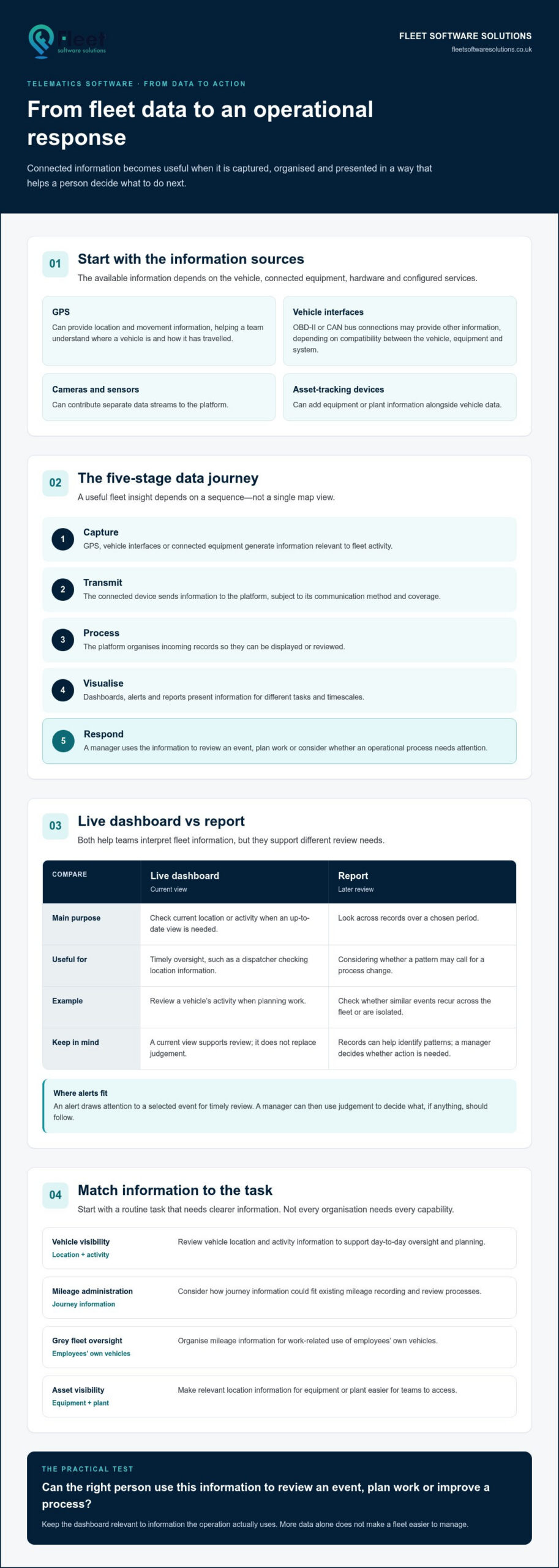
Start with a routine task that needs clearer information. If your team struggles to locate vehicles, it may need access to location and activity data. If mileage administration takes too much manual review, consider how journey information could fit into the process. For asset oversight, identify where equipment is and who needs that information. These are distinct requirements, so don’t assume one capability will solve them all.
- Vehicle visibility: Review location and activity information to support day-to-day oversight and planning.
- Mileage administration and grey fleet oversight: Organise mileage information for existing recording and review processes, including work-related use of employees’ own vehicles.
- Asset visibility: Make relevant location information for equipment or plant easier for teams to access.
Match each function to the information your operation actually uses. This keeps the dashboard relevant instead of filling it with data that has no clear purpose. For foundational terminology, the guide to what telematics means explains the wider concept; What is Telematics? provides a broader overview of the field and its applications.
How telematics software turns vehicle data into usable fleet insight
Useful fleet insight depends on a sequence, not a single map view. Information must be captured, transmitted, processed and presented in a form that helps someone decide what to do next. The available information depends on the vehicle, connected equipment, hardware and configured services.
Telematics turns connected-vehicle data into fleet insight by collecting relevant information, organising it for review and giving teams a basis for operational decisions. This can support both a current view of activity and a longer-term understanding of recurring patterns.
From GPS and vehicle interfaces to a central platform
GPS can provide location and movement information, helping a team understand where a vehicle is and how it has travelled. Vehicle interfaces, such as OBD-II or CAN bus connections, may provide other information, depending on compatibility between the vehicle, equipment and system. Cameras, sensors and asset-tracking devices can contribute separate data streams, so the platform may combine several sources rather than relying on GPS alone.
From dashboards and alerts to practical action
Once information reaches the platform, it can be processed and displayed through dashboards, reports or alerts. An alert draws attention to a selected event for timely review. A report helps a manager look across records and consider whether a pattern calls for a process change. Neither replaces judgement. The value lies in giving the right person relevant information in a useful format.
- Capture: GPS, vehicle interfaces or connected equipment generate information relevant to fleet activity.
- Transmit: The connected device sends information to the platform, subject to its communication method and coverage.
- Process: The platform organises incoming records so they can be displayed or reviewed.
- Visualise: Dashboards, alerts and reports present information for different tasks and timescales.
- Respond: A manager uses the information to review an event, plan work or consider whether an operational process needs attention.
A live dashboard and a report serve different purposes. Live visibility helps teams check current location or activity when they need an up-to-date view. Reports support later review, making it easier to examine records over a chosen period and distinguish a recurring issue from an isolated event. For example, an alert may prompt a manager to review a vehicle’s activity, while a report can show whether similar events recur across the fleet.
Decide who needs each view and what action could follow from it. A dispatcher may need timely location information, while someone handling mileage administration may need records arranged for review. The business vehicle tracking guide explores how tracking supports fleet oversight. Organisations can also explore Fleet Software Solutions’ fleet management tools to see how connected data can fit into their operations.
How to compare telematics software against your fleet’s needs
Compare platforms against the work your team needs to do, rather than counting features. Describe the operational problem, who handles it and what information would help them take the next step. This makes it easier to distinguish a useful capability from one that adds complexity without supporting a defined process.
Match software capabilities to the job the fleet needs done
Use the comparison below to frame your evaluation. Treat each question as a prompt to test against your workflows, not as an assumption that every platform includes the same functions. A demonstration based on a realistic task can reveal more than a long feature list.
Operational need: Location visibility. Useful capabilities to assess: map views, trip history and configured alerts. Question: Can relevant users find a vehicle and review the journey information they need for planning or follow-up?
Operational need: Mileage administration and grey fleet oversight. Useful capabilities to assess: mileage capture and workflows for reviewing work-related journeys. Question: Does the information fit how your organisation records, checks and uses mileage?
Operational need: Camera-related safety workflows. Useful capabilities to assess: how camera information is presented for review and how a selected event reaches the appropriate manager. Question: Can your team understand the review process and use it consistently?
Operational need: Vehicle and equipment oversight. Useful capabilities to assess: vehicle tracking alongside asset or plant tracking where required. Question: Do vehicles and equipment need different views, users or review processes?
These needs may overlap, but they aren’t interchangeable. A fleet with cars, vans and machinery may have different visibility requirements for each group. An organisation with grey fleet activity may prioritise mileage processes instead. Choose around the defined job, then consider additional functions only when they support another real requirement.
Assess usability, data handling and connected systems
Test a few routine tasks with the people who will use the platform. Can a manager find a relevant record without unnecessary manual steps? Are reports clear enough for the intended review? For reporting, access controls, integration and support, compare details established through platform information and demonstrations. Don’t infer that a function exists because it is common elsewhere.
Map who needs access to which information, how it will be used and how it fits with your organisation’s data-handling processes. UK GDPR and the Data Protection Act 2018 are relevant data-governance considerations where personal data is involved. Responsibilities depend on the circumstances, so use current Information Commissioner’s Office guidance when assessing your approach. A software feature is not a substitute for governance.
The best-fit telematics software supports agreed processes and can be used by the people responsible for them. It isn’t necessarily the platform with the longest feature list. Once you’ve identified your priorities, explore Fleet Software Solutions’ fleet management options for vehicle tracking, cameras, mileage capture and related tools.
How to introduce telematics software without disrupting fleet operations
A considered introduction starts with the operation, not the settings menu. Agreeing what needs to improve and who will use the information gives configuration a clear purpose, keeps the initial scope manageable and makes it easier to assess whether the platform supports day-to-day work.
Define the objective before configuring the platform, so every setting, user view and measure supports a real operational need.
Set objectives, users and essential workflows first
Before rollout, document how the chosen task is handled today, where delays or uncertainty arise, and what information could help. Decide who needs access and what decisions they’re responsible for. Then begin with a manageable use case, such as mileage administration or asset visibility. A focused starting point helps teams learn the workflow before considering wider use.
- Define the problem. Describe the practical issue, such as difficulty reviewing mileage records or locating relevant assets. Record the current steps, people involved and information they rely on.
- Map users. Identify which managers, administrators or other staff need access, what they need to see and why. Different responsibilities may call for different views.
- Configure for the workflow. Plan device and account set-up around the fleet’s operating requirements and selected use case. Keep the initial configuration focused, and account for vehicle or equipment differences that may affect available information.
- Introduce the system clearly. Explain to affected staff what information is collected, how it relates to the stated operational purpose and who will use it. Clear communication helps employees understand the process and gives them space to raise practical concerns.
- Review and refine. Check whether intended users can access and interpret the information, then compare the process with measures agreed before deployment. Adjust workflows where the evidence supports a change, without treating early results as a guarantee of future performance.
Configure, introduce and review the platform
Choose a small set of practical measures that reflect the task, rather than trying to assess everything at once. For mileage administration, a team might review whether required records are available and how the review process is working. For asset visibility, it could assess whether relevant staff can find the information they need. These are review points, not promised outcomes.
Role-based access can help align information with each person’s responsibilities, while clear communication supports responsible use and adoption. If cameras form part of the set-up, explain how camera information fits the intended workflow and who is expected to review it. The fleet camera systems guide covers camera use in fleet operations.
To plan an introduction around your fleet’s requirements, explore Fleet Software Solutions’ fleet management options.
How Fleet Software Solutions connects telematics software with fleet operations
Once you’ve identified which capabilities matter, connect those priorities with practical tools. Fleet Software Solutions provides fleet management software, vehicle tracking, vehicle cameras, mileage capture, grey fleet management and asset tracking. These capabilities can be considered in relation to your operation, rather than assuming every organisation needs the same combination.
Bring visibility, mileage and asset oversight into the discussion
For an organisation that needs vehicle visibility, vehicle tracking can support a wider discussion about the location information managers need and how they use it in daily planning. Where mileage administration is a priority, mileage capture and grey fleet management support processes for overseeing work-related journeys, including those made in employees’ own vehicles. The grey fleet management guide provides further context on employer oversight.
Asset requirements may be different. A business managing mobile plant or machinery can consider plant and machinery tracking alongside asset tracking, based on what equipment needs to be accounted for and who uses that information. Vehicle cameras can support camera-related workflows where they are part of the organisation’s operational priorities. These options can be considered separately or in combination, according to the fleet’s needs.
Some priorities extend beyond vehicle and equipment visibility. Fleet Software Solutions provides lone worker protection for organisations considering how to support staff who work alone, as well as DVS compliance solutions for fleets with a specific DVS compliance requirement. These capabilities address different operational concerns, so identify the purpose first and then consider how each fits into the wider fleet approach. For fleets operating in Greater London, the Progressive Safe System guide for fleet operators explains how vehicle scope, DVS ratings and compliance requirements fit together.
Choose the next step around the operation, not the feature list
Summarise your requirements in a few practical points. This gives a discussion about telematics software a useful starting point and keeps attention on the information and processes that matter:
- Fleet type: note the vehicles, grey fleet activity, assets or plant involved.
- Priority problem: describe the oversight or administrative task you want to address.
- Intended users: identify who needs information and what decisions it should support.
- Useful information: specify what the team needs to view, capture or review.
This brief connects tracking, cameras, mileage capture and other relevant tools to defined requirements, without turning the evaluation into a search for the longest feature list. Fleet Software Solutions provides fleet management tools spanning software, tracking hardware and camera systems, bringing technology and day-to-day fleet processes into the same discussion.
For a measured next step, discuss fleet management and tracking solutions in the context of your organisation’s requirements.
Make your next fleet decision more deliberate
Your next step doesn’t need to be a fleet-wide technology change. Choose one decision your team wants to make with greater clarity, then identify the information, people and process needed to support it. That gives telematics software a defined purpose and a practical starting point for assessing fit and adoption.
Fleet Software Solutions brings business-focused vehicle tracking and camera systems together with software for grey fleet management, mileage capture and lone worker protection. Its offering also includes asset and plant tracking and DVS compliance solutions, so the discussion can focus on your organisation’s operational priorities rather than a generic feature checklist.
With a clear requirement in view, consider which tools align with your fleet’s needs. Explore fleet management and tracking options with Fleet Software Solutions and take a measured step towards decisions grounded in information your team can use.
Frequently Asked Questions
What is telematics software?
Telematics software organises and presents information received from connected vehicles, equipment and related devices. It can help a fleet team monitor relevant activity and use the information to inform decisions. The data and functions depend on the connected hardware and configured service. For example, a platform may present information from a vehicle device separately from data supplied by an asset tracker. The software is the interface; devices capture or transmit the information.
Is telematics software the same as GPS tracking?
No. GPS tracking is one possible telematics capability, focused on position and movement, such as viewing a vehicle’s location or journey. Telematics software may also present other available vehicle, equipment or operational information, depending on connected devices and services. If you’re assessing a platform for a specific task, such as reviewing vehicle activity or monitoring equipment, compare the relevant capabilities rather than assuming GPS tracking covers every requirement.
Can telematics software work with a mixed fleet?
Yes. Mixed vehicle and equipment operations can use telematics, but compatibility and available information may vary by vehicle type and device. A system that suits a van may not provide the same information for a different vehicle or a piece of plant. List each asset category, the information needed and who will use it. Include device and technical compatibility in implementation planning before deciding how the system should be configured.
Does telematics software need an internet connection?
Connected devices commonly use communications networks to send information, and access to a cloud-based platform generally relies on connectivity. The timing of data transmission and any offline behaviour depend on the system and hardware, so don’t assume information will always appear live or remain accessible during a connection interruption. Before implementation, document where users need access, how current the information must be and what data availability they need to do their work.
How should employers handle driver data collected through telematics?
Employers should establish a clear business purpose for collecting driver data, limit access to appropriate users, explain its use to affected staff and set proportionate retention practices. UK GDPR and the Data Protection Act 2018 are relevant, but obligations depend on the circumstances and how information is handled. Use current Information Commissioner’s Office guidance when developing your approach, and ensure the organisation’s data-governance processes address the information collected and its intended use.
Can telematics software support mileage records for business use?
Yes. Mileage capture software can help record and organise business journeys, making information more accessible for internal administration and reporting. For example, an employer may use journey records as part of a process for reviewing work-related mileage. The software supports that process, but the organisation remains responsible for checking that its records meet its requirements and applicable HMRC guidance. It doesn’t by itself guarantee compliance or determine a particular tax outcome.