Protecting mobile workers takes more than knowing where a vehicle is. Mobile workforce safety and protection tools bring together location tracking, digital safety processes, hazard management and worker check-ins, helping employers maintain oversight when staff work away from a fixed site. Under section 2(1) of the Health and Safety at Work etc. Act 1974, employers must ensure, so far as is reasonably practicable, the health, safety and welfare at work of their employees.
GPS data can help show where workers are during their duties, while digital monitoring can support safety checks and record processes. But continuous location tracking can raise privacy considerations: according to the Information Commissioner’s Office, a Data Protection Impact Assessment under UK GDPR Article 35 may be required for continuous GPS tracking or other intrusive workforce monitoring.
It’s understandable to want clear visibility of workers’ whereabouts and a reliable way to support their safety, especially when schedules, locations and risks can change. This article explains how real-time tracking works alongside digital monitoring, flexible hazard management and check-in systems, and how each can support a coordinated approach to mobile worker safety.
Key Takeaways
- Use GPS and digital records to improve oversight, while considering privacy requirements for continuous location monitoring.
- Involve workers in identifying changing hazards so safety measures reflect the places and conditions they encounter.
- Set clear check-in and all-clear processes to help account for workers and coordinate responses during an incident.
- Understand how real-time location information can support workforce coordination, and where vehicle tracking fits into your fleet operations.
Workforce GPS tracking and digital monitoring
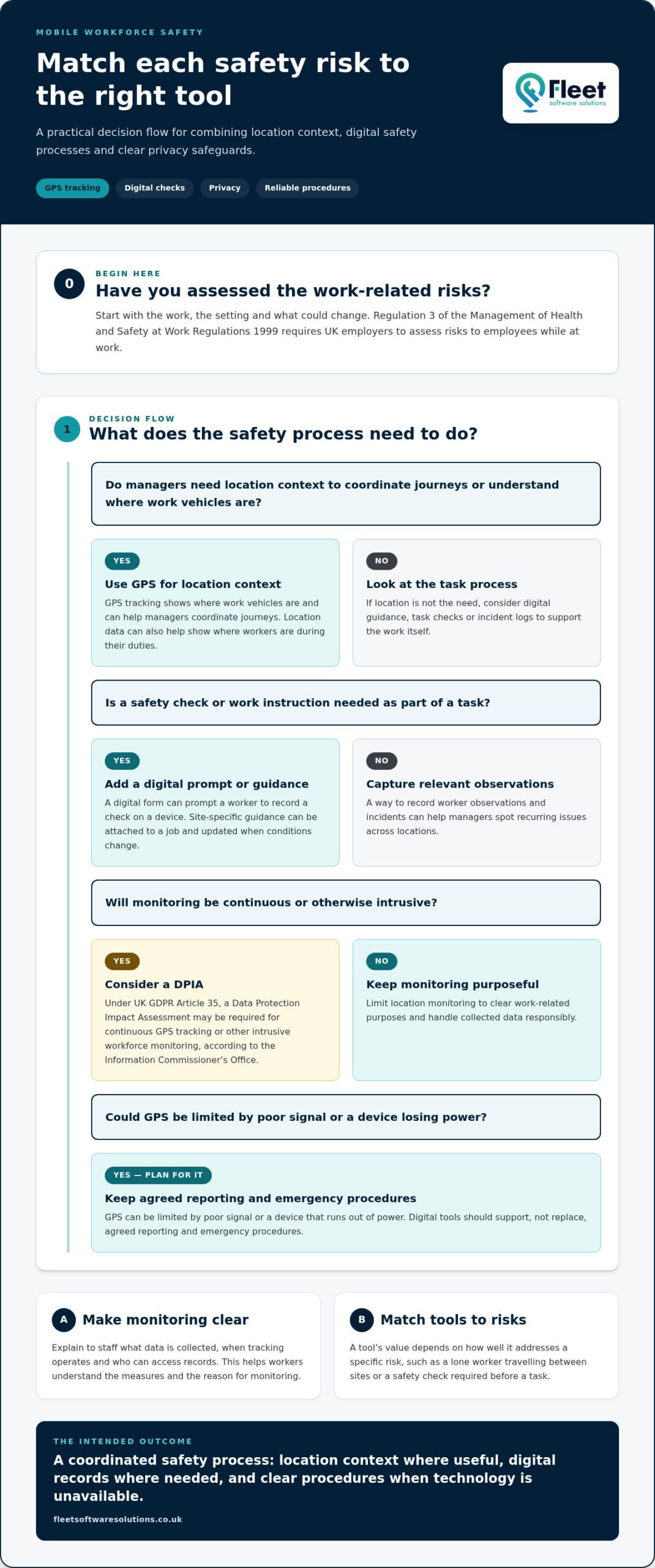
GPS tracking shows where work vehicles are, while digital tools can build health and safety checks into workers’ daily processes. Together, they help managers coordinate journeys, guidance and records across changing work locations.
Start with risk assessment: Regulation 3 of the Management of Health and Safety at Work Regulations 1999 requires UK employers to assess risks to employees while at work, according to UK Legislation. The Reporting of Injuries, Diseases and Dangerous Occurrences Regulations 2013 may require employers to report serious incidents involving mobile workers, site work or work-related travel, according to UK Legislation. The Employers’ Liability (Compulsory Insurance) Act 1969 requires employers to hold insurance cover for employee injury or disease arising out of employment, typically at a minimum level of £5 million, according to the Health and Safety Executive.
Comparing mobile safety tools
Mobile safety tools range from GPS tracking and worker check-ins to digital guidance, task checks and incident logs. Their value depends on how well each addresses a specific risk, such as a lone worker travelling between sites or a safety check required before a task. A digital form can prompt a worker to record a check on a device, while GPS can provide managers with location context. Comparing these functions helps match processes to the work being done.
Employee privacy and UK GDPR
Employee privacy means limiting location monitoring to clear work-related purposes and handling collected data responsibly. UK GDPR Article 35 provides for a Data Protection Impact Assessment, which may be required for continuous GPS tracking or other intrusive workforce monitoring, according to the Information Commissioner’s Office. Explain to staff what data is collected, when tracking operates and who can access records. This clarity helps workers understand the measures and the reason for monitoring.
Costs depend on whether a system uses an app, a dedicated device, monitoring services or a combination; the price depends on the case and is given after a quote request. To choose and implement a system, map work risks, select relevant functions, explain procedures to staff and test the process on a typical journey. GPS can be limited by poor signal or a device that runs out of power, so digital tools should support, not replace, agreed reporting and emergency procedures.
Flexible workplace hazard management
Managing mobile hazards means adapting controls to each place and task, rather than applying one fixed checklist everywhere. A home visit, roadside repair and temporary site each present different risks. Employers and employees share responsibility for designing mobile work safely and around people, so worker input should shape assessments and practical controls.
Begin with a location-specific assessment: identify the task, the setting and what could change during the visit. For a roadside job, consider passing traffic, safe access and how the worker will communicate if conditions worsen. At a customer’s premises, assess unfamiliar layouts, other people’s activities and available facilities. Record controls for each hazard, then make them accessible to employees before they arrive. Clear notes help workers follow the right measures without relying on memory or a generic workplace plan.
The Management of Health and Safety at Work Regulations 1999 give particular consideration to expectant mothers under Regulation 16 when assessing mobile work risks. That means considering how a journey, work location or task affects the individual, then adapting duties or controls to address the identified risk. A discussion with the employee can reveal practical concerns that a desk-based assessment might miss. Revisit the assessment when the task, location or worker’s circumstances change.
Travel risk management can also be structured with BSI PAS 3001, a standard that may help UK employers organise their approach but is not legally binding. For a team visiting multiple places, agree how staff report changing conditions, who reviews the information and what happens when a planned control cannot be used. Where an employer has little influence over a workplace, limiting the time employees spend in that setting is one protective measure. This can also help teams plan realistic schedules and protect productivity.
Digital work processes can make flexible controls easier to apply: attach site-specific guidance to a job, capture a worker’s hazard observations and update instructions when conditions change. Consistent records help managers identify recurring issues across locations, while employees have a practical way to flag hazards their assessment did not anticipate.
Check-in and all-clear systems
Check-in systems give mobile workers and their organisation an agreed way to confirm safety during a shift. A clear response process matters when an accident, missed appointment or sudden change disrupts a planned visit.
Check-in and all-clear processes
A check-in process sets when a worker reports, what information they share and who responds if contact is missed. For example, an employee visiting several properties can confirm arrival and departure at each location. An all-clear message after an incident helps managers account for people and identify anyone needing assistance. Assign a responsible person to monitor reports to make the procedure practical.
Planning for disruption matters too. A missed check-in could mean a delayed visit, a flat phone battery or a genuine emergency, so the response should distinguish between these possibilities. Set out who makes contact, how concerns are escalated and what information responders need. The process should reflect the work and the worker’s ability to use the chosen method in that environment.
Available lone-worker apps and devices
In the UK, options include lone-worker smartphone apps and dedicated alert devices. Some emergency panic-button apps can send an employee’s location and shared audio and video to an organisation’s security team. The right format depends on the task: a phone may suit a worker who already carries one, while a dedicated device may suit a role that requires a separate alert method.
Choose a system according to workers’ surroundings, communication needs and ability to operate the device. An alert process is useful only if employees know how to use it and managers know who receives alerts. Train staff with a realistic example, such as a worker unable to complete a scheduled check-in, and practise the response. Review the procedure when duties or work locations change.
Critical-event planning also needs an all-clear method. Seventy-eight percent of respondents said their leadership team wanted confirmation that everyone was safe and accounted for within an hour of a critical event; 36 percent said their organisation could provide that confirmation within an hour. These figures highlight the gap a defined process can address. Identify who records responses, how missing workers are followed up and how managers share verified updates.
Make the procedure fit existing regulations and emergency arrangements, rather than treating an app as a complete safety plan. Specify when staff should raise an alert, what details to provide and what happens if mobile coverage fails. An appropriate alternative, such as an agreed call to a supervisor, helps workers report concerns when the primary device cannot connect.
Real-time tracking of mobile workers
UK rules relevant to lone and mobile employees include the Health and Safety at Work etc. Act 1974, the Management of Health and Safety at Work Regulations 1999 and the Working Time Regulations 1998. Employers must ensure, so far as reasonably practicable, employees’ health, safety and welfare under section 2 of the Act. The regulations also address risk assessment, working hours and rest periods.
Real-time tracking software can show an employee’s movement and status, helping coordinators understand where work is taking place. For a construction team working across changing sites, that information can support task coordination and help managers see whether planned visits are progressing. It should serve a defined operational purpose, with staff informed about how location data is used and when tracking applies.
Location information can also support incident communications. For example, organisations can use employee location data to trigger communications for rostering, mustering or site evacuation. This can help identify which workers may be affected by an emergency and support reporting, but location data alone does not confirm someone’s condition. Pair it with an agreed check-in or all-clear process so managers can follow up directly.
Tracking is most useful when it fits the work, rather than creating constant oversight without a clear purpose. Set which roles and activities need location visibility, define who can access the information, and establish how it informs decisions. A worker travelling between appointments may need different monitoring arrangements from someone at a fixed construction site. Clear boundaries help staff understand the system and keep location data relevant to safety.
Real-time tracking cannot replace risk assessments, suitable training or emergency procedures. Under the Work at Height Regulations 2005, employers must assess risks and ensure work at height is properly planned and safely carried out. According to UK Legislation, the Reporting of Injuries, Diseases and Dangerous Occurrences Regulations 2013 may require employers to report serious incidents involving mobile workers, site work or work-related travel. For organisations reviewing how location information supports fleet oversight, explore real-time tracking options.
Fleet Software Solutions: Vehicle Tracking
Fleet Software Solutions provides Vehicle Tracking to help businesses oversee vehicles used by mobile teams. It can be a practical next step when you need clearer visibility of fleet movements alongside worker check-in and safety procedures. Vehicle Tracking supports vehicle oversight, while Lone Worker Protection addresses worker safety; each has a distinct role in your wider approach.
Where employees use their own vehicles for work, Grey Fleet and Mileage Capture can also support oversight of work-related journeys. Vehicle Cameras are another option for businesses looking to add cameras to fleet operations. The right combination depends on the operational need, such as understanding vehicle use, managing grey fleet journeys or capturing mileage.
To discuss Vehicle Tracking and the approach that fits your fleet, contact Fleet Software Solutions.
Make safety part of everyday operations
Turn your safety approach into a routine that fits the way employees actually work. Identify who owns each process, how workers raise concerns, and when location information is genuinely useful. Review these arrangements whenever duties, routes or work locations change, so your mobile workforce safety and protection tools remain relevant to current risks rather than becoming a separate administrative task.
Fleet Software Solutions provides Vehicle Tracking, Vehicle Cameras and Grey Fleet for businesses looking to strengthen fleet oversight alongside worker safety procedures. These services support different operational needs, from understanding vehicle movements to managing work-related journeys in employees’ own vehicles. Choose a starting point based on the gap you want to address, whether that involves fleet visibility or grey fleet oversight.
Contact Fleet Software Solutions to discuss your fleet requirements and take a practical next step towards more coordinated mobile operations.
Frequently Asked Questions
Section A: What Is a Mobile Workforce?
A mobile workforce is made up of employees who work away from their organisation’s premises using mobile information and communication technology. For example, a surveyor using a tablet at different customer sites fits this description. The term differs from work in a travelling workplace, such as passenger transport, and from tasks done at changing locations without information-based activities.
What are mobile workforce safety and protection tools?
Mobile workforce safety tools are systems and processes that help employers manage safety when employees work beyond a fixed workplace. Depending on an organisation’s needs, these can combine location oversight, lone-worker protection, digital work records and fleet information. A facilities team, for example, might coordinate site visits using work schedules while keeping safety procedures accessible to staff away from the office.
What features should mobile workforce protection tools include?
Choose features that match the work and the decisions managers need to make. A useful system may support clear task guidance, straightforward reporting, worker check-ins and records that managers can review. Consider who can access personal information and how workers should report concerns if a device cannot connect. For a team visiting varied sites, easy-to-follow procedures matter as much as the technology.
How do lone-worker monitoring and emergency alert systems work?
These systems give workers a way to report their status or raise an alert, then provide designated responders with information for follow-up. An emergency panic-button app may share an employee’s location and audio or video with an organisation’s security team. Employers should define who receives alerts, who assesses the situation and how the response is recorded, so each notification triggers an agreed procedure.
How should employers assess risks to mobile and lone workers?
Assess the work task, location, travel arrangements and individual circumstances together, then identify hazards and practical controls. Ask workers about conditions they encounter, such as unfamiliar premises, isolated visits or changing access arrangements. Record who is responsible for each measure and review it when duties or locations change. This keeps risk controls relevant to actual working conditions rather than relying on assumptions.