A machine is booked for a job, but no one can say whether it’s still at the depot, has moved to another site or been handed to a different crew. When equipment is spread across active worksites and records depend on manual updates, finding the answer can take time. Construction asset tracking software can connect an asset’s identity with its recorded location, status and handover history, making it easier to see what’s available and who is responsible.
Unrecorded movements make accountability harder, while asset registers can quickly become out of date. The aim isn’t simply to add more data. It’s to give teams a reliable way to record equipment movements and coordinate day-to-day work. This guide explains how tracking can support that goal and how to choose an approach that suits your equipment and site routines. It covers methods for different asset types, records and processes for effective handovers, and practical steps for introducing a system across one or more sites.
Key Takeaways
- Link each asset to its recorded location, status and responsible team to make equipment movements easier to follow.
- Choose construction asset tracking software based on the equipment you need to track and how site teams can keep records current.
- Distinguish between updates entered by staff and location information supplied by tracking hardware when deciding how to monitor assets.
- Introduce tracking in manageable stages: organise records, pilot the approach, train teams and review how it works across sites.
- Fleet Software Solutions provides asset tracking and plant and machinery tracking to support oversight of mobile construction equipment.
What construction asset tracking software does for site teams
Equipment rarely stays in one place for long. Plant may move from a depot to a worksite, tools may travel between jobs in a van, and attachments can be passed between crews. If these movements aren’t recorded, an inventory of owned equipment won’t tell a site manager what is currently available or who last took responsibility for it.
Construction asset tracking software gives teams a way to record equipment identity, location and status, then update that information when assets are assigned, moved or checked in. The aim is a useful operational view, not simply a count of what the business owns. Asset tracking includes different approaches and technologies. The right method depends on the asset and how it is used.
A spreadsheet can hold an inventory, but it only reflects a move or handover once someone updates it. A tracking record is intended to change as an asset’s circumstances change. Updates may be entered by a person or supplied by tracking hardware, depending on the system. This means it’s important to understand what the information represents: a staff update records what someone reports, while hardware can provide location data for selected assets. Current records help teams check availability, follow handovers and plan work, but they don’t guarantee that equipment is available or in working order.
Which construction assets can a tracking system cover?
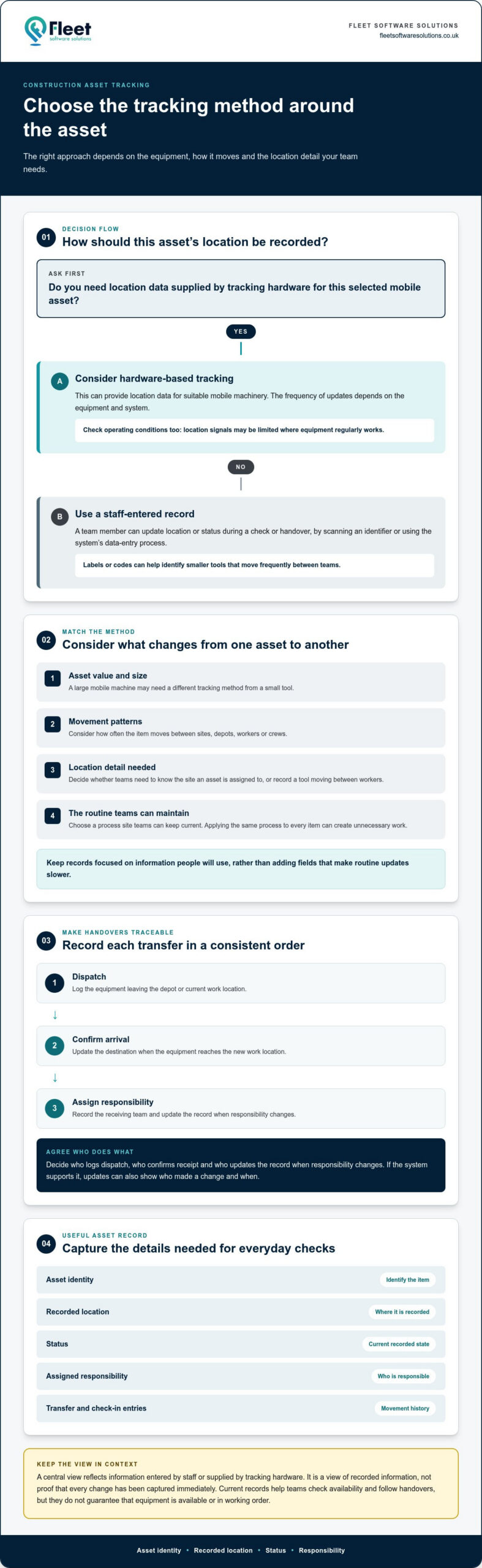
Records can cover plant and machinery, tools, attachments and other reusable business equipment. A large mobile machine may need a different tracking method from a small tool that changes hands frequently. Asset value, size, movement patterns and the level of location detail required all influence how it makes sense to track an item.
For example, a team might need to know which site a machine is assigned to, while also needing a quick way to record a tool moving between workers. Applying the same process to every item can create unnecessary work. Match the method to the equipment and the decisions teams need to make about it.
What information does an asset record provide?
A basic record can identify an asset and show its recorded location, status and assigned responsibility. Transfer and check-in entries add movement history, helping teams see when equipment changed hands or returned to a depot. These details help distinguish between an item that is simply listed in the inventory and one recorded as available at a particular location.
Before choosing a system, decide which fields your teams need to complete a handover and answer everyday questions. At a minimum, consider whether staff can identify the asset, record where it is, update its status and assign responsibility. Keep the process focused on information people will use, rather than adding fields that make routine updates slower.
How construction asset tracking software follows equipment across sites
A useful tracking process follows an asset through its working life: identify it, assign it to a person or location, record movements, update its status and review its history. Construction asset tracking software brings these records into a central view, helping managers see where equipment is recorded and whether it is assigned, in transit or available. The view is only as current as the information entered or supplied, so distinguish staff updates from location data provided by tracking hardware.
With staff-entered records, a team member updates an asset’s location or status during a transfer, often by scanning an identifier or using the system’s data-entry process. Hardware-based tracking and telematics supplies location data for selected mobile assets. How often that data updates depends on the equipment and system. A central view should therefore be treated as a view of recorded information, not proof that every change has been captured immediately. For more on how virtual boundaries complement location data, see what a geofence is and how it differs from live GPS tracking.
Labels, scanning and location data: how approaches differ
A label or code gives each asset a clear identity. Staff can scan it during a check or handover and update the record, which can suit smaller tools that move frequently between teams. Hardware-based tracking is a different approach that can provide location data for suitable mobile machinery. Consider the asset’s value and movement frequency, as well as operating conditions such as whether it regularly works where location signals may be limited.
How site transfers and handovers become more traceable
Consider equipment sent from a depot to another work location. A consistent process records its dispatch, updates the destination on arrival and assigns responsibility to the receiving team. If the system supports it, updates can also show who made a change and when. That creates a clearer transfer history than an informal message or a spreadsheet edited later.
Agreeing who records each step matters as much as choosing a tracking method. Decide who logs dispatch, who confirms receipt and who updates the record when responsibility changes. When those steps are part of the routine, teams have a shared reference for checking an asset’s status instead of relying on memory. The future of construction asset management is also shaped by how digital tools support better asset information, making it useful to assess the record process as well as the technology.
Fleet Software Solutions provides asset and plant tracking for organisations managing mobile equipment across work locations.
How to assess construction asset tracking software for your operation
Start with the work your teams need to do, not a feature list. Map the equipment that moves between sites and depots, how staff record those movements now, and what managers need to know before allocating an asset. Use that picture to assess whether construction asset tracking software fits real site routines and helps teams make decisions without adding unnecessary administration.
Match the tracking method to the asset
Manual updates, scan-based identification and hardware-supported location tracking serve different purposes. A simple update may suit equipment that moves infrequently. Scanning a label or code can make identification and record changes more practical during frequent handovers. Hardware-supported location data may be useful for selected mobile machinery. Assess each asset’s value, movement patterns and operating environment rather than applying one method to every tool, machine and attachment.
Use the comparison below to identify what to assess. The questions are prompts to help define your needs.
| Assessment area | Questions to consider |
|---|---|
| Asset type | Is it plant, machinery, a frequently shared tool, an attachment or other reusable equipment? |
| Tracking method | Would staff updates, scan-based identification or hardware-supported location data suit its value and movement? |
| Update process | Who records dispatch, arrival, reassignment and return, and how much effort does each update take? |
| Site coverage | Can the process represent your sites, depots, vehicles and transfers, including locations with varying connectivity? |
| Reporting | Can managers review the recorded location, status, assignment and movement history they need? |
Check usability, visibility and reporting needs
Test the update process against a normal working day. If a worker has to stop and complete several steps for a routine handover, records may be missed or delayed. Check whether field teams can identify equipment and record changes with minimal disruption, including when connectivity varies. Establish how updates are made when a live connection isn’t available, and how the record is brought up to date afterwards.
Managers should be able to answer practical questions: where is an asset recorded, who is it assigned to, and is it marked available, in use or awaiting return? Review how reports show those details and whether access can reflect the different tasks of site teams and managers. List any integration requirements with existing business systems and assess them as part of the decision. A focused assessment keeps the choice tied to operational needs across work locations.
How to introduce construction asset tracking software on site
A phased rollout gives site teams time to establish a reliable process before extending it across the operation. Keep the first stage focused: choose assets and work locations that reflect typical movements, then use what you learn to refine records and routines. Assign clear ownership from the outset so updates don’t depend on someone assuming another person has made them.
Prepare asset records and choose a useful pilot
Start with a consistent asset list. Give each item a clear identifier and category, and record its known status and location without filling gaps with guesses. Before the pilot, note how complete current records are and where staff spend time checking or searching for equipment. Choose a representative group of assets and locations, including ordinary transfers and handovers, so the trial reflects real working conditions.
- 1. Define the scope. Decide which equipment, teams and work locations are included in the first phase, and what questions the tracking process should help answer.
- 2. Clean the records. Remove duplicates, standardise identifiers and categories, and flag details that still need to be established.
- 3. Select a pilot. Include assets that move in ways typical of the wider operation, such as between a depot and a worksite or between teams.
- 4. Train the people involved. Show staff how to record the agreed updates, who owns each step and how to handle missing or conflicting information.
- 5. Review before expanding. Compare pilot records with the baseline, gather team feedback and adjust the process before adding more assets or locations.
Build adoption into everyday site routines
Build updates into work that already takes place: record an asset at dispatch, confirm receipt at the destination and update its assignment when responsibility changes. Keep guidance concise and accessible, with a clear process for resolving an unknown location or incomplete record. Assign someone to maintain record quality and an operational lead to manage the process, so issues have a clear owner.
Review practical measures, not just whether the system is being used. Check record completeness and how much time teams spend locating equipment, then compare the results with the baseline. Early feedback can show where an update step is unclear or disruptive. Adjust the routine and extend the rollout in manageable stages so construction asset tracking software supports site work rather than competing with it.
For a phased approach to equipment oversight, explore asset tracking solutions from Fleet Software Solutions.
Where Fleet Software Solutions fits into construction asset tracking
Effective oversight depends on connecting three things: a clear identity for each asset, a record of where it moves and who is responsible for it. Construction asset tracking software can bring those details into view, giving teams a consistent basis for checking equipment status across sites, depots and work locations. The information is most useful when the tracking process fits the way equipment is assigned and moved.
Fleet Software Solutions provides asset tracking and plant and machinery tracking for organisations managing mobile equipment. These services support construction teams overseeing plant and machinery as it moves between work locations. The right process starts with the equipment and handovers that matter to your operation, then establishes how those movements will be recorded.
Connect plant and machinery tracking with operational oversight
Plant and machinery tracking lets organisations focus oversight on mobile business equipment instead of treating every asset as if it has the same use or movement pattern. Start by identifying which machines regularly change location, what teams need to know about their status and how movements are recorded. For a wider view of managing equipment, read the guide to plant and machinery asset management.
Where vehicles and equipment operate together, considering them as connected parts of site activity can help clarify what information managers need. For background on that overlapping area, explore business vehicle tracking.
Choose a practical next step for your tracking process
Before making changes, write down the asset groups you want to bring into view, the work locations they move between and the handovers that need clearer records. Then identify the operational questions the process should answer: where equipment is recorded, who is responsible for it and how teams update information when it moves. This keeps the next step grounded in practical requirements.
Once those needs are clear, explore how Fleet Software Solutions’ asset and plant tracking can support your operation. Explore Fleet Software Solutions to learn more about its tracking solutions for organisations managing mobile equipment.
Make equipment oversight more practical across your sites
Clear asset identities, current movement records and defined responsibility give construction teams a more dependable view of equipment across sites and depots. The right construction asset tracking software should suit the assets being tracked and the way teams can realistically update records. A phased introduction helps establish consistent handovers before the process expands.
Fleet Software Solutions provides asset tracking and plant and machinery tracking for organisations managing mobile equipment. If you’re ready to improve oversight of equipment movements and handovers, explore Fleet Software Solutions’ tracking solutions.
Start with the assets and movements that matter most, then build a tracking process your teams can use consistently.
Frequently Asked Questions
What is construction asset tracking software?
Construction asset tracking software is a system for recording equipment identity, location, status and, where relevant, responsibility. It helps teams maintain a working view of assets as they move between sites, depots and crews. Unlike a static inventory, its records can be updated as equipment is assigned or transferred. Updates may be entered by staff or supplied by tracking hardware, depending on the approach used.
How does asset tracking software work on a construction site?
It links an asset to a record that teams can update when its location or status changes. Staff might record a machine leaving a depot, confirm its arrival at a worksite and assign it to a team. Some systems can also receive location data from tracking hardware. Update frequency depends on the system and tracking method, so construction asset tracking software should not automatically be assumed to provide continuous location information.
Can construction asset tracking software track tools and heavy machinery?
Tracking processes can cover both smaller tools and heavy machinery, although the appropriate method may differ. A frequently shared tool could be identified and updated during a handover, while a mobile machine may suit hardware-supported location tracking. Consider asset value, movement patterns and site conditions when deciding what information is useful. Fleet Software Solutions provides asset tracking and plant and machinery tracking for mobile equipment.
What is the difference between asset tracking software and fleet tracking software?
Asset tracking focuses on equipment and other business assets, recording details such as identity, location, status and assignment. Fleet tracking generally focuses on vehicles and their movements as part of fleet operations. The categories can overlap on construction sites, where vehicles transport plant or tools between locations. The most useful view depends on the operational question: where an item is recorded, or how vehicles are being managed.
Do construction teams need GPS tracking for every asset?
No. GPS tracking and geofencing aren’t necessarily suitable or necessary for every tool, attachment or machine. A staff update or scan-based identification process may be sufficient for equipment that moves less often or is routinely handed over. Hardware-supported location tracking may be more relevant for selected mobile assets. Base the choice on the asset’s value, movement frequency, operating conditions and the level of location detail your team needs.
How can a construction business improve equipment accountability?
Set a consistent handover routine and make responsibility clear at each step. Record who dispatches an asset, who receives it and when its assignment changes, using the system’s available fields. Give someone responsibility for record quality and make it straightforward for site teams to report missing or incorrect information. Reviewing transfer records helps managers spot gaps and rely less on memory or informal messages.
Is construction asset tracking software difficult for site teams to use?
It depends on how well the update process fits normal site routines. A process that adds too many steps may be harder to maintain during busy shifts, so test it with a representative group of assets and locations first. Provide concise guidance on recording movements and resolving missing information, then gather feedback. Simplifying the routine before expanding it can help teams keep records more consistently.