

The best commercial vehicle mileage tracking app isn’t necessarily the one with the most features. A smartphone app uses GPS to record journeys, while its subscription may be monthly or annual, with costs depending on the number of licences. For UK mileage records, capture the journey date, business reason, start point, destination and distance.
Choosing a system means more than putting a journey on a map. Records need to support business reporting, and tracking must suit how employees use their own vehicles. A smartphone app may not provide detailed vehicle data, so compare each option’s records with your operation’s needs.
This comparison covers how mileage apps work, what affects their cost and which records to capture. It also looks at grey fleets, where clear boundaries around business journeys help organisations record work mileage while respecting employees’ use of personal vehicles.
Key Takeaways
- Compare app subscriptions by licence needs and the level of vehicle data your operation requires.
- Set consistent reimbursement rates, submission deadlines and reporting formats before rolling out mileage tracking.
- Build reliable mileage records around the journey details needed to support business claims.
- For grey fleets, define when work journeys are recorded and how personal use stays separate.
How much does business vehicle tracking cost?
There’s no single best commercial vehicle mileage tracking app for every UK business. The right option depends on whether you need mileage records for reimbursements or live vehicle-location data. For a small fleet that doesn’t need real-time locations, a mobile app may be a simpler, more cost-efficient option.
App subscriptions may be monthly or annual, and costs depend on the number of licences. Compare the licences your team needs with the reporting features it will use. Vehicle telematics can provide live location data and, depending on the device, route history and speed information. An app is simpler for recording mileage but may not capture detailed vehicle data such as engine performance, fuel efficiency or maintenance alerts.
For tax reimbursement reports, record each business journey separately from personal driving. HM Revenue & Customs’ approved mileage allowance is 55p per mile for the first 10,000 business miles, then 25p per mile after that. A report should make clear which miles are business-related, so a personal detour doesn’t inflate a claim.
Set a consistent process: drivers classify each trip, review the details and submit reports by the business’s deadline. A visit to a client, for example, can be marked as business, while a weekend visit to friends remains personal. Consistent categories make reports easier to compare and approve.
| Option | Cost basis | Records and capabilities | Best fit |
|---|---|---|---|
| Mobile mileage app | Monthly or annual subscription; licence count affects cost | GPS journey records and mileage reports | Business mileage and reimbursement records |
| Vehicle telematics device | Depends on the selected system | Real-time location; route history and speed may be available | Fleet location oversight and vehicle data |
| Manual log | Staff time to record and prepare reports | Driver-entered journey details | Low-volume mileage with a clear review process |
Choose an app when mileage records are the priority, and telematics when you also need live location or vehicle data.
For a small UK fleet that mainly needs business mileage and reimbursement records, a mobile mileage app is the best fit. Compare licence costs and reporting features; choose a telematics system instead if live vehicle locations or additional vehicle data are priorities.
How do mileage tracker apps work?
Start implementation by setting journey categories, a reporting format and a submission deadline for every driver.
Tracking implementation and reporting rules
A smartphone app uses GPS to record relevant journeys and organise the mileage for review. Before rollout, agree reimbursement rates, submission deadlines and a reporting format across the business. Drivers should know how to classify each trip and correct a manual entry. This makes reports more consistent than leaving the process to individual preferences.
Mileage and driver behaviour reports
Scheduled reports can give managers a regular view of recorded mileage and journey categories, while driver-behaviour reports cover driving information available to the system. They have different purposes: mileage reports support expense reviews, while behaviour reports inform operational oversight. Assess mileage reports against practical criteria: which journeys and fields they show, how clearly they separate business use, and whether the format suits your review process.
GPS trip logging and fleet management
Apps with automatic GPS trip logging and fleet management combine smartphone journey capture with tools for reviewing fleet activity. Functions vary by system. GPS mileage accuracy depends on the location data captured during a journey, so drivers should review unusual or incomplete records before submission. A GPS tracker can provide live vehicle location and may also provide route history and speed information, depending on the device.
Mileage reimbursement and software integration
For reimbursement, a manager can review a driver’s report, check each journey’s business category and approve eligible mileage for expense processing. Accounting and fleet management software may connect through an integration or an exported report, depending on the systems used. Aligning fields such as driver, date, distance and trip purpose limits manual re-entry and supports consistent records. A defined approval step makes the reimbursement decision clear.
Businesses reviewing how mileage records fit wider operations can explore fleet software and mileage workflows.
Cents-per-kilometre and logbook records
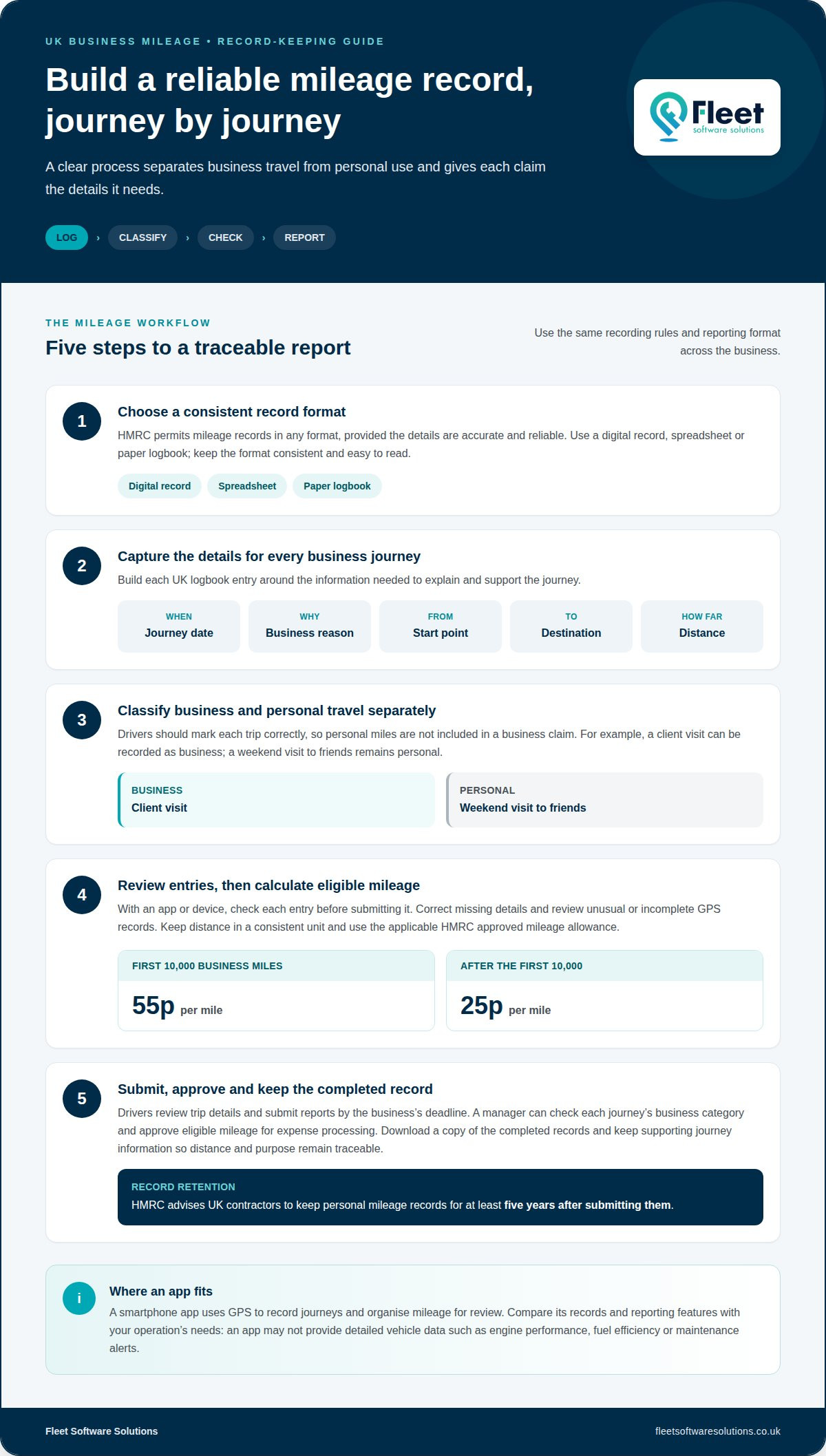
For UK business mileage, HM Revenue & Customs’ approved mileage allowance is 55p per mile for the first 10,000 business miles. HM Revenue & Customs’ approved mileage allowance is 25p per mile after the first 10,000 business miles. These figures are stated per mile, so record distance in a consistent unit and use the applicable allowance when calculating a reimbursement.
For a UK logbook, capture the journey date, business reason, start point, destination and distance. These details help distinguish a client visit from a personal drive and support the business mileage total. For example, record the meeting’s purpose and both journey points, rather than entering only a monthly distance.
HMRC permits mileage records in any format, provided the details are accurate and reliable. This could be a digital record, spreadsheet or paper logbook. With an app or device, review each entry before submitting it, correct missing journey details and download a copy of the completed records. A consistent format makes records easier to read and reconcile.
HM Revenue & Customs advises UK contractors to keep personal mileage records for at least five years after submitting them. Keep the submitted version alongside supporting journey information so the distance and business purpose remain traceable. Recording journeys regularly is more useful than trying to reconstruct them much later.
For vans, cars and electric vehicles, use the same core logbook fields: date, business reason, start point, destination and distance. These records focus on business miles and journey evidence; they don’t set out separate formats for different vehicle types.
Keep company-vehicle records showing each business journey’s date, purpose, start point, destination and distance. Apply the approved allowance to eligible business miles, and retain the submitted records in an accurate, reliable format.
Grey-fleet mileage tracking
Grey-fleet tracking covers employees’ personal vehicles when they’re used for work. A consulting firm whose employees visit clients, for example, could distinguish work visits from private driving in its mileage records. The key is to capture business use without unnecessarily monitoring personal journeys.
For personal vehicles used for work, tracking requires employee consent unless it’s agreed in a company policy. Set out what the software records, why the business needs it and when tracking operates. Explain how employees classify journeys, correct mistakes and report work mileage. Clear instructions help drivers understand the process before using the system.
Choose a tracking feature that operates only during work hours and lets employees disable tracking outside business use. For example, a driver could record a client visit during work, then switch tracking off for a personal drive. This makes it easier to separate work and private journeys.
Build the policy around how staff actually drive. Define which journeys count as business travel, how drivers label mixed-purpose trips and when they submit mileage. Review a sample report for missing categories before approving reimbursement. For limited-company contractors, mileage records cannot be backdated and should be updated alongside business mileage.
Company-owned cars involve a different consideration: employers must inform employees and have a valid business reason to track them. For a grey fleet, consent or an agreed company policy, working-hours controls and clear trip categories provide a practical framework. Use these criteria to assess whether your process captures necessary work journeys while keeping private use separate.
Explore grey-fleet tracking options to support clearer mileage capture and work-hour boundaries.
Fleet Software Solutions: Vehicle Tracking
Fleet Software Solutions helps businesses align mileage records with wider fleet oversight through Vehicle Tracking, Mileage Capture and Grey Fleet Management. These services suit operations that need more than trip-by-trip records, such as visibility of business vehicles alongside consistent records of work journeys in employees’ own cars.
The right mix depends on the records and oversight your team needs. Mileage Capture supports mileage recording, while Vehicle Tracking provides vehicle oversight. Grey Fleet Management is relevant when staff use personal vehicles for work. Vehicle Cameras can also be part of a broader fleet setup when camera solutions are needed.
Contact Fleet Software Solutions to discuss an approach suited to your mileage and vehicle-tracking needs.
Make mileage tracking part of your fleet process
Next, decide who owns the mileage process, from setting journey categories to resolving incomplete records. Clear responsibility helps make a commercial vehicle mileage tracking app a dependable part of day-to-day fleet administration, rather than another system drivers use inconsistently. Agree how managers will review reports and how employees can raise questions about tracking their personal vehicles.
Fleet Software Solutions provides Vehicle Tracking, Vehicle Cameras and Grey Fleet Management for businesses whose employees drive for work. Identify the operational gaps that matter most before deciding what to address first, so your approach matches your fleet and reporting priorities.
If you’re ready to discuss a suitable approach, contact Fleet Software Solutions. A clear starting point can help your team build a mileage process that fits its working practices.
Frequently Asked Questions
Are there hidden costs?
Potential extra costs depend on what a tracking package includes, so compare the full scope before choosing. Request an itemised breakdown covering licences, devices, installation, software integrations and optional support. A low entry cost, for example, may not reflect the total if your fleet needs additional hardware or customised reporting. Check how changes to your fleet affect ongoing charges.
What is the best method to track a company vehicle?
The best method depends on whether you need mileage evidence or ongoing vehicle oversight. A smartphone app suits recording work journeys, while vehicle telematics can provide live location data and may include route history or speed information. For a delivery fleet, location visibility may matter most; for staff claiming business mileage, clear journey records are the priority.
How much do UK commercial vehicle mileage tracking apps cost?
UK app costs vary according to the number of user licences and the subscription arrangement. Compare what each option includes, such as reporting access, data exports and support, rather than judging a headline figure alone. The cost of a business’s tracking setup depends on its requirements and is provided after a quote request; relevant factors include fleet size, devices and chosen functionality.
Can mileage tracking apps distinguish business and private journeys?
Apps can help distinguish business and personal journeys when drivers or managers classify each trip. For instance, a driver might mark a client appointment as work travel and a personal errand as private. Agree how to correct misclassified trips and review exceptions, especially when a journey combines business and personal purposes.
What data privacy and driver monitoring rules apply to UK vehicle tracking apps?
Employers must inform employees and have a valid business reason to track company-owned cars. For personal vehicles used for work, tracking requires employee consent unless it’s agreed in a company policy. Set clear boundaries for private use, explain the purpose of monitoring and use controls that restrict tracking to working hours where appropriate.
How do you set up a mileage tracking app for a business fleet?
Start by assigning an administrator to manage access and agree how drivers will classify journeys. Set the reimbursement approach, reporting format and submission deadline, then give staff clear instructions for reviewing and correcting trip entries. Before routine use, check that a sample report gives managers the information they need to approve claims and spot incomplete records.