
A truck’s blind spots don’t disappear when the driver adjusts the mirrors. Blind spot camera systems for trucks can show areas alongside the vehicle on a live cab display, giving the driver more information when turning or manoeuvring.
A truck’s size and driving position can make it harder to see road users close to its sides. A camera retrofit can help address this visibility gap, but its usefulness depends on camera placement, coverage and whether the driver can interpret the display easily from the driving position.
This guide explains why blind spots remain a risk, how camera retrofits and cab displays work, and what to consider when choosing a setup for your vehicle. Fleet Software Solutions offers Vehicle Cameras for businesses looking to improve fleet visibility with an integrated camera setup.
Key Takeaways
- Identify where a retrofit camera could improve the driver’s view, taking the vehicle layout and its usual work environment into account.
- Consider how live footage will reach the cab, including whether the dashboard display or an additional monitor best suits the setup.
- Assess camera position and coverage with nearby cyclists, pedestrians and other road users in mind.
- Use the article’s system-selection criteria to clarify what your fleet needs before considering an integrated vehicle camera solution.
Camera-system retrofits for existing vehicles
A retrofit adds camera equipment to a truck already in service, rather than relying on a factory-fitted system. Side-view cameras can show areas beside the cab that are difficult to see directly.
Retrofit installation efficiency
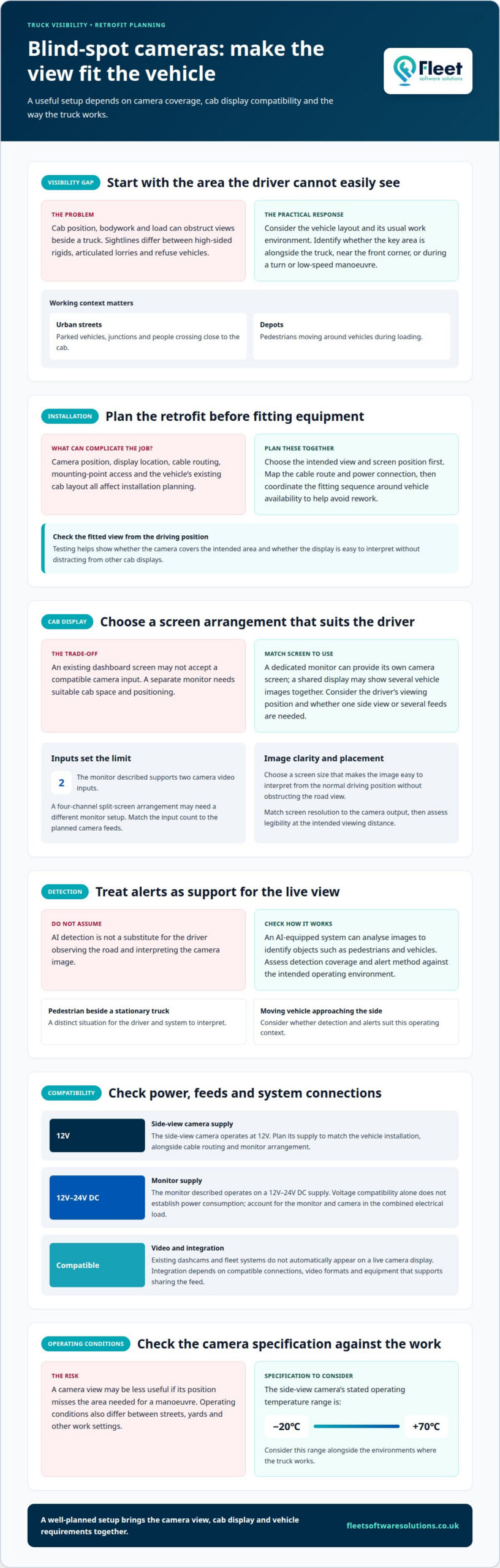
Installation planning affects how long a truck is unavailable for work. Before fitting the equipment, the installer identifies a suitable camera position, display location, cable route and power connection. Planning around the vehicle’s layout helps avoid rework that could extend downtime.
A truck with existing cab displays may need a different installation plan from one requiring a separate monitor. The number of cameras, access to mounting points and cable routes around vehicle components also affect the work. A clear installation sequence helps coordinate vehicle availability with the tasks involved.
Pedestrian and vehicle detection
An AI-equipped camera system analyses images to identify objects such as pedestrians and vehicles. This can help distinguish road users from other visible objects, while the camera view gives the driver visual information about the surrounding area.
Consider how detection works alongside the live image, rather than treating it as a substitute for the driver’s observation. A pedestrian beside a stationary truck and a moving vehicle approaching its side, for example, are different situations. The system’s detection coverage and alert method should suit the intended operating environment.
Power compatibility is another retrofit decision. The side-view camera operates at 12V, so its supply must match the vehicle installation. A truck’s electrical setup and the equipment being added determine the appropriate connection; this should be planned alongside cable routing and the monitor arrangement, rather than after the camera is mounted.
Before installation, define the area the driver needs to see and where the display will sit in the cab. This gives the installer a practical basis for positioning the camera and routing its wiring. Testing the fitted view from the driving position shows whether it covers the intended area without distracting from other cab displays.
Live video on the dashboard display or an additional monitor
A side-view camera sends live footage to a cab monitor, showing the area beside the truck. An existing monitor can display the footage if its connections and video formats are compatible. Integration with a dashcam or fleet system depends on separate compatibility.
Dashboard display and monitor options
Drivers can view the camera feed on a suitable dashboard display or a separate monitor. The choice depends on available cab space, the driver’s viewing position and whether an existing screen accepts a compatible camera input. A separate monitor gives the camera its own screen, while a shared display can show several vehicle images together.
Some monitors use a four-channel split screen to show multiple camera feeds. Consider whether the driver needs a dedicated side view or several views at once, as this affects how live footage appears on the display.
Screen size and resolution
Choose a screen that makes the camera image easy to interpret from the normal driving position without obstructing the driver’s view of the road. A larger screen may make details easier to distinguish, but it also needs suitable dashboard space and positioning.
Resolution affects how clearly the image appears on the monitor. Match the screen’s capabilities to the camera output, then assess whether the image is legible from its intended position in the cab. The right balance depends on the camera feed, display and viewing distance.
Camera inputs and system integration
Count the camera feeds the monitor needs to display. The monitor described here supports two camera video inputs, so it can connect two compatible feeds. A four-channel split-screen setup may need a different monitor arrangement, so the number of inputs must suit the planned cameras.
Existing dashcams and fleet systems do not automatically appear on a live camera display. Integration depends on compatible connections and video formats, and on whether the equipment supports sharing the feed. Treat these as separate requirements when planning the cab setup.
Check power requirements alongside screen and input choices. This monitor operates on a 12V-24V DC supply, but voltage compatibility alone does not establish power consumption. The combined electrical load depends on the connected equipment, so the installation must account for the monitor and camera supply. For fleets planning a setup, vehicle camera systems can be considered as part of the wider cab arrangement.
Why Do Trucks Still Face Blind Spot Risks and Collisions?
Truck blind spots persist because the cab, bodywork and load can obstruct views beside the vehicle. The risk varies with vehicle type and operating environment, particularly during turns and low-speed manoeuvres near pedestrians or cyclists.
A high-sided rigid truck, an articulated lorry and a refuse vehicle each have different sightlines. Their length, cab position and equipment affect which areas are difficult to see. Urban streets may have parked vehicles, junctions and people crossing close to the cab. Depots present different challenges, including pedestrians moving around vehicles during loading.
A camera can add a view of an obscured area, but the driver still needs to interpret the image and respond to the road. Camera position matters: a view that covers the vehicle’s side during a turn may be less useful if it misses the area beside the front corner. Operating conditions also matter. A side-view camera’s stated temperature range is -20℃ to +70℃, which gives operators a concrete specification to consider alongside the environments where the truck works.
CAM1000 operating speed should be assessed against the vehicle’s actual manoeuvres, such as turning into a yard or moving through a busy street. The appropriate operating range is the one that matches those tasks; a system’s speed capability should not be assumed from its model name. This helps fleet managers judge whether its operation suits the intended use.
A truck entering London or another UK city does not, by itself, determine which visibility equipment it needs. Assess the vehicle and route requirements separately from the equipment choice. Fitting a camera alone does not establish compliance with local rules.
Matching the camera setup to the truck, route and working conditions helps operators identify visibility gaps. A city delivery truck, for example, may need particular attention around close turns, while a vehicle in a depot faces moving people and equipment at short range.
Choosing a truck blind spot camera system
Choose equipment to suit the blind area, vehicle layout and driving tasks it needs to support. Compare camera coverage, alerts, display arrangements and installation requirements before selecting a setup.
Available camera system types
Side-view camera systems show a live image of an area beside the truck, usually with footage on a cab monitor. A camera with a 120° viewing angle offers a defined field of view, but mounting position determines which part of the vehicle’s side appears on screen.
Some systems add an acoustic alert when an obstacle enters a hazard zone as the vehicle prepares to move off. Others use a monitor to show camera feeds in the cab. Choose based on whether the priority is a visual view, an alert or both.
Camera, radar and ultrasonic comparisons
A camera provides visual information that lets the driver interpret what appears beside the vehicle. Radar and ultrasonic systems detect nearby objects and can provide alerts, but they do not show a camera image of the area.
Consider the manoeuvre and the information the driver needs. A driver approaching a tight turn, for example, may benefit from seeing the area alongside the cab, while an alert can draw attention to an obstacle. Some camera setups also include an acoustic signal when an obstacle is in the hazard zone as the truck prepares to move.
UK laws and safety standards
Do not assume that fitting a camera, radar or ultrasonic system alone proves a truck meets applicable UK requirements. A camera’s viewing angle or alert function describes how the equipment works, not whether it complies with the law.
Assess the vehicle’s applicable requirements separately from the system’s technical features. For example, a 120° camera view may help address a visibility gap, but the specification alone doesn’t establish compliance with a law or safety standard.
System and installation costs
UK costs depend on the vehicle layout, camera and monitor requirements, cable routing and installation work. The price is provided after a quote request, with the assessment taking account of the number of components and the complexity of the fitting.
Share the truck type, the visibility issue and any existing display arrangement when requesting a quote. These details help define the required setup and installation scope. Request a vehicle-camera quote to discuss the requirements for your fleet.
Fleet Software Solutions: Vehicle Cameras
Fleet Software Solutions offers Vehicle Cameras for businesses assessing visibility across their commercial vehicles. Identify which areas are difficult to see and how drivers need to view footage, then use those priorities to define a suitable camera setup.
This is a practical next step if you’re planning camera coverage for trucks already in service or reviewing requirements across a mixed fleet. Requirements can differ by vehicle layout and working environment, so a clear picture of operational needs helps guide the discussion. Fleet Software Solutions also offers Vehicle Tracking, Grey Fleet Management and Mileage Capture for related fleet-management needs.
Contact Fleet Software Solutions to discuss your fleet’s vehicle camera requirements.
Turn visibility priorities into a fleet decision
Prepare a clear operational brief: identify which vehicles need better visibility, which situations drivers find most challenging, and how camera footage should fit with existing cab equipment. This turns the choice of blind spot camera systems for trucks into a defined fleet requirement, rather than a device decision made in isolation.
Fleet Software Solutions offers Vehicle Cameras, Vehicle Tracking and Grey Fleet Management to support connected fleet-management needs alongside camera requirements. Start with the visibility issue and the vehicles affected, so the discussion can focus on the operational context and a suitable solution.
Bring those priorities together and take a considered next step. Contact Fleet Software Solutions to discuss your fleet’s camera requirements and move towards a clearer plan.
Frequently Asked Questions
Which truck blind spot camera systems are best rated in the UK?
There is no single best-rated system for every UK truck, because suitability depends on the vehicle and the visibility problem. Compare systems by camera coverage, display clarity, alert functions and compatibility with the vehicle’s equipment. A rigid truck making frequent tight turns, for example, may need different coverage from a vehicle operating mainly on open roads. Focus on how well the system suits the fleet’s actual use.
How are blind spot cameras installed and maintained on a truck?
Installation involves mounting the camera, routing its cables, connecting power and linking it to a compatible in-cab display. The camera position should give a useful view without obstructing the driver’s sightline. For routine upkeep, keep the lens clear, look for visible damage to the camera or wiring, and check that the display shows an image before use. A change in image quality may indicate a fault or obstruction.
What are the limitations and risks of truck blind spot camera systems?
A camera shows only the area it covers, leaving anything outside its field unseen. Dirt, water, damage or poor positioning can also reduce the image’s usefulness. Drivers must interpret the display while staying attentive to the road and mirrors. A cyclist, for example, may move into the truck’s path after the driver glances at the screen, so camera footage cannot replace observation or careful manoeuvring.