A portal can improve oversight, but lone worker protection has no single standard UK price. Costs depend on the number of workers, the level of monitoring and the technology required, and are provided after a quote request. A lone worker safety monitoring portal can help managers oversee activity and organise user information, so first define what the system needs to do.
It’s reasonable to want a clear figure before deciding. The right setup depends on the risks workers face and how your organisation will respond when someone needs support. A portal is one part of a wider safety approach, not a substitute for assessing risks, which is why organisations often turn to health and safety consultancies like DL Safety for ongoing technical support and compliance guidance.
This guide explains what can affect protection costs, what a monitoring portal does and how to assess whether its features suit your workforce. It also covers what to consider when choosing a system and how lone worker protection can fit into broader fleet operations.
Key Takeaways
- Protection costs depend on workforce needs, risk levels and the monitoring approach, so define what your organisation needs before assessing a system.
- Use an online portal to organise worker information and oversee activity, while setting clear procedures for keeping in touch and responding to incidents.
- Match monitoring methods to the risks and locations workers face, including whether they work in isolated areas or travel between sites.
- Assess portal features alongside your safety procedures, including how monitoring data is collected, used and communicated to staff.
How much does lone worker protection cost?
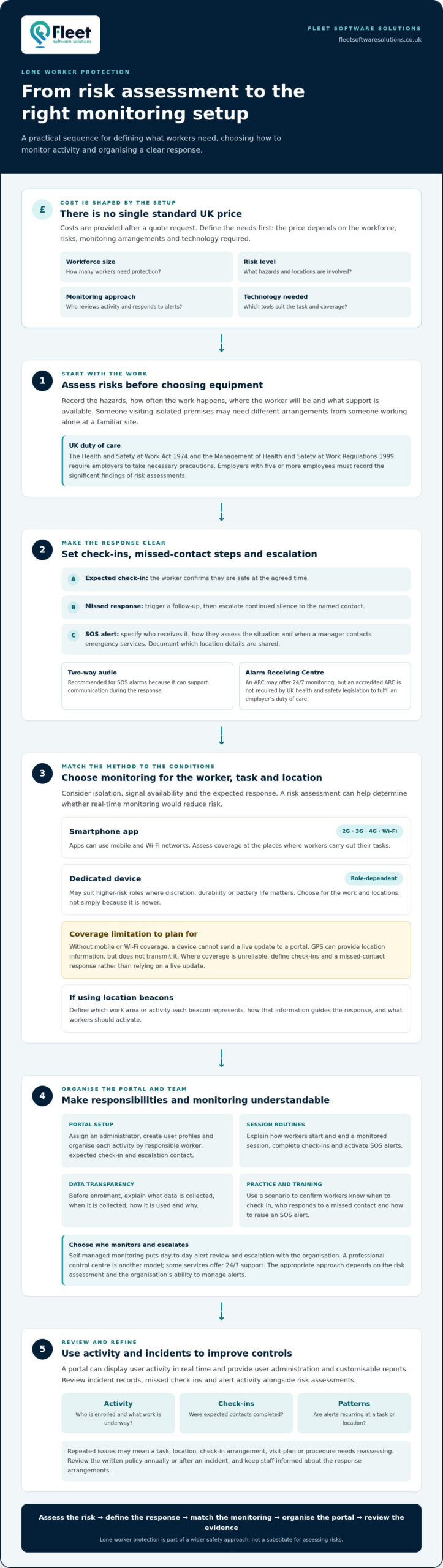
According to UK legislation, the Health and Safety at Work Act 1974 and the Management of Health and Safety at Work Regulations 1999 require employers to take necessary precautions to protect lone workers. The price depends on the case and is given after a quote request; key cost factors include workforce size, risk level, monitoring arrangements and the technology needed.
Start with the risk assessment, not the equipment. A worker visiting isolated premises may need different arrangements from someone working alone at a familiar site. Record the hazards, how often the work takes place, the worker’s location and the support available. According to the Health and Safety Executive, employers with five or more employees must record the significant findings of their risk assessments.
Next, set the response process. A written policy should state who checks on each worker, how often contact is expected and what happens if a check-in is missed. Review the policy annually or after an incident, and ensure workers know how to call for assistance. Employers should maintain regular contact and provide a way for lone workers to seek help.
Check-ins and missed check-ins need a clear sequence: the worker confirms they’re safe, a missed response triggers a follow-up, and continued silence escalates to the named contact. An SOS alert should identify who receives it and how they assess the situation. Two-way audio is recommended for SOS alarms because it can support communication during the response. An Alarm Receiving Centre (ARC) may provide 24/7 monitoring, but UK health and safety legislation doesn’t require an accredited ARC to fulfil an employer’s duty of care.
For each alert, document the escalation steps, including when a manager contacts emergency services and what location details they share. Explain the arrangements through training and scenario practice. For example, someone starting a remote visit should know when to check in, who responds to a missed check-in and how to activate an SOS alert. Clear procedures align protection with actual risks and help define the monitoring required.
What Is a Lone Worker Safety Strategy and Why Is It Important?
A safety strategy combines risk controls, staff training and alert-response procedures. UK services range from self-managed portals to professional control-centre monitoring, so compare who monitors activity and responds to alerts.
Safety Data and Risk Management
A lone worker safety monitoring portal can display user activity in real time, helping managers spot patterns across remote work. Review incident records, missed check-ins and alert activity alongside risk assessments. Repeated issues may indicate that a task, location or procedure needs reassessing.
Use the findings to adjust controls, rather than treating reports as a record-keeping exercise. For example, recurring alerts during visits to an isolated site could prompt a review of check-in arrangements, visit planning or staff training.
Operational Management and Reporting
Portal functions can include user administration and customisable reports. Look for clear oversight of who is enrolled, which activity is underway and whether expected check-ins have been completed, so managers can follow up consistently.
Self-managed monitoring places day-to-day alert review and escalation with the organisation. A professional control centre provides another monitoring model, with some services offering 24/7 support. The appropriate approach depends on the risk assessment and the organisation’s ability to manage alerts.
To set up a portal, assign an administrator, create user profiles and explain how workers start and end a monitored session. Train them on check-ins, SOS alerts and response procedures, then use a practice scenario to confirm everyone understands their role.
Keep tasks and sessions organised by linking each activity to the responsible worker, expected check-in and escalation contact. Before enrolment, explain what data the system collects, when it collects it, how it is used and why. This gives staff a clear understanding of monitoring and helps managers use reports consistently.
How does lone worker monitoring work?
Without mobile or Wi-Fi coverage, a device cannot send a live update to a portal. GPS can provide location information, but does not transmit it. Before monitoring starts, explain what data is collected, when it is collected, how it is used and why.
Choosing an Approach for Risks and Locations
Start with the risk assessment and map the locations where each role works alone. A worker visiting rural sites may face different communication challenges from someone working inside a known building, so consider signal availability, isolation, tasks and expected response arrangements.
Match the monitoring approach to those conditions. A risk assessment can help determine whether real-time monitoring would reduce a worker’s risks. Where coverage is unreliable, define check-in steps and a missed-contact response rather than relying on a live location update.
App, Device and Beacon Integration
Smartphone apps can use 2G, 3G, 4G and Wi-Fi networks, while dedicated devices may suit higher-risk roles where discretion, durability or battery life matters. The right choice depends on the worker’s task, equipment and typical locations, not simply on whether an app or device is newer.
If a process uses location beacons, define which work area or activity each beacon represents and how that information guides the response. Include the process in staff training, so workers know what to activate and managers can interpret the resulting activity record.
Live Location and GPS Monitoring
Employee-enabled monitoring lets workers start location sharing when a work activity or shift begins, then turn it off when work ends. GPS location information can help identify where a worker is during an activity, while portal records add context about their activity.
Before introducing live sharing, tell staff which activities are monitored and limit collection to the stated work purpose. Explain when location sharing starts and stops, who can view the data and how it supports an alert response. This clarifies privacy expectations while keeping location information relevant to lone working.
Lone worker safety monitoring portal
A well-chosen portal brings worker activity, alert handling and management oversight together. Assess its features against your health and safety procedures, workforce risks and reporting needs.
Portal Features
Look for user administration, real-time activity views and customisable reports, so managers can oversee enrolled workers and review patterns. A practical portal should also make alert status and escalation information accessible to those responsible for responding. Ensure workers understand what data is collected, when it is collected, how it is used and why.
Consider how the portal links to emergency response. BS 8484 accreditation for an Alarm Receiving Centre with 24/7 monitoring is a feature to look for in lone worker safety technology. Two-way audio is recommended as standard for SOS alarms, while some products provide a 3-second response time. Treat response arrangements as part of the system, not just a dashboard feature.
Available Portals and Providers
UK options include self-managed portals, where an organisation oversees alerts, and systems connected to a professional control centre. Some products provide 24/7 support from a professional control centre. These models differ in who monitors activity and manages escalation, so assess them against your own operating procedures and risk assessment.
Compare reporting, user administration and alert workflows, then map each feature to a real task. Identify who reviews a missed check-in, who receives an SOS alert and how emergency services are contacted. UK health and safety legislation does not require an accredited Alarm Receiving Centre to fulfil an employer’s duty of care.
Before adoption, walk through a typical shift with managers and workers. Confirm that activity is clearly recorded, reports support risk reviews and escalation responsibilities are understood. This practical assessment can reveal gaps between the portal and your procedures before the system becomes part of routine operations.
For a monitoring setup aligned with your organisation’s requirements, discuss your lone worker safety needs.
Fleet Software Solutions: Vehicle Tracking
Fleet Software Solutions supports organisations managing lone workers who also travel for work, where fleet oversight forms part of the wider operational picture. Its Vehicle Tracking can help managers coordinate business vehicles alongside established lone worker procedures. It complements, rather than replaces, a risk assessment, worker check-ins or an emergency response plan.
Where employees use their own vehicles, Grey Fleet and Mileage Capture can help organisations manage work-related travel. Vehicle Cameras may also suit businesses reviewing their fleet requirements. The right mix depends on how your workforce travels and what you need to manage.
Contact Fleet Software Solutions to discuss how its fleet tools can support your fleet and lone worker requirements.
Make your next safety review practical
Use your next review to turn the monitoring approach into a working routine. Bring managers and workers together to check that responsibilities remain clear, data use is understood and procedures reflect how people work. A lone worker safety monitoring portal should support these decisions with information that helps your organisation act on emerging patterns, not simply store activity records.
Where lone workers also travel for work, consider how fleet oversight fits alongside your safety arrangements. Fleet Software Solutions offers Vehicle Tracking, Vehicle Cameras and Grey Fleet, which can support related fleet requirements without replacing lone worker procedures.
Choose a manageable next step: identify the operational gap you want to address, then consider which tools fit that need. For a discussion about your organisation’s requirements, contact Fleet Software Solutions. A clear, considered approach can help you build safer working practices with confidence.
Frequently Asked Questions
Do lone workers need a dedicated device?
No, a dedicated device isn’t necessary for every role. A smartphone app may suit workers whose tasks and locations are compatible with phone use, while a dedicated device may be more appropriate for higher-risk work where discretion, durability or longer battery life matters. Compare what a worker can safely carry with the conditions they encounter during a shift.
How Can I Keep My Lone Workers Safe?
Build safety around each worker’s actual duties, not a generic checklist. For a home visit, for example, record the destination and expected finish, give the worker a way to request help and identify who will follow up if plans change. Train staff to report new hazards, such as an unsafe entrance, so managers can review controls before the next visit.
How do I determine the right lone worker solution for my workforce?
Compare roles by task, environment, communication coverage and the consequences of delayed assistance. A worker moving between customer sites may need different arrangements from someone based at one premises. Group similar roles, identify exceptions and test the proposed process against a realistic shift scenario. This helps determine whether an app, device or manager-led check-in process suits each group.
What is Lone Working?
Lone working means carrying out work without close or direct supervision, either for part of a shift or throughout it. Examples include a caretaker opening a building alone, a mobile worker visiting customers or an employee working from home without colleagues nearby. The key question is whether someone could be isolated if an incident, illness or urgent problem occurs.
What is a lone worker safety monitoring portal and how does it work?
A lone worker safety monitoring portal is an online interface for managing worker accounts and activity. Managers can view activity in real time, administer users and create customisable reports. For example, a supervisor might review recorded activity after a shift and use the report to identify a process that needs adjusting.
How much do lone worker safety monitoring services cost in the UK?
There is no single cost for UK lone worker monitoring services. Pricing depends on the number of workers, their risk profile, the monitoring model and the technology required, and is provided after a quote request. Decide whether your organisation needs self-managed oversight or control-centre support, then define the required functions before comparing a proposed setup.