A missed check-in during a delivery, breakdown or out-of-hours journey can leave managers unsure whether a driver needs help or is simply delayed. A lone worker app for fleet drivers should support more than location monitoring: it should connect a driver’s check-in or alert to a clear response from the organisation.
Choosing an app is only one part of the process. Drivers’ routes, tasks and risk levels vary, so check-in expectations and escalation steps should reflect the work. Without an agreed procedure, alerts can be missed, follow-up can vary between shifts and safety records can become disconnected from wider fleet oversight.
This practical 2026 checklist explains how to assess driver risks, compare app capabilities with real working patterns and decide what should happen when a check-in is missed or an alert is raised. It also considers how lone-worker arrangements can sit alongside other fleet processes. Fleet Software Solutions provides lone worker protection as part of its fleet management software, alongside tools such as vehicle tracking and grey fleet management for businesses overseeing mobile workforces.
Key Takeaways
- Use a risk assessment to identify the situations your drivers face and the safeguards your process needs alongside an app.
- Assess a lone worker app for fleet drivers against usability, flexible check-ins, escalation workflows, location handling and reporting.
- Assign responsibility for monitoring check-ins, responding to alerts and recording follow-up, so managers know what to do when a driver misses a prompt.
- Plan configuration, driver communication and training around actual routes and working patterns, then review the process as needs change.
- Keep worker safety information and vehicle data distinct, while coordinating lone-worker procedures with wider fleet oversight where appropriate.
Why fleet drivers need a lone worker app and a clear safety process
A lone worker app for fleet drivers is a digital tool that can support communication, check-ins or escalation when an employee works without close or direct supervision. A lone worker may be a truck driver, but the important distinction is the working arrangement: routine vehicle tracking monitors a vehicle or journey, while lone-worker protection focuses on the person’s ability to check in or raise a concern.
An app can support a safety process, but it cannot replace assessing risks, training drivers or setting out emergency procedures. Managers need to identify hazards relevant to each role, decide how drivers should seek help and name who is responsible for responding. That preparation gives every notification a defined next step, rather than leaving staff to decide what to do under pressure.
Which fleet driving situations can create lone-working risks?
Solo deliveries, field visits, remote routes and late shifts can all involve periods without close supervision. A breakdown or roadside incident may add an unexpected risk, particularly if a driver is delayed or unable to follow the planned route. These situations are not automatically unsafe: the risks depend on the task, location, timing and available support. An agreed check-in process helps managers distinguish a known delay from a situation that needs follow-up.
What can an app contribute to driver safety?
When comparing apps, assess whether the available functions match your risk assessment. You might look for scheduled check-ins, a way for a driver to raise an alert, location sharing and a process for escalating missed contact. For each function, decide who receives the information, what they should do next and how they record the outcome. A feature is only useful when staff understand how it fits into the response procedure.
For work journeys in privately owned vehicles, lone-worker arrangements should sit alongside processes for managing business use of those vehicles. See the grey fleet management guide for more on that part of fleet oversight.
How a lone worker app supports check-ins, alerts and escalation
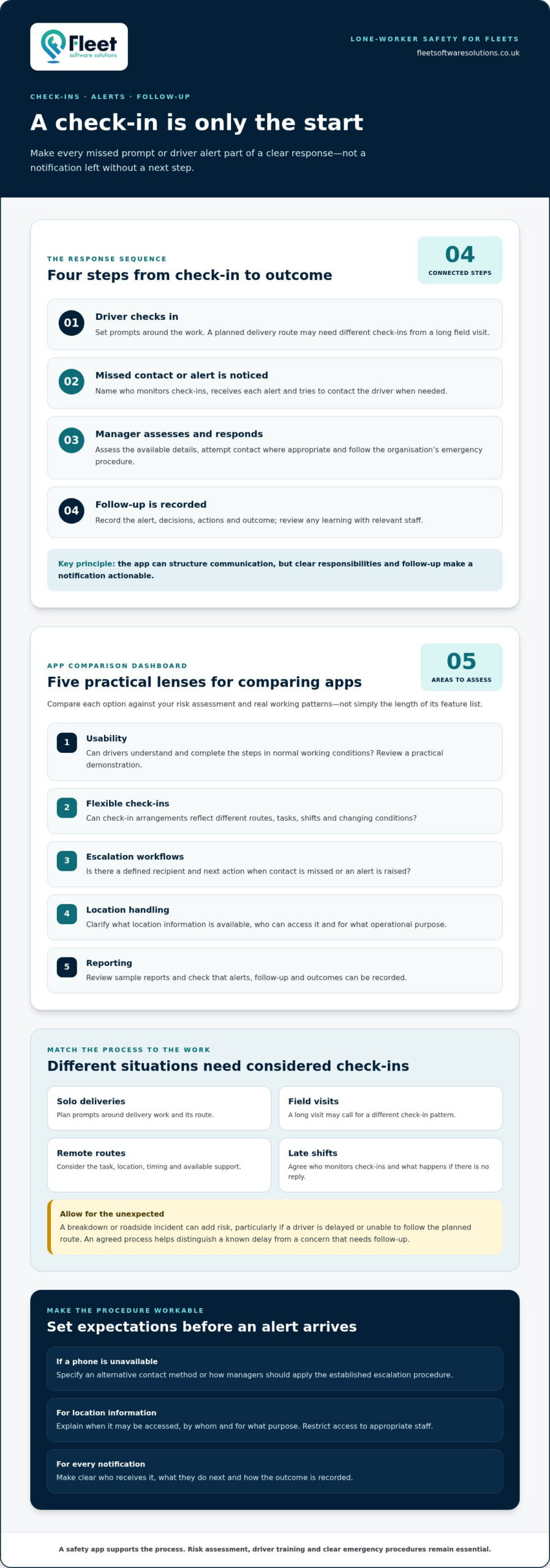
A useful process connects four steps: the driver checks in, a missed check-in or alert is noticed, a manager assesses the situation and the response is recorded. The lone worker app for fleet drivers supports one part of that sequence. It can structure communication, but clear responsibilities and follow-up are what make a notification actionable.
Check-ins and missed-contact escalation for drivers
Set check-in arrangements around the work rather than imposing the same pattern on every shift. A planned delivery route may need different prompts from a long field visit, and changing conditions can affect when a driver can safely respond. Decide who monitors check-ins, how they will try to contact a driver and what happens if there is no reply. Name a recipient for every alert and document the next action that person should take.
Plan for a flat, lost or unavailable phone. Specify an alternative contact method or explain how a manager should apply the organisation’s established escalation procedure. Drivers need to know what to do if they cannot complete a check-in; managers need to know how to tell a reported delay from an unresolved welfare concern.
Emergency alerts, location sharing and follow-up
When comparing systems, check whether they support driver-initiated alerts, notifications after a missed check-in and location sharing. Clarify what information is provided, who receives it and what response procedure applies. Do not assume that a notification on its own provides enough context to decide what has happened or what action to take.
Location is useful only when someone can interpret the information and act on it. Explain to drivers when location information may be accessed, by whom and for what operational purpose. Restrict access to appropriate staff and make the process clear to support trust and reduce unnecessary exposure of personal information.
When an alert arrives, the responsible manager should assess the available details, attempt contact where appropriate and follow the organisation’s emergency procedure. Record the alert, decisions, actions and outcome, then review any learning with relevant staff. For UK fleets, use UK-specific guidance for local requirements; the US Federal Motor Carrier Safety Regulations apply to operators working under US federal rules and are not a substitute for UK guidance.
Fleet management software can include lone worker protection within a wider approach to mobile workforce oversight. Explore fleet management software with lone worker protection to see how those arrangements can sit alongside fleet processes.
How to compare a lone worker app for fleet drivers
Compare options against the risks and working patterns identified in your assessment, not the length of a feature list. Use the same operational questions for each option and review comparable evidence, such as a demonstration of the workflow, sample reports or written guidance. The right lone worker app for fleet drivers should fit the way your team works and a response process managers can maintain.
| Criterion | Question to ask internally | Evidence to review |
|---|---|---|
| Usability | Can drivers understand the steps and complete them during normal working conditions? | A practical demonstration of the driver process, plus feedback from employees who represent different roles. |
| Check-in flexibility | Can check-ins reflect shift length, route type and changes to planned work? | Examples of how schedules are set, changed and communicated to drivers. |
| Escalation workflow | Who receives a missed check-in or alert, and what happens next? | A clear workflow showing recipients, follow-up steps, responsibility and record keeping. |
| Location handling | When is location information available, and who can access it? | An explanation of location access, permissions, retention and review arrangements. |
| Reporting and fleet fit | Can managers review relevant activity alongside existing processes without confusing worker and vehicle data? | Sample reports and a demonstration of how records fit the organisation’s current fleet procedures. |
App usability, connectivity and driver adoption
Test the process in realistic conditions, not just at a desk. Consider low-signal routes, a phone with limited battery and situations where a driver cannot safely interact with the screen. Decide on an alternative contact or escalation route if the app or phone is unavailable. Training should explain each step plainly, including how to raise a concern and where drivers can report problems with the process.
Privacy, location data and fleet system fit
Explain the purpose and limits of location monitoring before introducing a system. Tell staff when information may be accessed, who can see it and how it will be used. Set access permissions, retention arrangements and review responsibilities, then communicate them consistently so employees understand how monitoring supports safety rather than unrestricted tracking.
Consider how safety records fit alongside fleet processes, while keeping their purpose distinct from vehicle data. For broader context on vehicle location and fleet oversight, read the business vehicle tracking guide. A suitable option addresses identified risks, works for drivers and supports a response process the organisation can deliver.
A fleet manager’s checklist for implementing a lone worker app
Introducing a lone worker app for fleet drivers works best when the technology supports a defined safety process. Use this checklist to move from understanding the work to reviewing whether the arrangements are effective.
Prepare the policy, roles and escalation steps
- Assess the work. Map driver tasks, working hours, routes and lone-working situations. Record existing controls and any gaps that need attention.
- Check relevant guidance. Review current Health and Safety Executive (HSE) guidance before describing legal duties or making compliance claims. Base the procedure on your organisation’s assessment of its work and risks.
- Set ownership. Name who monitors check-ins, receives alerts, takes the first action and acts as a backup. Document how unresolved concerns or incidents are escalated, so responsibility does not depend on informal assumptions.
- Configure the process. Set check-in arrangements and alert routes to reflect different duties and shifts. Explain what managers should do when a check-in is missed, an alert arrives or a driver cannot use their phone.
- Explain privacy and communication. Tell employees why monitoring is used, what information may be accessed, who can see it and how records are handled. Provide a clear route for drivers to raise questions or concerns.
Train drivers and review the process
- Train before deployment. Show drivers how to follow the agreed check-in and emergency procedures, including how to raise a concern and what to do if the usual method is unavailable.
- Test realistic scenarios. Walk managers and drivers through a missed check-in, an unanswered contact attempt and an unavailable phone. Confirm that each person understands their role and that the backup route is workable.
- Review and improve. Record incidents, near misses and feedback, then look for points where the procedure caused confusion or delayed follow-up. Update the process as routes, tasks or working arrangements change, and communicate revisions to the people affected.
Keep the checklist practical: assign an owner to each step and keep a record, so the process remains consistent across the fleet. Explore fleet management software that includes lone worker protection as part of a joined-up approach to mobile workforce oversight.
Integrating lone worker protection with fleet management
Lone-worker arrangements can sit alongside routine driver oversight, vehicle tracking and grey fleet processes, giving managers a clear structure for managing mobile work. That does not mean every record should be combined or used for the same purpose. Worker safety information relates to a person’s check-in, concern or welfare response; vehicle data relates to a vehicle’s location or use. Keeping those purposes distinct helps managers use information appropriately and explain the process to staff.
When fleet-level oversight adds practical value
Coordinated processes can help managers consider relevant vehicle and worker information when reviewing an operational issue. For example, a delivery delay may call for reviewing the journey context as well as following the driver check-in procedure. Keep access appropriate to each task, and review records according to their purpose rather than treating them as interchangeable.
Consistent records can help teams examine how procedures were followed, what actions were taken and whether changes are needed. They do not guarantee a particular outcome, but they can provide a basis for operational review. For more on the wider role of fleet software, read the fleet management guide.
Fleet Software Solutions provides lone worker protection within its fleet management software offering, alongside fleet tools such as vehicle tracking and grey fleet management. This gives businesses a fleet-focused way to consider worker safety as part of mobile workforce oversight, while keeping the purpose of each data type clear.
Turning the checklist into a sustainable safety process
Software supports an organisation’s risk controls; it does not take over management responsibility. Keep procedures current as work patterns change, refresh driver training when processes are updated, and use staff feedback, incidents and near misses to identify where follow-up or communication could be clearer. Regular reviews also help confirm that alert ownership and backup arrangements remain practical.
A suitable lone worker app for fleet drivers is one part of a connected safety process, with clear ownership, relevant safeguards and a response that drivers and managers understand. Explore Fleet Software Solutions’ fleet-focused lone worker protection as part of your approach to managing mobile workforces.
Build a safer, better-connected fleet process
A suitable lone worker app for fleet drivers is only one part of effective oversight. Start by identifying the risks drivers face, then assess app capabilities against their working patterns and assign clear ownership for check-ins, alerts and follow-up. Reviewing procedures and driver feedback helps keep the process relevant as work changes.
Bringing lone-worker protection into wider fleet management can also help organise mobile workforce oversight. Fleet Software Solutions includes lone worker protection in its fleet management software offering, alongside vehicle tracking, grey fleet management and mileage capture. Keep worker safety and vehicle information focused on their distinct purposes.
Take the next step towards a joined-up approach: Explore fleet management software with lone worker protection. Put clear procedures and appropriate tools at the centre of your driver-safety oversight.
Frequently Asked Questions
What should a lone worker app for fleet drivers include?
A useful lone worker app for fleet drivers should support the safety process your organisation has designed. When comparing options, look for relevant capabilities such as check-ins, ways for drivers to raise alerts, location sharing and escalation workflows. Assess each against actual driving tasks, connectivity and manager response arrangements. An app does not replace risk assessment, suitable training or emergency procedures. Its value depends on people knowing what to do when a check-in is missed.
Can a lone worker app track a driver’s location?
Some systems can share a worker’s location, but functions and settings vary. Before introducing location monitoring, define why it is needed, who may access the information and how it will be used. Explain these arrangements to drivers and follow your organisation’s privacy and data-protection procedures. Location information is most useful when an authorised person can interpret it and follow a clear response process, rather than simply viewing a position without an agreed next step.
Is an app enough to protect lone workers?
No. An app can support communication and help organise safety information, but it cannot guarantee a worker’s safety or replace wider management arrangements. Employers should consider relevant work risks, set clear procedures, train employees and define what happens when contact is missed or an alert is raised. Managers still need to act on notifications and review outcomes. Technology should support a working process, not stand in for one.
What happens if a fleet driver loses mobile signal?
If connectivity is limited, a driver may be unable to send or receive app information, depending on the system and device. Plan for that possibility before relying on digital check-ins. Set out an alternative way to make contact, who the driver should inform and what managers should do if an expected update does not arrive. Include phone battery problems and unavailable devices in training, so drivers and managers understand the fallback procedure.
Do employers have to use a lone worker app in the UK?
Do not assume that UK employers are legally required to use a particular app. Employers should assess relevant workplace risks and decide which controls are suitable for their circumstances. Specific legal duties depend on the situation, so consult current Health and Safety Executive guidance and seek appropriate professional advice where needed. An app may support communication and record keeping, but using one does not by itself establish that an organisation has met its responsibilities.
How can employers address driver privacy when using a lone worker app?
Explain the monitoring purpose, when location information may be used, who can access it and how records are managed. Keep monitoring proportionate to the identified safety need and follow your organisation’s data-protection policies. Involve drivers in implementation, give them clear guidance and provide a route to raise concerns. Explain how safety information is kept distinct from unrelated monitoring, so employees understand the boundaries and purpose of the process.
Can fleet management software support lone worker protection?
Yes. Fleet management software can provide an operational context for overseeing a mobile workforce, depending on its capabilities. Fleet Software Solutions includes lone worker protection within its fleet management software offering, alongside tools such as vehicle tracking and grey fleet management. Managers still need to define check-in and escalation procedures, train employees and review how the arrangements work in practice. Software supports that process, but responsibility for managing it remains with the organisation.