What if the information needed to manage your fleet was easier to find, compare and act on? When vehicle records sit across spreadsheets, tracking systems and manual processes, even routine decisions can take more time than they should. Fleet software can bring relevant information into a more organised view, helping managers see what their operation needs to oversee and where separate tools may fit.
It’s understandable to be cautious about adding another system. The right choice depends on your vehicles, drivers, mileage and any wider assets you need to manage, as well as the quality of your existing data and how easily staff can adopt new processes. Fleet software isn’t automatically the same as vehicle tracking or telematics. Understanding the difference helps you focus on capabilities that solve real operational problems, rather than features you may not need.
This guide explains what fleet software can manage, how it differs from tracking and telematics, and which functions may be useful for your operation. It also sets out practical questions about data, usability and implementation, so you can assess whether a fleet management platform is a suitable fit before making a change.
Key Takeaways
- Map your vehicles, drivers, assets and current processes to clarify what the system needs to support.
- Fleet software can help organise operational information, but the data available depends on the hardware, modules and provider configuration.
- Compare vehicle tracking, mileage capture, grey fleet oversight and vehicle cameras against specific operational needs.
- Before choosing a platform, check how information is recorded, who will use it and how you’ll assess whether it meets your requirements.
- A focused tracking solution may suit a different need from a broader fleet management approach covering people, assets and workflows.
What Is Fleet Software, and What Does It Help a Business Manage?
Vehicle details in one spreadsheet, mileage records in another and driver information stored elsewhere can make routine oversight harder than it needs to be. Fleet software is a set of digital tools businesses use to organise and oversee work vehicles, drivers and related processes. Depending on the provider and the services selected, the wider solution may also include tracking hardware or support services. The label alone doesn’t tell you exactly what’s included.
The aim is to bring relevant information and workflows into a more manageable structure. That might mean reviewing vehicle locations, capturing work mileage or overseeing grey fleet use. The Fleet management software (FMS) overview provides further context, but providers’ capabilities and deployment options vary. Compare what a solution actually manages rather than assuming every platform offers the same functions.
Fleet software, fleet management software and vehicle tracking
These terms overlap, but they aren’t interchangeable. Vehicle tracking focuses on location and movement, whilst fleet software may support a wider range of business workflows. Telematics describes the collection and transmission of data from vehicles or assets. The information available depends on the equipment and configuration in use.
Some providers combine software with tracking hardware or related services, whilst others offer a more focused capability. A consumer vehicle tracker is generally intended to locate a personal vehicle; business fleet tools support oversight of work vehicles and associated operational processes. Ask providers which functions are included and what requires additional equipment or configuration.
Who uses fleet software in a business?
Fleet managers may use it to review vehicle information, while operations teams and business owners can use relevant records for planning and oversight. Employees who drive for work may also use processes for recording mileage or providing information, depending on the setup.
The need isn’t limited to businesses with a pool of company owned vehicles. An organisation might manage company vehicles, employees’ own vehicles used for work (grey fleet), plant and machinery, or mobile workers. The right scope depends on what the business needs to oversee. A firm mainly concerned with vehicle location may have different requirements from one that also needs mileage capture or grey fleet oversight. Listing the people, vehicles and workflows involved gives managers a clearer basis for comparing solutions.
How Fleet Software Turns Operational Data into Useful Oversight
Useful oversight starts with information being captured, brought together and reviewed in a way that supports a clear next step. Fleet software may help teams move from separate vehicle, mileage or worker records towards a more coordinated view. The process depends on what information is collected and how the system is set up.
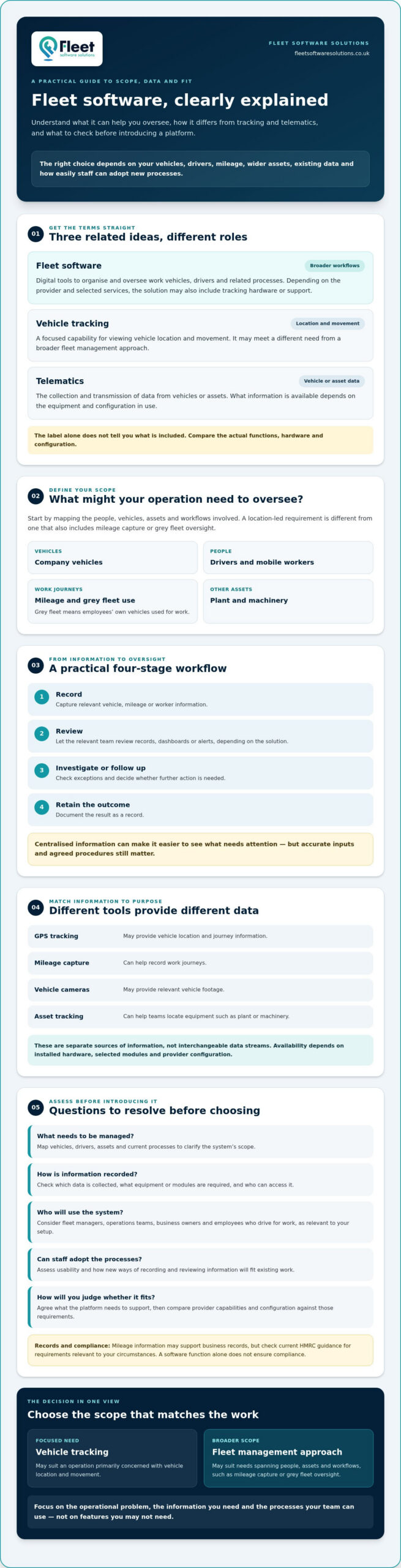
A typical workflow has four stages: data is recorded, the relevant team reviews it, someone investigates or follows up where needed, and the outcome is retained as a record. Centralising information can make it easier to see what needs attention, but it doesn’t remove the need for accurate inputs or agreed procedures. As Forbes explains, fleet management involves coordinating multiple responsibilities; software can support that work by making selected information easier to review.
From vehicle or driver activity to a usable record
GPS tracking may provide vehicle location and journey information, while mileage capture can help record work journeys. Camera systems and asset tracking serve different purposes: cameras may provide relevant vehicle footage, while tracking can help teams locate equipment such as plant or machinery. These are separate sources of information, not interchangeable data streams.
What appears in the system depends on installed hardware, selected software modules and provider configuration. Confirm which data is collected, how it is recorded and who can access it. Mileage information may support business records, but check current HMRC guidance for any tax or record keeping requirements relevant to your circumstances. Don’t assume a software function ensures compliance.
Dashboards, alerts and everyday decisions
Depending on the solution, teams may review information through records, dashboards or alerts. They can check exceptions, decide whether further investigation is needed, assign a follow up and document the outcome. For example, if a journey record looks unexpected, a manager could check the available information with the relevant employee and note the explanation. If a mileage entry is missing, the team could follow its process to request or verify the record.
Capture the relevant data, review what stands out, take an appropriate action and keep a record of the decision. This sequence helps turn information into a repeatable process, without assuming that software alone guarantees a particular operational or compliance outcome.
Before choosing a setup, clarify which workflows matter and ask providers to demonstrate how the required information is captured and reviewed. Businesses comparing fleet software and tracking solutions can use those questions to assess whether the available capabilities fit their operation.
Which Fleet Software Capabilities Matter for Different Business Needs?
The right capabilities depend on what your organisation needs to oversee, not on how many features a provider lists. A business focused on vehicle locations may have different priorities from one that also records work mileage, manages grey fleet use or tracks plant and mobile workers. Fleet software can bring several requirements together, but availability, integrations and functionality vary. Confirm the scope of each solution.
IBM describes how technology can support coordinated fleet operations through a real-time logistics platform. Use the comparison below to connect a practical need with a capability and questions to ask providers.
| Operational need | Relevant capability | Questions to ask a provider |
|---|---|---|
| Understand vehicle location and movement | Vehicle tracking | What location and journey information is available, and how is it accessed? |
| Record work journeys | Mileage capture | How are journeys recorded, checked and corrected? Which records can be retained? |
| Oversee employees’ own vehicles used for work | Grey fleet management | How are vehicle and journey details collected, and who is responsible for keeping them current? |
| Review information from vehicle cameras | Vehicle camera systems | What footage or information is available, and how is access managed? |
| Locate equipment away from road vehicles | Asset or plant and machinery tracking | Which types of assets can be tracked, and what information does the setup provide? |
| Support staff working alone or remotely | Lone worker protection | What does the service include, and what procedures or user actions does it require? |
Vehicle, mileage and grey fleet oversight
Tracking can show location or movement information, but it doesn’t by itself explain why a journey took place, confirm who was driving or establish whether a trip was authorised. Mileage capture and grey fleet oversight are distinct workflows. One focuses on recording work journeys, whilst the other concerns vehicles employees use for work. Clarify how information is collected, checked and retained. If records relate to tax, check current HMRC guidance for the requirements relevant to your circumstances.
Cameras, assets and mobile worker safety
Vehicle cameras address a different need from location tracking: they provide camera related information rather than simply indicating where a vehicle is. Plant and machinery tracking may matter where equipment moves between sites or operates separately from road vehicles. Lone worker protection is a specialist capability. Ask the provider to explain the service scope, how employees use it and what processes sit alongside it.
Before comparing providers, list the decisions each capability should support. This keeps discussions focused and makes it easier to verify technical details, integrations and responsibilities before choosing a setup.
How to Assess Fleet Software Before Introducing It
A structured assessment helps you select a system around real operational needs, rather than adopting features that add complexity without solving a clear problem. Before comparing providers, establish what information you need, who will use it and how you’ll judge whether the new process is working.
1. Map your fleet and current processes. Record the types of vehicles, whether you manage grey fleet, plant or other assets, and which teams or employees use them. Note how information is captured, where it is stored and which records are difficult to maintain or retrieve.
2. Identify users and decisions. List who needs access, what decisions they make and which records they’re responsible for. A fleet manager may need a different view from an employee recording work mileage, so clarify roles before discussing permissions or workflows.
3. Separate essentials from useful additions. Define the outcomes you need first, then distinguish must have capabilities from functions that could be helpful later. This keeps discussions focused and helps you avoid choosing a broad fleet software package simply because it has a long feature list.
4. Check compatibility and provider scope. Ask how the proposed solution will work with your existing systems and whether required integrations are available. Confirm what is included, what depends on hardware or configuration, how data can be accessed and what support is available during implementation and ongoing use.
5. Agree data and adoption responsibilities. Decide who can access information, how it will be handled and how long it needs to be retained. Consider your UK GDPR and data protection responsibilities for the specific information and use case, and check current guidance where needed. Explain the purpose of new processes to affected employees and provide suitable instructions or training.
6. Plan a proportionate rollout and review. Consider introducing the system in a manageable stage before extending it across the operation. Agree practical measures in advance, such as whether required records are complete, intended users are following the workflow and information is available to the people who need it. Review these measures after launch and adjust processes if gaps emerge.
Use your assessment to compare providers against consistent requirements, then confirm technical details and responsibilities before proceeding. You can review fleet software options to explore business solutions across tracking and fleet management.
Choosing a Fleet Software Approach That Fits Your Operation
The right approach reflects what your organisation needs to oversee, rather than which provider has the broadest feature list. Consider the vehicles and people involved, whether you manage grey fleet or mobile workers, and whether plant and machinery are part of the operation. Then match those requirements to specific capabilities and confirm how each would work in practice.
A focused vehicle tracking requirement may call for location and movement information, whilst broader fleet management needs could include mileage capture, grey fleet oversight, cameras or asset tracking. These needs don’t necessarily require the same tools or setup. For operations handling freight, haulage or subcontractors that require dedicated operational coordination, you can learn more about Logivo.ai to see how purpose-built platforms manage daily transport workflows. If your requirements include several workflows, ask how the proposed solution handles each one and whether information can be accessed in the way your teams need. Confirm availability, integrations and included functionality directly with the provider.
Match the provider’s capabilities to the requirements
Check that each essential requirement has a clear answer. Ask a provider to demonstrate relevant workflows, explain what information is captured and clarify any hardware, configuration or staff processes needed. This is particularly useful when comparing capabilities with different purposes, such as vehicle cameras and tracking, or mileage capture and grey fleet oversight.
For DVS related requirements, confirm which vehicles and operating circumstances are relevant to your fleet, what the proposed solution covers and which current requirements apply. Don’t rely on a product label alone to establish suitability. Check the details against authoritative, up to date guidance and ask the provider to explain the scope of its DVS compliance solutions.
Explore relevant fleet management and tracking solutions
Fleet Software Solutions provides UK businesses with fleet management and tracking solutions. Its offerings include vehicle tracking, vehicle cameras, grey fleet management, mileage capture, asset and plant tracking, lone worker protection and DVS compliance solutions. Its software capabilities include mileage capture, grey fleet oversight and lone worker protection. The appropriate combination depends on your operational needs, so confirm specific functionality and technical requirements before deciding.
With your requirements mapped, you can have a more focused conversation about which capabilities may fit your operation. Discuss your fleet requirements with Fleet Software Solutions.
Take the Next Step with a Clear Fleet Plan
The most useful fleet software is the solution that fits the work your organisation needs to manage. Start with the records and decisions that matter, then check that a provider can demonstrate the relevant capabilities and explain what depends on hardware, configuration or staff processes.
Vehicle tracking is only one part of fleet oversight. Depending on the operation, a business may also need mileage capture, grey fleet management, vehicle cameras or support for mobile workers. Fleet Software Solutions offers vehicle tracking and vehicle camera systems, with software capabilities that include mileage capture, grey fleet oversight and lone worker protection.
Document your priorities before comparing options. Discuss your fleet requirements with Fleet Software Solutions to explore a practical next step for your operation.
Frequently Asked Questions
What is fleet software?
Fleet software is a digital tool businesses use to organise information and processes related to work vehicles, drivers and other assets. Depending on the provider and setup, it may support tasks such as mileage capture, grey fleet oversight or lone worker protection. Some solutions also work alongside vehicle tracking or camera systems. Start by identifying what your organisation needs to manage, rather than assuming every platform includes the same capabilities.
What is the difference between fleet software and vehicle tracking?
Vehicle tracking focuses mainly on a vehicle’s location and movement, while fleet software may cover a broader range of operational records and workflows. A business might need mileage capture or grey fleet oversight as well as location information. Tracking data alone doesn’t explain why a journey took place or whether it was authorised. Check which functions a provider offers and what hardware or configuration each requires.
Can small businesses use fleet software?
Yes. A small business can consider fleet software if it has work vehicles, employees who drive their own vehicles for work, or mobile workers whose activity it needs to oversee. The right scope depends on the operation, not simply the size of the organisation. Recording mileage may call for a different setup from managing vehicles, assets and staff workflows together. Start with the processes that are difficult to handle now.
How does fleet software work?
Fleet software works by collecting or organising selected information, making it available for review and supporting follow up processes. Information might be entered by employees, captured through a software function or supplied by compatible tracking equipment, depending on the setup. A manager could review a missing mileage entry, ask for clarification and retain the updated record. Available data and workflows vary, so ask the provider to demonstrate how your required tasks would work.
Does fleet software include vehicle tracking?
Not always. Some providers offer fleet management software alongside vehicle tracking, while others sell tracking as a separate or more focused service. Check whether location and journey information is included, whether tracking hardware is needed and how the data is accessed. Also clarify which vehicles or assets the setup can cover. Ask the provider to demonstrate the specific tracking capability you require rather than relying on a broad product label.
Does fleet software help with HMRC mileage records?
Mileage capture software can help a business record work journeys, but a digital record doesn’t automatically meet the requirements relevant to your circumstances. Check current HMRC guidance for applicable record keeping expectations, particularly if mileage information is used for tax purposes. Before selecting a system, ask how journeys are entered, reviewed, corrected and retained. Make sure your internal process assigns responsibility for checking that records are complete and accurate.
What should I check before choosing fleet software?
List your vehicles, assets, users and existing processes, then separate essential capabilities from optional ones. Check what information the system captures, who can access it, whether required integrations are available and what hardware or configuration is needed. Ask the provider to demonstrate relevant workflows and explain data handling, support, staff responsibilities and implementation. Agree practical measures to review after launch, such as record completeness and whether intended users are following the process.
Is fleet software the same as telematics software?
No, although the terms can overlap. Telematics meaning refers to collecting and transmitting information from vehicles or assets, which may include location or journey data when suitable equipment is installed. Fleet software is a broader category of digital tools for organising fleet related information and workflows. A platform may use telematics data, but not every fleet system includes it. The data available depends on hardware, modules and provider configuration.