

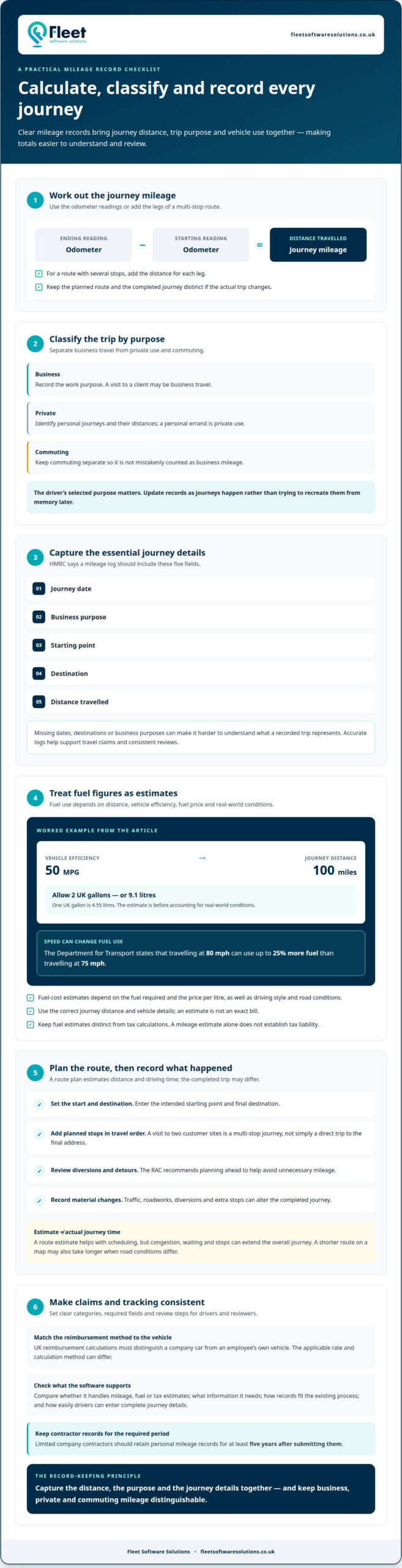
To calculate a journey’s mileage, subtract the starting odometer reading from the ending reading, or add the distances for each leg of a planned route. Company car mileage calculation software can organise journey totals alongside business and personal trip records. HMRC says a mileage log should include the journey date, business purpose, starting point, destination and distance travelled.
The arithmetic is straightforward; keeping a clear record of why each journey took place is what makes the information useful for managing company-car mileage. Business trips and personal journeys need to be distinguishable, so totals can be understood in context rather than treated as one undifferentiated figure.
This article explains how to calculate journey mileage, record business and personal trips, and estimate route distance and driving time. It also covers how mileage capture software can support consistent records and fit into everyday fleet management.
Key Takeaways
- See how fuel economy, driving style and road conditions affect estimated fuel use and journey costs.
- Understand why business and personal trips need to be distinguishable in mileage records, and how records support travel claims.
- Learn how advance route planning can help avoid unnecessary mileage and provide a more useful estimate of driving time.
- Explore how mileage capture and related fleet tools can support more consistent oversight of company and grey fleet journeys.
How do I calculate the total mileage of my journey?
Subtract the starting odometer reading from the ending reading to calculate distance travelled. For a route with several stops, add the mileage for each leg. A mileage calculator can work out a remaining value after you enter two or three figures, such as distance, fuel consumption or fuel cost.
To estimate fuel required, divide the journey distance by the vehicle’s miles-per-gallon figure. A car rated at 50 MPG can travel 50 miles on one UK gallon of petrol or diesel; one UK gallon is 4.55 litres. For a 100-mile trip at that efficiency, allow two gallons, or 9.1 litres, before accounting for real-world conditions.
Fuel-cost estimates depend on the fuel required and the price per litre, as well as driving style and road conditions. Treat the result as an estimate, not an exact bill. The Department for Transport states that travelling at 80 mph can use up to 25% more fuel than travelling at 75 mph, so speed can materially affect a calculation.
A mileage or tax estimate from a calculator is only as useful as the information entered. Use the correct journey distance and vehicle details, and distinguish fuel estimates from tax calculations. Tax outcomes depend on the relevant circumstances, so a mileage estimate alone does not establish tax liability.
UK reimbursement calculations must distinguish a company car from an employee’s own vehicle. The applicable rate and calculation method can differ, so record which vehicle was used instead of applying one rate to every journey.
Separate private fuel use from business travel in your records. Identify personal journeys and their distances, then keep them apart from business mileage. Combining the two can distort mileage and fuel estimates.
Compare software by what it calculates and how it handles records. Check whether it supports mileage, fuel or tax estimates, what information it requires, and whether its records fit your existing process. Consider how easily drivers can enter complete journey details.
Inaccurate mileage can produce unreliable journey totals, fuel estimates and reimbursement calculations. Missing dates, destinations or business purposes also make it harder to understand what a recorded trip represents. HMRC says a mileage log must record the journey date, business purpose, starting point, final destination and distance travelled.
Business and personal mileage records
A useful mileage record separates journeys by purpose, so business travel is not confused with personal use or commuting. Clear categories make it easier to review claims and understand how vehicles are being used.
Recording business and personal journeys
Classify each trip as business, private or commuting, and record its purpose and distance. This helps a business assess claims consistently and identify which journeys relate to work.
Apps can organise journeys by category, using driver classifications or recorded trip details. The driver’s selected purpose matters: a visit to a client may be business travel, while a personal errand is private. Keep commuting separate so it is not mistakenly counted as a business journey.
HMRC says a mileage log should include the journey date, business purpose, starting point, destination and distance travelled. Limited company contractors need accurate logs to support travel claims. Update records as business mileage occurs rather than trying to recreate them later.
Setting up mileage tracking and reimbursement
To set up mileage tracking and reimbursement software, define journey categories, required record fields and how claims will be reviewed. A consistent process shows drivers how to classify trips and gives reviewers structured information to assess claims.
First, explain how drivers should distinguish business, private and commuting journeys. Then set out how to submit and review claims. Capture HMRC’s required journey details and decide how mileage rates apply to different vehicle types. This helps prevent company-car and personal-vehicle journeys from being treated as though they use the same reimbursement method.
Keep records as journeys happen instead of reconstructing them from memory when a claim is due. Limited company contractors should retain personal mileage records for at least five years after submitting them. Regular updates create a clearer audit trail and help identify missing details before claims are processed.
Software can support accurate categorisation and consistent reviews, but drivers still need to enter the correct purpose for each trip.
Calculating journey distance and driving time
A planned route gives an estimated distance and duration before a driver sets off. The actual journey may differ because of traffic, roadworks, diversions or extra stops. Keep planned and actual journey details distinct to explain differences in mileage and travel time.
The RAC recommends planning a route in advance to avoid unnecessary mileage. Enter the intended start point and destination, then add business stops in travel order. For example, a visit to two customer sites is a multi-stop journey, not simply a direct trip to the final address.
Driving time is an estimate based on the chosen route and expected conditions. It helps with scheduling, but it is not the same as time spent driving: congestion, waiting and stops can extend the overall journey. Use a route plan to anticipate travel and the completed trip record to capture what happened.
- Set the correct starting point and final destination.
- Add planned stops in the order the driver expects to visit them.
- Review the route for diversions or unnecessary detours before departure.
- Record any material change between the plan and the journey completed.
These steps make journey estimates more useful for operational planning. A route that avoids a detour may reduce distance, while a shorter route on a map may take longer if road conditions differ. Treat mileage and duration as separate measures: one describes distance travelled, the other the time required.
The RAC describes a 200-mile journey as an example of a drive for a long weekend away or a UK city break. The same planning principle applies to work travel: identify the route and stops beforehand, then compare the completed journey with the plan. Where the route changes, recording the reason helps explain why actual mileage or duration differs from the original estimate.
Clear route information gives managers a better basis for reviewing travel patterns. Repeated differences between planned and completed journeys can prompt a closer look at stop sequences, route choices or recurring delays. Not every variation means that travel was unnecessary.
Which UK company car mileage calculation software products are available?
UK businesses can choose from three broad types of mileage software: dedicated journey loggers, expense and reimbursement platforms, and wider fleet management systems. They differ in scope, from recording trips to supporting broader fleet oversight.
A dedicated mileage logger focuses on trip records and journey classification. It may suit a small team that needs a focused way to capture business and personal journeys. An expense platform includes mileage alongside other employee claims, which can help finance teams review submissions through one process.
Fleet management software takes a broader operational view, putting mileage records in the context of vehicle use. It may suit a business managing company cars alongside other fleet requirements. Choose according to your priority: journey capture, reimbursement administration or wider oversight.
- Journey logging: consider how drivers record trips and identify their purpose.
- Claim handling: assess how mileage details move from submission to review.
- Integration: identify whether records can fit the business’s existing finance or fleet processes.
- Ease of use: consider how clearly drivers and reviewers can complete their tasks.
A business that already processes employee expenses through one system may value a connected mileage workflow. A fleet manager overseeing vehicle use may prioritise a broader view of mileage activity. In either case, accurate journey data is essential: software can organise information, but drivers still need to classify journeys correctly.
Compare products against your actual process, not the feature count alone. Consider who enters trip details, who reviews them and how the records are used. A straightforward interface can help drivers complete records consistently, while suitable integrations may reduce repeat entry across systems. These criteria help distinguish a mileage tool from software built for broader fleet administration.
If you’re assessing how mileage tools fit your fleet’s processes, you can discuss your mileage requirements with Fleet Software Solutions.
Dedicated journey loggers focus on recording and classifying trips, expense platforms combine mileage with other employee claims, and fleet systems place mileage within broader vehicle-use oversight. Compare how each fits existing finance or fleet processes and how easily drivers and reviewers can complete their tasks; the section gives no product-specific comparisons.
Fleet Software Solutions: Mileage Capture
Fleet Software Solutions offers Mileage Capture for businesses that need a clearer way to manage company and grey fleet mileage. It can be a practical next step when manual records are difficult to maintain or journey information needs to fit into a wider fleet management approach.
Alongside Mileage Capture, Vehicle Tracking and Vehicle Cameras can support broader vehicle oversight. Grey Fleet Management helps businesses manage work-related journeys made in employees’ own vehicles. The right combination depends on your fleet and the records your operation needs.
To discuss a more structured approach to mileage records, contact Fleet Software Solutions and explain what your business needs to capture and manage.
Make mileage management fit your fleet
As your fleet’s needs change, review whether your mileage process gives managers and drivers the information they need. Choosing company car mileage calculation software is an opportunity to consider both journey records and how mileage oversight fits into wider vehicle management.
Fleet Software Solutions offers Mileage Capture alongside Vehicle Tracking, Vehicle Cameras and Grey Fleet Management. These services can support businesses managing mileage records alongside other fleet requirements, including work-related journeys in employees’ own vehicles. Identify the records and operational oversight your business needs, then contact Fleet Software Solutions to discuss a suitable approach.
A clear understanding of your current process can help make that conversation practical: consider where journey information is difficult to manage and what you want to improve. Contact Fleet Software Solutions to discuss your mileage management needs and take a considered next step.
Frequently Asked Questions
What is company car mileage calculation software and how does it work?
Company car mileage calculation software organises journey information and calculates mileage-related totals from the details entered by a driver or administrator. For example, a business can review a driver’s recorded work journeys separately from personal trips. The result depends on accurate journey information and the purpose assigned to each trip.
What HMRC mileage records and evidence must employers and drivers keep?
HMRC says a mileage log should show each journey’s date, business purpose, starting point, destination and distance. Record journeys as they happen rather than reconstructing them later; limited company contractors need accurate, contemporaneous logs to support travel claims. They should retain personal mileage records for five years after submission. These details help employers understand what each claim relates to.
How do the leading UK mileage software options compare on features, integrations and ease of use?
Dedicated mileage loggers focus on trip records and journey classification, expense platforms include mileage alongside employee claims, and fleet systems provide broader vehicle oversight. Compare what each calculates, the information it requires and how well its records fit existing processes. Ease of use depends on how simply drivers can enter complete journey details.