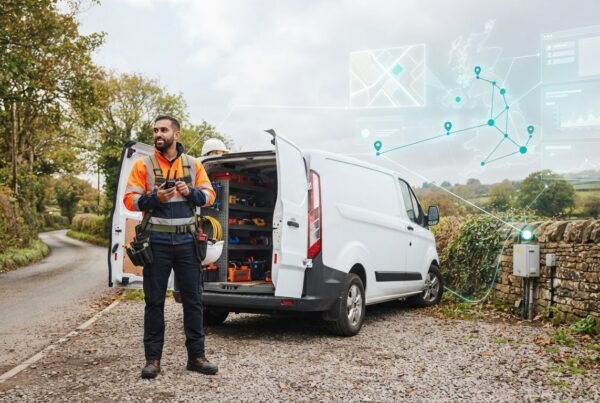
Real time plant and equipment tracking uses GPS devices and software to show where machinery is and how it moves. Geofence alerts can notify users when tracked equipment leaves a defined boundary, helping teams spot unexpected movement and respond promptly.
Knowing a machine’s location is only part of fleet management. Teams also need information to understand utilisation and make practical decisions, whether coordinating equipment across sites or keeping track of assets when they are not in use.
This guide explains how plant tracking works, how GPS and usage monitoring can support equipment security and fleet oversight, and what to consider when choosing a tracking system. It also looks at the role of software and mobile access, so you can assess how location data could fit into your day-to-day operations.
Key Takeaways
- Understand how GPS tracking, equipment usage data and geofences can help you monitor machinery across sites.
- Learn how movement alerts can flag equipment leaving a defined area and support a prompt response to unexpected activity.
- Compare the needs of different fleet sizes and industries to identify the tracker setup that fits your operations.
- See how tracking software and mobile access can help turn equipment data into practical fleet oversight.
- Explore which factors to consider when choosing a tracking solution, from the machinery you use to the information your team needs.
How does plant tracking work?
A tracker records a machine’s location and sends data to software, where teams can review movement and configure alerts. With real time plant and equipment tracking, its practical value depends on setting useful boundaries, alert conditions and operating data.
Geofences and movement alerts
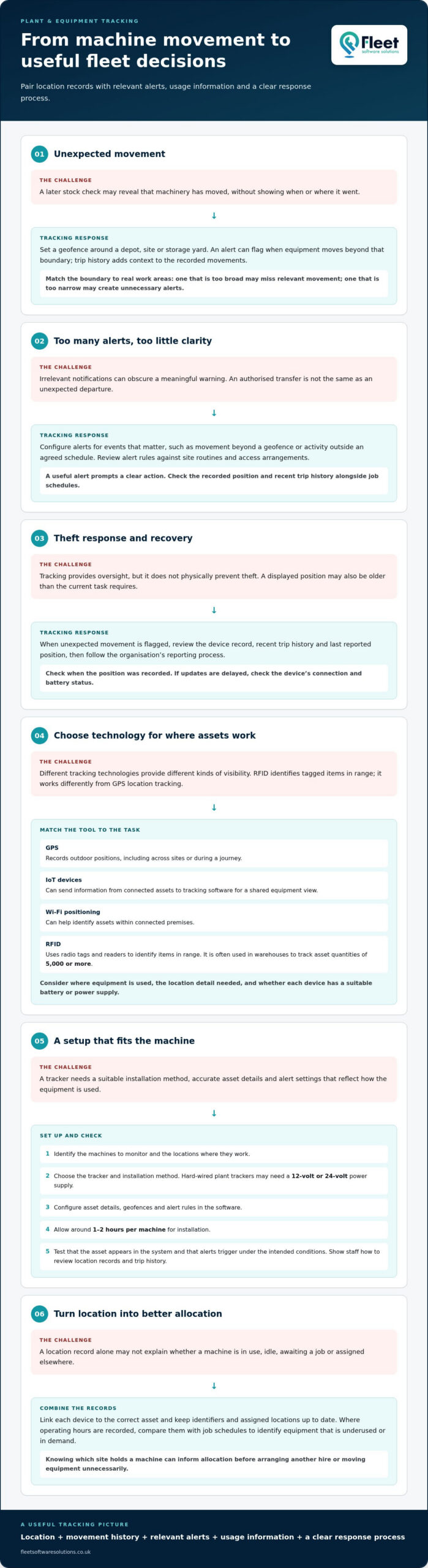
A geofence is a virtual boundary around a site, storage yard or work area. Set one around a depot, for example, and the tracking system can notify users when machinery moves beyond it. This gives managers a location-based prompt to investigate, rather than relying only on a later stock check.
Trip history adds context by showing recorded movements over time. Compare a machine’s route with expected site movements to identify an unfamiliar journey or return. Set boundaries to match actual work areas: one that is too broad may miss relevant movement, while one that is too narrow may trigger unnecessary alerts.
Theft prevention and unauthorised movement
Movement alerts can flag plant machinery leaving an agreed area or planned work location. Teams can then check the recorded position and recent trip history before following their reporting process. Tracking supports oversight and recovery efforts, but it does not physically prevent theft.
Real-time location information can also help improve utilisation. When a team can see which site holds a machine, it can make a more informed allocation decision before arranging another hire or moving equipment unnecessarily. Review alerts alongside job schedules: movement during an authorised transfer means something different from an unexpected departure. Earlier identification can help limit disruption and downtime.
Custom and machine alerts
Configure alerts for events that matter to your operation, such as movement beyond a geofence or activity outside an agreed schedule. A useful alert prompts a clear action. Too many irrelevant notifications can obscure a meaningful warning, so review alert rules against site routines and access arrangements.
Machine alerts and operating hours can add a usage perspective to location records. Where the tracking setup records operating hours, compare them with job schedules to identify equipment that is underused or in demand. Review software updates and their notes as part of routine system administration, so users understand any changes to alert settings or the information displayed.
Equipment tracking setup
To install and set up equipment tracking, first identify the machines to monitor and the locations where they work. Choose a suitable tracker and installation method, then configure each asset’s details, geofences and alert rules in the software. Hard-wired plant machinery trackers can require either a 12-volt or 24-volt power supply, so match the installation to the machine.
Installation takes around 1-2 hours per machine. After fitting, test that the asset appears in the system and that a movement alert is triggered under the intended conditions. Then show relevant staff how to find location records, review trip history and respond to notifications. A consistent setup makes fleet information easier to use in operational decisions.
Theft prevention and asset recovery
Asset tracking supports theft response by making equipment location and movement easier to review. Its value depends on the technology used, how recently positions were recorded and how staff respond to alerts.
Tracking technologies
GPS devices record outdoor positions, helping teams locate plant across sites or during a journey. IoT devices can send information from connected assets to tracking software, giving users a shared view of equipment. Wi-Fi positioning can help identify assets within connected premises, while RFID uses radio tags and readers to identify items in range.
RFID is often used in warehouses to track asset quantities of 5,000 or more. It can help teams check which tagged items are present, but it works differently from GPS location tracking. Choose technology according to where equipment is used, the level of location detail needed and whether each device has a suitable battery or power supply.
For theft prevention, connect the technology to a clear response process. When an alert identifies unexpected movement, staff can review the device record, establish the last reported position and share useful details with the people responsible for recovery. Some plant equipment tracking systems offer 24/7 monitoring and theft alerts.
Live location and usage monitoring
Live monitoring brings asset positions into one view, allowing a manager to see where equipment was recorded and compare its location with current work. For example, a site manager can check whether a machine is at its assigned work area before arranging a transfer. Usage information can also indicate whether an asset is active or idle, helping teams plan allocation.
In healthcare, staff can use asset records to find mobile equipment within a building, such as a device assigned to a department. In pharmaceutical operations, location records can help teams organise equipment used across storage and work areas. These examples concern operational visibility; tracking does not replace an organisation’s own handling procedures.
Accurate, useful records depend on linking each device to the correct asset. Keep identifiers and assigned locations up to date, then review position and usage information together. That makes it easier to distinguish equipment awaiting a job from assets moved elsewhere, supporting better planning and reducing avoidable searches.
Asset positions and reporting freshness
A displayed position is most useful when staff can see when it was recorded. Compare the report time with the task: a recent update may help locate a machine, while an older position may show only where it was last reported. Check the device’s connection and battery status if updates are delayed.
Reporting frequency affects how quickly a change becomes visible and how much information teams need to review. When responding to a recovery situation, prioritise the latest position, recorded movement and asset identity. Nearly one in three tradespeople have been victims of tool theft, making clear asset records relevant beyond large machinery fleets.
Set a consistent process: identify the missing asset, review its latest report, note the time and location, then share those details through the appropriate internal channels. For organisations looking to manage equipment locations in one system, asset tracking can support a more organised view of recorded positions and movements.
Choosing a tracker for different fleet sizes and industries
The right tracking system depends on the assets you manage, their working environments and the decisions your team needs to make. Start with a clear use case, such as locating equipment between sites or reviewing how plant is allocated.
For a smaller fleet, prioritise a straightforward view of each asset and its reported location. A larger operation may need consistent asset records across depots, vehicles and work areas. In either case, list the questions managers need answered before comparing solutions: where equipment is, how it is used and whether it is available for its next job.
Warehouse, logistics and fleet tracking
Warehouses, logistics teams and vehicle fleets often share equipment across locations. A warehouse manager might need to find a mobile asset inside a building, while a logistics coordinator needs to know which site or vehicle holds it. Choose a plant tracking system that represents these working locations clearly, rather than treating every asset as if it operates in the same environment.
For example, a business moving machinery between a depot and construction sites can organise records by asset and location. Vehicles and plant can then be reviewed as distinct resources, even when both support the same job. Decide which teams need access to these records and what information they need for routine planning.
Plant fleet utilisation and management
Location and usage records can help managers compare equipment availability with upcoming work. If one site has idle machinery while another needs the same type of asset, the information can support a better allocation decision. Review recorded activity alongside job schedules, since location alone does not show whether equipment is ready for use.
For a fleet with different machine types, organise assets into useful categories, such as excavators, access equipment or generators. This makes it easier to review demand by equipment type and identify records that need attention. The aim is operational efficiency: use existing resources effectively and limit avoidable transfers or duplicate arrangements.
Fleet data is more useful when teams can relate it to existing processes. Before selecting software, map how asset details are recorded, who updates them and which reports managers use. For example, a site team may record equipment allocation in digital site diary software while operations staff review availability across locations. Clear responsibilities help keep records accurate.
Consider how a tracking system will fit alongside current fleet management software. Identify what information should be shared, such as asset identity, location or usage records, and how staff will access it. Do not choose on a feature list alone: assess whether the system supports decisions your teams already make and whether its reports fit their daily workflow.
A useful selection process is to:
- List the equipment types, operating locations and teams involved.
- Define the decisions tracking data should support, from locating an asset to planning its allocation.
- Compare software views and reports against those tasks.
- Set a consistent method for maintaining asset records and reviewing fleet data.
This approach keeps the tracking solution focused on practical fleet requirements, whether equipment works from one depot or moves between sites.
Real-time GPS location and equipment usage monitoring
GPS location and usage records help teams monitor where plant is and how it moves between work areas. Their value depends on how recently updates were recorded, access controls and how managers use the information.
In the UK, tracking that can identify employees engages data protection and privacy requirements. Explain the monitoring purpose, restrict access and keep records only as long as operationally needed. Key risks include inappropriate access, data exposure and connectivity gaps.
Live GPS location tracking
A GPS device records a plant machine’s position and sends updates to a platform, where authorised users can view its reported location. For example, a manager coordinating equipment across work sites can check which site last reported the machine before planning its next use.
Assess how current the position needs to be for the task. A recovery response may need recent movement information, while routine asset management may rely more on a clear view of equipment allocation. GPS visibility supports decisions, but it does not explain why a machine moved.
Location history and movement records
Location history gives teams a record of reported positions and movement over time. Compare a machine’s route with a planned transfer between a depot and a work site; an unexpected stop or destination can prompt an operational review.
Use movement records alongside job schedules, asset identifiers and authorised transfers. This context helps distinguish a legitimate relocation from activity that needs investigation. Keep records organised by machine so teams can retrieve relevant movements without confusing similar assets.
Usage monitoring adds another layer to location data. Where a system records operating activity, compare it with work allocations to see whether machinery is active, waiting or assigned elsewhere. A site manager, for instance, can review availability before requesting a transfer, while an operations team can assess whether assets are distributed appropriately.
Interpret each data point in context. A machine recorded at a site may be present but not ready for a scheduled task; usage information and local job records provide a fuller picture. Consistent asset identifiers help connect the position, machine and work allocation across the tracking platform.
Connectivity affects how reliably updates reach users. If a device cannot transmit from a work location, the platform may not show a current position until communication resumes. Distinguish the latest reported location from a live update, and use the timestamp to judge whether the record is recent enough for the task.
Security controls matter because location histories can reveal operational patterns, including where equipment is stored and when it moves. Limit platform access to staff who need it, use individual accounts and review permissions when responsibilities change. These steps reduce unnecessary exposure of movement records.
For effective monitoring, establish a routine: assign each device to the correct machine, review position and usage together, and record authorised transfers. This gives managers a dependable basis for coordinating work, investigating unexpected movement and making asset management decisions, without treating a single location point as the complete operational picture.
Plant tracking software and mobile app
Plant tracking software brings equipment records, location information and activity into a shared platform. Useful features include an asset list, location view, movement history, configurable alerts and reports. A mobile app can help authorised staff access the information they need while away from an office.
Start by identifying the decisions the software should support. A construction manager might need to find a machine assigned to another site, while an operations team may want to review equipment availability across its fleet. Choose features for these tasks, rather than treating a long feature list as proof of a suitable system.
A clear asset record is essential. Each machine should have an identifiable entry connecting its name or reference with its reported location and relevant activity. If similar excavators work on separate sites, for example, distinct asset records help users select the correct machine before reviewing its details or movement.
Location visibility should show where each asset was last reported and when that information was recorded. The timestamp helps users judge whether a displayed position suits their immediate task. An “instant” notification still depends on the device recording movement and transmitting an update, so the app should make the event and its timing clear.
Movement alerts can help staff notice activity that needs attention, such as a machine leaving an agreed work area. Configure each alert around a useful response: identify who receives it, which asset it concerns and what action follows. This helps distinguish an unauthorised movement notification from a planned transfer between construction sites.
Usage information can add context to location data. If operating hours are available, managers can compare them with work allocations to assess whether equipment is being used as intended. Reports should make it practical to review assets by site, machine type or activity, helping teams identify patterns without searching through unrelated records.
For a mobile app, consider how staff will use it during a normal working day. Check whether the layout makes asset details easy to find on a phone, whether users can view relevant movement records and how access is organised. A supervisor locating a machine from a site office needs a simple route from the fleet view to that asset’s information.
- List the equipment and records your team needs to manage.
- Match location, history and alert functions to real operational tasks.
- Decide which staff need access and what each role should see.
- Review sample reports against the decisions managers make.
These steps help assess whether software supports day-to-day fleet oversight, not merely device installation. Explore fleet management software to consider how tracking information can fit into wider fleet processes.
Fleet Software Solutions: Vehicle Tracking
Fleet Software Solutions offers Vehicle Tracking for businesses seeking better visibility across company vehicles. If your review of plant monitoring also includes vehicles moving between sites, vehicle tracking can bring that part of fleet oversight into focus.
Consider how vehicle location information could support operational planning alongside equipment records. Fleet Software Solutions also offers Vehicle Cameras, Grey Fleet Management and Mileage Capture, which may be relevant when your requirements extend to those areas.
To discuss your business’s vehicle tracking requirements, contact Fleet Software Solutions.
Make tracking part of your next fleet decision
Use your real time plant and equipment tracking requirements to define what better oversight should enable: clearer asset allocation, more informed operational decisions or a more organised response to unexpected movement. Then decide who will use the information and how it should shape everyday planning. This gives your next step a practical focus, rather than making technology the objective in itself.
For businesses reviewing tracking beyond plant, Fleet Software Solutions offers Vehicle Tracking, Vehicle Cameras and Grey Fleet Management. These services can support wider fleet oversight alongside the equipment considerations explored in this guide.
Set out the operational priorities you want to address, then discuss the relevant options with Fleet Software Solutions. Contact Fleet Software Solutions to take the next step towards a tracking approach that fits your business.
Frequently Asked Questions
What is commercial GPS asset tracking?
Commercial GPS asset tracking uses devices and software to help businesses monitor equipment and other valuable assets. A company can associate a machine with its asset record, then use reported location information to support allocation, oversight or a search when it cannot be found. Unlike a basic inventory list, it connects asset records with location data, helping teams make operational decisions using current information.
Do you supply GPS hardware?
Yes. Fleet Software Solutions supplies tracking hardware for business vehicles and assets, including plant and machinery tracking solutions. The right setup depends on what you want to monitor and how the equipment is used. A business tracking machinery across work sites, for example, has different requirements from one monitoring vehicles. Consider the hardware alongside the software and reporting your team needs, so the information supports practical fleet management.
What are geofences used for?
Geofences mark virtual areas on a tracking system’s map, such as a depot, storage yard or work site. They help teams identify when tracked machinery crosses a defined boundary, prompting a check on an unexpected departure or arrival. For example, a business could use a site boundary to distinguish normal work-area movements from movements that need review.
How does GPS and telematics equipment tracking work?
A GPS tracker determines an asset’s position and sends location information to tracking software. Telematics can combine location with other data collected by a device, allowing a business to review equipment information through a central platform. For instance, a manager could link a machine’s record to its reported position, then use available data to support work allocation. The value comes from connecting accurate asset records with information teams can act on.
Which plant tracking systems are best for UK businesses?
The most suitable system is the one that fits your equipment, work locations and management needs. A business tracking machinery across separate sites may prioritise location records and movement reporting, whilst a warehouse managing a large inventory may consider RFID, which is often used to track asset quantities of 5,000 or more. Compare the information each system provides with the decisions your team needs to make, rather than choosing on features alone.
How do GPS trackers compare with Bluetooth and RFID asset tracking?
GPS is useful for tracking equipment across outdoor locations, while Bluetooth is typically suited to detecting nearby tagged items. RFID uses tags and readers to identify assets within a reading area; it is often used in warehouses to track asset quantities of 5,000 or more. The right approach depends on whether you need to locate equipment across sites, find items nearby or manage inventory in a defined space.