
A dash cam’s value depends on more than the camera: it also needs reliable power, useful footage and a considered approach to privacy. Commercial vehicle dash cam integration brings these elements together with vehicle data, helping fleets review road events and support safer driving. Dash cams can use a vehicle’s cigarette lighter socket or be hardwired, with the vehicle’s 13.8 V supply typically converted to a 5 V USB connection.
It’s understandable to focus first on what a camera records, but how it connects to the vehicle and handles footage matters just as much in day-to-day fleet operations. This guide explains how dash cams can support safety and video telematics, what to consider for GDPR-aligned privacy and secure storage, and how electrical integration affects installation. You’ll also see how to think through the practical requirements before bringing camera footage into your fleet’s wider operating picture.
Key Takeaways
- Choose a camera configuration around the views your fleet needs, from the road ahead to the cab or multiple vehicle areas.
- Linking footage with telematics can give fleet teams useful context around driving events and support timely review.
- Set clear privacy practices for driver-facing footage, including how recordings are accessed and stored.
- Plan the power connection as part of installation so the camera works reliably with the vehicle’s electrical system.
Why invest in dash cams?
A forward-facing camera records the road, while a driver-facing camera captures activity inside the cab. Dual-facing systems combine both views, giving fleet managers context when reviewing incidents or discussing driver behaviour. Multi-camera systems can add coverage of a vehicle’s sides, rear or interior. An MDVR connects multiple cameras to one recording unit, which may suit larger or specialist vehicles. Choose the configuration based on the views and evidence your fleet needs.
Image quality and visibility shape how useful footage is. Full HD video is 1080p, or 1920×1080 pixels, and a front camera’s field of view may be 130° or more. A wider view can capture more of the scene, although position affects what appears in frame. For unlit cabs at night, infrared LEDs help capture interior footage when ordinary lighting is limited.
If your fleet uses electronic logging or other operational reporting systems, consider whether camera footage can be reviewed alongside existing records. For school and passenger transport procurement, set camera requirements before selecting equipment. Specify the views needed, how staff will review footage and how the system fits each vehicle’s work. This makes camera selection part of the wider operational plan, not an isolated equipment decision.
Choose a system by matching camera coverage to vehicle type and recording purpose. A road-facing camera may suit fleets focused on incidents ahead; a driver-facing view adds context about cab activity, while several cameras can cover areas around a larger vehicle. Compare required views, resolution, night vision and recording arrangements together. This gives procurement teams a practical basis for selecting cameras that meet fleet requirements and support driver safety.
Dashcams as part of commercial video telematics
Commercial vehicle dash cam integration connects recorded images with vehicle and fleet data. A camera captures an event, while telematics can add context such as location or vehicle movement. Together, these records help commercial fleets review driving incidents, identify patterns and improve reporting. The value comes from linking relevant footage to an event, rather than collecting video without a clear operational purpose.
Connected camera systems can use GPS and a g-sensor to identify events such as harsh braking, harsh turning or collisions. Where supported, footage can upload to cloud storage for central review. Some commercial dash cams connect over 4G, supporting event alerts, remote coaching and live streaming to a fleet platform. A driver-facing camera may add interior footage, giving managers more context when reviewing a specific incident.
For insurance telematics, video can complement driving information by showing what happened around a collision. Footage may help fleet operators provide evidence to insurers and handle claims. Camera use is not a universal insurance requirement; requirements depend on the relevant policy and insurer. Keep the recording purpose clear, and link footage access to defined incident-review and reporting processes.
How much does commercial vehicle dash cam installation and integration cost in the UK? The price depends on the case and is provided after a quote request; cost factors include the number of cameras, vehicle type, installation method and fleet platform requirements.
How do cameras integrate with vehicle CAN bus, ADAS and existing fleet software? There is no single connection for every vehicle or system. CAN bus data, ADAS information and camera footage can be brought together when the equipment and platform support compatible interfaces. Integration should preserve each system’s role, so define which data and events need to appear together.
For an operational view that brings camera information alongside fleet data, explore connected fleet management options.
GDPR-aligned privacy settings and secure video storage
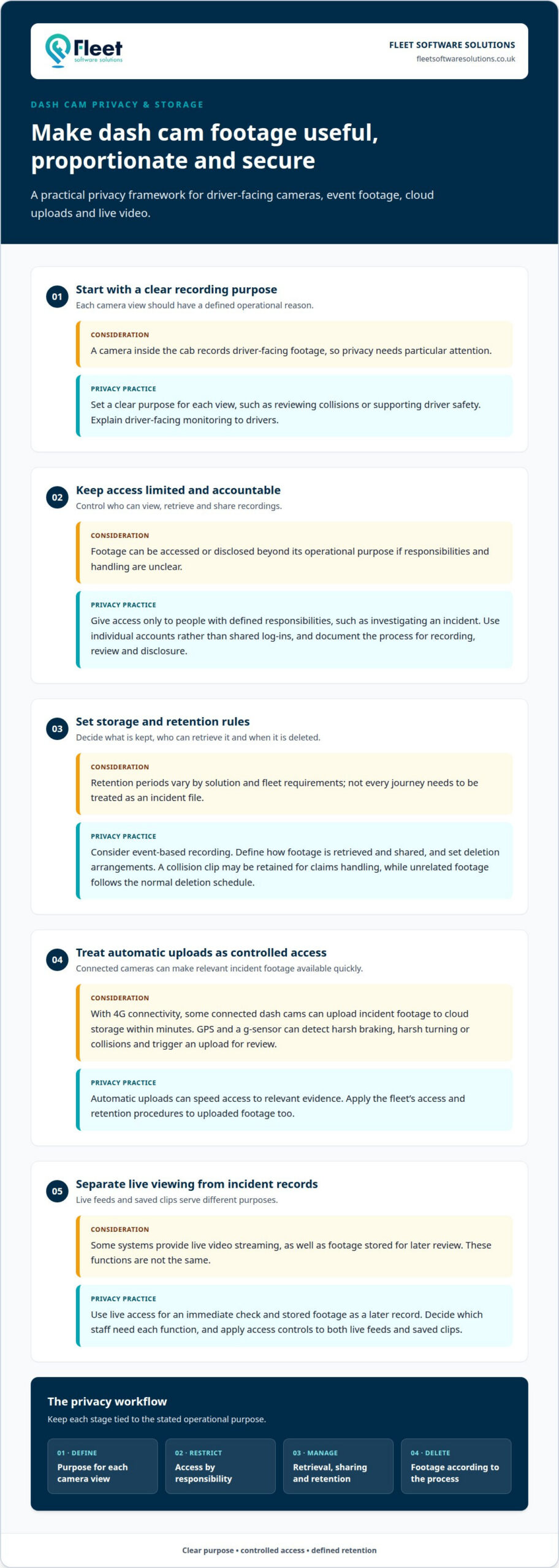
Build privacy considerations into camera use, particularly when a device records inside the cab. Set a clear purpose for each view, such as reviewing collisions or supporting driver safety, and explain driver-facing monitoring to drivers. Limit footage access to people with defined responsibilities, such as investigating an incident, and use individual accounts rather than shared log-ins. A documented process helps keep recording, review and disclosure proportionate to the operational purpose.
Set storage arrangements according to how footage will be used. Event-based recording can keep relevant clips available without treating every journey as an incident file, while retention periods vary by solution and fleet requirements. Define who can retrieve recordings, how they are shared and when they are deleted. For example, a collision clip may be retained for claims handling, while unrelated footage follows the normal deletion schedule. Access controls help protect evidence from casual viewing or unnecessary copying.
Recording quality also affects whether footage is useful. Resolution determines how much visual detail a clip captures, while night vision can support visibility in poorly lit conditions. With 4G connectivity, some connected dash cams can upload incident footage to cloud storage within minutes. GPS and a g-sensor can detect events such as harsh braking, harsh turning or collisions, triggering an upload for review. Automatic uploads can speed access to relevant evidence, but should follow the fleet’s access and retention procedures.
Video can help clarify collision disputes by showing the road scene and, where fitted, driver behaviour inside the vehicle. Some systems also provide live video streaming, giving authorised fleet staff a real-time view of a vehicle’s surroundings. Live access serves a different purpose from incident recording: it supports an immediate check, while stored footage provides a record for later review. Decide which staff need each function, and apply access controls to live feeds and saved clips.
Vehicle electrical system integration
Electrical integration determines how a camera receives power and when it can operate. Dashcams can use a vehicle’s cigarette lighter socket or connect directly through hardwiring. A typical setup converts a 13.8 V vehicle supply to a 5 V USB connection, matching the camera’s power input. The installation method affects cable routing, access to power and how neatly the device sits within the cab.
Hardwiring connects the camera to the vehicle’s electrical system rather than relying on a removable socket connection. The installer needs to identify a suitable supply, route cables securely and keep them clear of moving parts and the driver’s forward vision. Poor cable placement can obstruct access or distract the driver, so plan cable routing and camera position together. The power source also affects whether the camera operates only while driving or under other configured conditions.
Some cameras also use a GPS antenna, which has its own electrical requirements. Dashcam GPS antennas typically operate at 3.0 to 5.0 V, so the antenna connection must match the equipment. Separating power connections from data connections helps clarify what each cable supports. For example, the camera’s power supply keeps it operating, while GPS information can associate recorded footage with vehicle location.
Plan the power and data paths together. A forward-facing camera may record an incident, while telematics or vehicle tracking can add context for reviewing the journey. Keeping relevant devices connected can help make alerts and footage available for reporting. Before installation, map the camera position, power source, cable route and required connections for each vehicle type. A van and a larger commercial vehicle may need different routing, even when both use a 5 V camera connection. That coordinated approach helps fleets integrate recording without overlooking driver access, visibility or operational requirements.
Fleet Software Solutions
Fleet Software Solutions helps businesses bring vehicle cameras and fleet oversight into a more manageable operational picture. If you’re planning camera integration, its Vehicle Cameras and Vehicle Tracking offerings can help you review footage alongside vehicle activity. Fleet Management Software supports day-to-day fleet administration, while Grey Fleet Management and Mileage Capture address other aspects of business vehicle use.
The right combination depends on your vehicles, the information you need and how your team will use it. Bringing these requirements together helps you make a considered decision about camera coverage, tracking and fleet processes, rather than treating each as a separate task.
Contact Fleet Software Solutions to discuss your fleet’s requirements.
Shape a practical next step for your fleet
The next step is to turn operational needs into a clear integration plan. Decide what the system should help your team do, which vehicles are in scope and how recorded information will support everyday decisions. A practical plan for commercial vehicle dash cam integration also considers how camera and fleet data will be used as requirements change, rather than treating installation as a standalone technical task.
Fleet Software Solutions offers Vehicle Cameras, Vehicle Tracking and Grey Fleet Management. These services help businesses consider cameras in the wider context of vehicle oversight, including vehicles used for work outside a directly managed fleet. The right combination depends on your operational priorities and how your team manages business vehicle use.
Contact Fleet Software Solutions to discuss your fleet’s requirements and identify a sensible way forward. A considered plan can help your team move from camera selection to a more joined-up approach with confidence.
Frequently Asked Questions
What dash cam installation and support options are available?
Fleet Software Solutions offers Vehicle Cameras, connected streaming camera options, and ongoing support and training. The right arrangement depends on vehicle types, required camera views and how your team needs to access footage. For a mixed fleet, first group vehicles by operational use, then match camera configuration and platform requirements to each group. This helps align the setup with real working conditions.
What is a fleet dash cam?
A fleet dash cam is a vehicle camera used in a business fleet to record journeys or relevant events. Unlike a camera used only for personal recordings, a fleet setup can support operational tasks such as reviewing an incident, coaching a driver or compiling a report. For example, a delivery business could use footage to clarify what happened during a disputed road event.
What’s the difference between a dash cam and an MDVR system?
A dash cam usually records a forward-facing view, while an MDVR connects multiple cameras to one recording unit. That difference matters when choosing coverage for a vehicle. A van needing road footage may suit a dash cam, whereas a specialist vehicle requiring front, rear, side and interior views may need a multi-camera arrangement. The deciding factor is the number and position of views required.
Which dash cams integrate with fleet management, telematics and GPS systems?
Choose camera equipment and a platform that can exchange the information your operation needs, such as footage, vehicle location and event data. Compatibility depends on the devices and software involved, so define the required data flow before deployment. Fleet Software Solutions’ device-agnostic software works with a wide range of tracking device options, helping businesses plan camera and tracking requirements together.
What are the UK data protection and ICO rules for fleet dash cams and driver monitoring?
Configure fleet cameras around a clear operational purpose and explain monitoring to drivers, particularly when a camera records inside the cab. Set access permissions, decide how footage is retained and establish when it should be reviewed or shared. These controls help make monitoring transparent and proportionate. For a UK deployment, assess the specific use of footage against applicable data protection requirements and ICO guidance.
How should businesses install and configure dash cams in vans, HGVs and other commercial vehicles?
Plan each installation around the vehicle’s cab layout, camera views, power source and cable route. Position cameras to capture the intended scene without obstructing the driver’s forward vision, and route wiring away from moving parts and controls. A van and an HGV may need different mounting positions or cable paths. Record each vehicle’s configuration so later support and footage reviews remain straightforward.