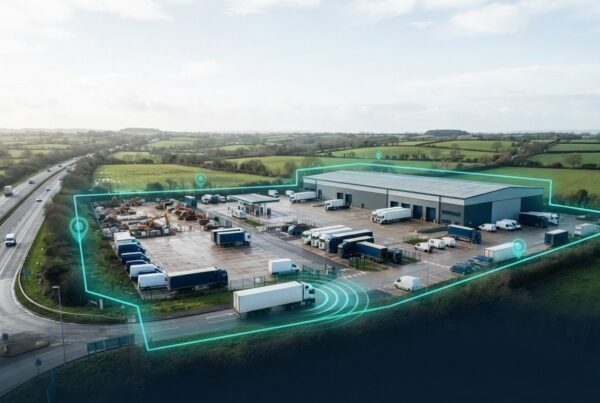
What if knowing where a machine is only solves part of the problem? Plant and machinery tracking can show teams where equipment is and help them make better-informed decisions about job planning, asset movements and equipment use.
When equipment is spread across sites and teams, limited visibility can make coordination harder and leave you concerned about loss, theft or unauthorised movement. Tracking won’t replace clear processes, but it can give teams useful information to support day-to-day oversight.
This guide explores seven practical uses for plant and machinery tracking, from locating equipment to coordinating assets across jobs. It also explains what to consider before introducing tracking, how location information differs from broader telematics, and how to make tracking part of a wider asset-management approach. The aim is to help you focus on operational questions, not collect data for its own sake.
Key Takeaways
- Separate location visibility from operational status, then decide what information your teams need to make day-to-day decisions.
- Use tracking to support practical tasks such as locating equipment, coordinating jobs, reviewing utilisation and maintaining asset records.
- Match the tracking approach to each asset’s mobility, time on site, risk and oversight requirements.
- Start with an accurate asset register, clear responsibility for the information and an agreed process for acting on it.
- Fleet Software Solutions provides plant and machinery tracking, asset tracking and fleet management software to support mobile-asset oversight.
What plant and machinery tracking can reveal about your assets
Plant and machinery tracking uses tracking technology to improve visibility of business assets, helping teams see where equipment is and make better-informed decisions about its use.
Location is not the same as operational status. Location information can show where an asset is, while information about utilisation or condition depends on the tracking setup and the data it provides. Tracking can support oversight, but it does not by itself prevent theft or guarantee savings. Its value depends on whether teams use the information in clear, consistent processes.
Tracking can help with seven practical tasks: locating equipment, reviewing movement alerts where supported, allocating machinery, reviewing utilisation, checking asset records, supporting security awareness and coordinating equipment across jobs. Each task answers a different operational question. Start by identifying which decisions are difficult today and which assets are involved.
Which assets and operations can tracking support?
Relevant assets may include mobile plant, machinery and other business equipment used in construction, plant hire or site-based operations. Requirements vary with the asset and its work pattern. Consider how often it moves, how long it stays in one place, who uses it and the conditions in which it operates. A machine shared between jobs creates different visibility needs from equipment assigned to one site for an extended period.
What information does tracking help teams understand?
Location visibility can answer “where is it?” To assess utilisation or allocation, teams need to interpret location information alongside job schedules, asset records and work requirements. For security oversight, location information may help teams notice movement that needs investigating, but it is not a guarantee against loss or theft.
The information available depends on the chosen setup. Some forms of asset tracking use technologies such as GPS or RFID, but systems do not all use the same methods or provide the same information. Distinguish basic location tracking from broader telematics, too. Location data alone does not show machine condition or prove how equipment has been used.
For a construction-focused view of how visibility can support asset oversight, see our construction asset tracking guide. It can help you identify the operational questions your own tracking approach needs to answer.
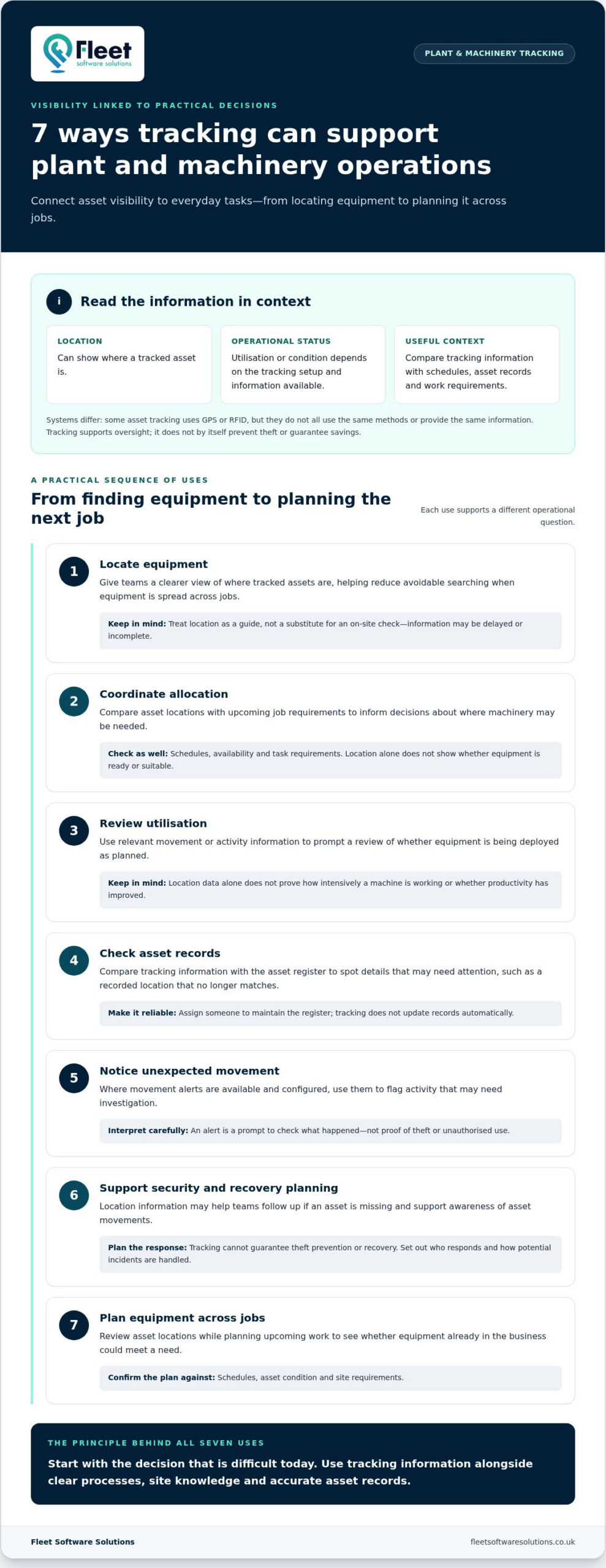
7 Practical ways plant and machinery tracking can support operations
Plant and machinery tracking is most useful when teams connect visibility to a specific decision. The examples below cover tasks from finding equipment to reviewing its allocation. What the information can show depends on the tracking setup and the processes around it.
From locating equipment to improving allocation
When equipment is spread across jobs, teams may spend time searching records or asking colleagues for updates. Location information can help them find an asset and coordinate its use. It cannot confirm on its own whether the machine is available, suitable for a task or safe to operate, so check it against schedules and normal operational checks.
- Locate equipment: Give teams a clearer view of where tracked assets are, which can help reduce avoidable searching. Treat location data as a guide, not a substitute for checking on site, particularly if information may be delayed or incomplete.
- Coordinate allocation: Compare asset locations with upcoming job requirements to inform allocation decisions. Check schedules, availability and task requirements as well, since location alone does not establish whether equipment is ready or suitable.
- Review utilisation: Use relevant movement or activity information to prompt a review of whether equipment is being deployed as planned. Location data alone does not prove how intensively a machine is working or whether productivity has improved.
- Check asset records: Compare tracking information with the asset register to spot details that may need attention, such as a recorded location that no longer matches. Assign someone to maintain the register; tracking does not update records automatically.
- Notice unexpected movement: Where configured movement alerts are available, use them to flag activity for investigation. An alert is a prompt to check what happened, not proof of theft or unauthorised use.
- Support security and recovery planning: Location information may help teams follow up if an asset is missing. It cannot guarantee theft prevention or recovery, so set out who responds and how potential incidents are handled.
- Plan equipment across jobs: Review asset locations when planning upcoming work to see whether equipment already in the business could meet a need. Confirm any plan against schedules, asset condition and site requirements.
Supporting security, utilisation and oversight
Movement alerts and geofences may help teams monitor activity around defined areas when these functions are available and configured. The geofence guide for fleet and asset managers explains the concept. In plant hire and construction, treat tracking information as a prompt for review and check it against site knowledge and records before taking action.
For organisations building asset visibility into wider fleet workflows, Fleet Software Solutions’ plant and machinery tracking can form part of a broader approach to mobile-asset oversight.
How to match plant tracking to the asset and the job
The right tracking arrangement depends on the asset, how it is used and the decisions your teams need to make. First define the operational question: do you need to locate equipment, oversee movement, review utilisation or coordinate assets between jobs? A clear priority helps keep plant and machinery tracking focused on practical requirements rather than features that do not address the underlying need.
What should managers assess before tracking equipment?
Start with a working inventory. Record asset categories, whether each item is owned or hired, how often it moves, where it is usually deployed and which team is responsible for it. Then identify the oversight need and who should act on the information. This makes it easier to prioritise assets and decide how tracking could fit into existing processes.
For a technical assessment, note practical conditions such as connectivity, installation constraints and the working environment. Assess these against the asset and its use rather than assuming every setup will work in the same way. Consider additional features only after the core operational requirements are clear.
How do fixed-site and mobile assets differ?
Equipment that moves frequently may need closer attention to location changes and coordination between jobs. For machinery that stays at one site, the main questions may be how much site oversight is needed and how long the equipment will be deployed there. Handling patterns, exposure to movement and the consequences of losing visibility all affect what to prioritise.
| Asset or work pattern | Mobility and deployment | Risk and oversight priorities |
|---|---|---|
| Mobile plant shared between jobs | Moves regularly; deployment may change with schedules | Prioritise locating assets and coordinating their allocation against job needs. |
| Machinery assigned to a site | May remain in place for an extended period | Consider the required level of site oversight and how teams will respond to relevant information. |
| Hired equipment | Movement and duration depend on the hire arrangement | Clarify who owns the records, who needs visibility and how changes in deployment are managed. |
Use the comparison as a starting point, not a technical specification. Assess connectivity, installation and environmental demands against each asset’s work pattern. For a related but distinct perspective on tracking road-going vehicles, see the business vehicle tracking guide. Requirements for vehicles should not automatically be applied to non-vehicle plant or machinery.
A practical checklist for introducing plant and machinery tracking
Start with the operational problem, not the technology. This sequence helps you prepare assets, people and processes, then review whether tracking information is informing better decisions.
- 1. Define the problem. Be specific about what needs to improve: locating equipment, coordinating assets between jobs, overseeing movement or reviewing utilisation. A clear priority helps you choose an approach that fits the work.
- 2. Build a clear asset register. Record each asset’s category and identifier, whether it is owned or hired, and the details needed to distinguish it from similar equipment. Assign an operational contact to maintain the records as assets change hands or location.
- 3. Map movement and working patterns. Note where equipment is usually deployed, how often it moves and which teams use it. Include relevant site conditions and possible connectivity or installation considerations for technical assessment. Avoid assuming one arrangement suits every asset.
- 4. Agree who needs the information. Identify which roles need location visibility and what action each role should take. An operations contact might use location information to support allocation, while a site team may use it to confirm an asset’s presence.
- 5. Set access and communication expectations. Use proportionate access controls so information is available to people who need it for their role. Explain the purpose of tracking to relevant employees and contractors, including how the information will be used in operational processes.
- 6. Establish a routine for action. Decide how to follow up on information that needs attention, such as an asset location that does not match the register or an unexpected movement notification where supported. Assign responsibility so the information leads to a defined next step.
- 7. Review and refine the process. Return to the original problem and choose practical measures related to it. Review data quality, whether people use the information and whether it informs decisions. If records are incomplete or the process is being bypassed, address those issues before adding more features.
This checklist makes plant and machinery tracking part of an operational process rather than a separate source of information. Fleet Software Solutions provides plant and machinery tracking, asset tracking and fleet management software to support oversight of mobile assets. Read about plant and machinery tracking options as you shape an asset-management approach around your priorities.
How Fleet Software Solutions fits into plant and machinery tracking
Once you know which assets need oversight and what decisions tracking should support, consider how it fits into your wider asset-management approach. Fleet Software Solutions provides plant and machinery tracking, tracking hardware, asset tracking and fleet management software for businesses seeking clearer oversight of mobile assets.
Asset visibility works best when it supports the processes your teams use. For example, staff need to know who maintains the asset register, who should access relevant information and how that information can support allocation between jobs. Start with your operational priorities rather than assuming every asset needs the same arrangement or that tracking alone will resolve gaps in a process.
Connecting tracking with wider asset oversight
Plant and machinery often sits alongside other business assets that teams need to manage. Including plant tracking in wider mobile-asset oversight can help define consistent responsibilities for records and operational decisions. Do not assume different systems automatically connect; focus on the information your teams need and the actions they can take.
Geofencing may be relevant to location oversight, depending on the tracking arrangement. Our geofence guide for fleet and asset managers explains how geofences relate to fleet and asset management. Assess any particular function as part of the chosen setup rather than treating it as a standard capability of all tracking hardware.
Deciding on a sensible next step
Bring together the asset categories you need to oversee, their ownership or hire status, typical movement and deployment patterns, and the operational questions you want tracking to help answer. Identify which teams need visibility, who owns the asset information and what actions should follow. These details give you a practical basis for planning an arrangement without specifying technical features before the requirements are clear.
Fleet Software Solutions serves businesses nationally across the UK with tracking solutions, including plant and machinery tracking, asset tracking and fleet management software. These services can support organisations bringing plant oversight into a broader approach to mobile assets. Keep the intended operational outcomes clear as you consider how tracking fits your assets and workflows.
Explore plant and machinery tracking options for your business.
Make asset visibility part of your next operational decision
Plant and machinery tracking is most useful when it gives teams relevant information they can act on. Define the visibility you need, then match the approach to each asset’s movement, deployment and working environment. Location data can support coordination and allocation, but consider it alongside job schedules, accurate records and accountable processes.
Give people clear responsibilities: keep the asset register current, decide who needs access to information and agree how teams should respond. Review whether the data is reliable and whether it informs the decisions you set out to improve. Tracking alone does not guarantee a particular result.
Fleet Software Solutions provides plant and machinery tracking, asset tracking and fleet management software to support mobile-asset oversight. Explore Fleet Software Solutions’ plant and machinery tracking solutions to discuss how asset visibility can fit your organisation’s priorities.
Frequently Asked Questions
What is plant and machinery tracking?
Plant and machinery tracking uses tracking technology to help a business see where equipment is and understand its movement. This visibility can support asset oversight, allocation between jobs and security planning, depending on the tracking arrangement. It does not automatically prevent theft or guarantee that missing equipment will be recovered. Start by identifying which assets need oversight and what decisions better location information should help your teams make.
How does plant and machinery tracking work?
A tracking arrangement uses hardware associated with an asset to provide location or other available information to a business platform. The information and update frequency depend on the equipment and service configuration, so systems should not be assumed to work identically. Teams can use relevant information to support oversight and planning, provided they keep asset records current and agree who is responsible for acting on what the data shows.
Can plant tracking help prevent machinery theft?
Tracking may support security by improving visibility of an asset’s location and, where configured, helping teams notice unexpected movement. It should form part of a wider security approach, not be treated as a guarantee that theft will be prevented or an asset recovered. Its practical value depends on the arrangement, whether people respond to relevant information and how the organisation handles potential security incidents.
What equipment can be tracked with plant and machinery tracking?
Businesses may consider tracking mobile plant, machinery and other valuable equipment. Suitability depends on the asset and the tracking equipment used. Begin with items that move between sites, are difficult to locate or need closer oversight. Then consider their movement patterns, working conditions and operational importance. This helps identify where tracking may be useful without assuming one arrangement will suit every asset.
Is plant and machinery tracking suitable for hired equipment?
Tracking can help businesses improve oversight of hired equipment when responsibilities and access arrangements are agreed with the relevant parties. Establish who owns the asset, who manages its location information and how it will be tracked during the hire period. This helps tracking fit the hire workflow and clarifies who should act on relevant information. Do not assume ownership, access or tracking responsibilities are automatically shared.
What should a business consider before tracking plant and machinery?
Identify the assets involved, the operational problem to address and the people who need to use tracking information. Consider movement patterns, working conditions, asset records and how to explain tracking’s purpose to relevant staff. Decide who is responsible for operational actions and how you will review whether the approach is helping. Technical details depend on the arrangement, so assess specifications before relying on them in planning.
Can plant tracking show how often machinery is used?
Plant tracking may inform utilisation reviews if the chosen setup provides relevant movement or activity information. Location data alone does not necessarily show productive use, operating hours or job output. Define what you need to understand, then check what information the arrangement provides. Interpret it alongside schedules and operational records, since an asset’s location or movement by itself may not explain how it has been used.