A digital mileage log isn’t automatically a reliable one. For electronic mileage logging for company cars to reduce admin and support sound records, journeys need to be captured consistently, and the process needs to work for drivers as well as fleet teams. Paper logs can take time to complete and be difficult to check. A digital approach raises practical questions too, including what records should show and how employee data will be handled.
This guide compares manual and digital mileage-recording methods, explains what to check against current HMRC guidance and helps you set requirements before evaluating providers. It also covers how to balance dependable mileage capture with driver privacy and adoption, so better oversight doesn’t create avoidable administration. If your organisation also manages employee-owned vehicles used for business, you’ll find guidance on when grey fleet considerations may be relevant. The aim is to help you choose a suitable approach and understand how mileage capture could fit within wider fleet management, rather than becoming another disconnected record-keeping task.
Key Takeaways
- Compare manual entry, app-supported logging and vehicle-linked capture to find an approach that suits your drivers and administrative processes.
- Assess electronic mileage logging for company cars by checking whether records are complete, easy to review and straightforward to correct when details need updating.
- Set clear requirements for journey records, driver review and manager oversight. Check current HMRC guidance before finalising your process.
- Consider employee privacy alongside record-keeping needs. Define what information is collected, why it is needed and how it will be managed.
- Explore how mileage capture and fleet management software could support wider fleet administration, and confirm which functions are available before choosing a solution.
Why electronic mileage logging for company cars matters to fleet teams
Electronic mileage logging for company cars means capturing and organising journey information digitally for business administration. Depending on the method, drivers may enter journey details themselves, or a system may use vehicle data to help record them. A vehicle tracking system can use GPS and related technology to establish a vehicle’s location. Tracking and mileage logging aren’t identical, though: the information collected and how it is used depend on the system and the organisation’s process.
Consistent records can help fleet teams review business mileage, support expense processes and maintain information relevant to tax reporting. The rules differ by vehicle arrangement. Approved Mileage Allowance Payments relate to employees using their own vehicles for business, whilst Advisory Fuel Rates apply to business mileage in company-provided cars. Check current HMRC guidance for the specific expense or tax process rather than assuming one mileage record or rate covers every situation.
A company car belongs to or is provided by the employer. Grey fleet refers to employee-owned vehicles used for business journeys. The distinction matters because the applicable processes can differ, although both require organisations to decide what journey information they need and how it will be reviewed. A digital tool can support recordkeeping, but it doesn’t replace a clear policy, employee guidance or oversight.
What information should a company-car mileage record capture?
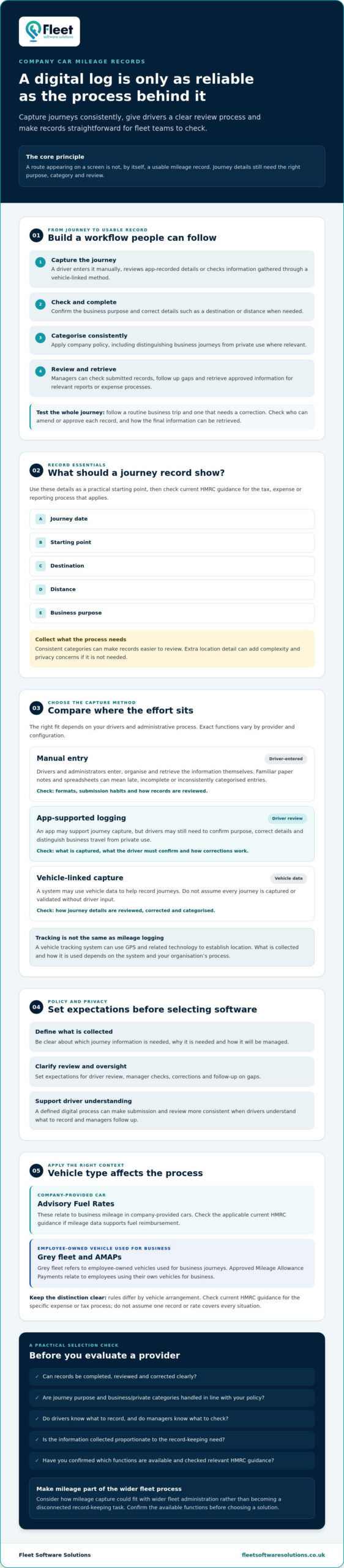
As a practical starting point, consider recording the journey date, starting point, destination, distance and business purpose. Check current HMRC guidance for the requirements that apply to your particular tax, expense or reporting process before setting a policy. Internal reports may need additional categories, while other details may not be necessary.
Prioritise complete records and consistent categorisation, such as distinguishing business journeys from private use where relevant. Collecting more location detail than the process requires can add complexity and raise privacy concerns without making the record more useful.
Why do fleets move beyond manual mileage logs?
Paper notes and spreadsheets are familiar, but drivers and administrators must enter, organise and retrieve the information themselves. That creates opportunities for late, incomplete or inconsistently categorised entries, particularly when people use different formats. A defined digital process can make submission and review more consistent and reduce repeated handling, provided drivers understand what to record and managers follow up on gaps.
Digital doesn’t always mean automatic. Some approaches rely on manual entry, while others may support journey capture through an app or vehicle-linked data. Check how each option handles driver review and corrections. Don’t assume every system captures or validates every journey without input.
How electronic mileage logging works for company cars
A usable mileage record comes from a workflow, not simply a route appearing on a screen. The journey must be captured, checked for its business purpose, categorised according to company policy and made available for the relevant review or reporting process. These steps vary by provider and configuration, so map the process before comparing systems.
What happens from a journey to a usable mileage record?
A driver may enter a journey manually, review details recorded through an app or check data gathered through a vehicle-linked method. They may still need to confirm the purpose, correct a destination or distance, and distinguish business travel from private use. A manager can then review submitted records, follow up on gaps and use approved information in internal reports or expense processes.
Before choosing a system, test a representative journey from capture through to report. Include a routine business trip and a journey that may need correction. Then check who can amend or approve the record and how the final information can be retrieved. If mileage data supports fuel reimbursement for a company car, check the applicable Advisory Fuel Rates on GOV.UK. The rate guidance informs reimbursement; it doesn’t determine how a provider captures journeys.
Manual, app-based and vehicle-linked logging compared
Each method places the effort in a different part of the process. Use the table as a starting point for evaluation. Exact functions depend on the provider and system configuration.
| Approach | Driver effort | Review considerations |
|---|---|---|
| Manual entry | Driver records each journey in a form or spreadsheet. | Simple to begin, but consistency and retrieval depend on timely entries and a shared process. |
| App-supported entry | Driver records or reviews journey details using an app, where available. | Check how purpose, category and corrections are handled, and whether drivers must submit each record. |
| Vehicle-linked capture | May reduce repeated distance or journey entry, subject to configuration. | Automated capture may still need a driver to confirm business purpose or correct a journey. Verify records before reporting. |
A smaller fleet may prefer a straightforward process that’s easy to explain, whilst a larger or more varied fleet may prioritise consistent review and reporting. Fleet size alone won’t identify the right option. Assess driver habits, journey types and the time available for oversight. Explore mileage capture and fleet management options as part of that assessment, and confirm which functions are available in the relevant configuration.
How to compare company-car mileage logging solutions
Choosing electronic mileage logging for company cars isn’t simply a choice between paper and automation. Digital records don’t have to mean unrestricted employee monitoring. The aim is to collect information for a defined business purpose and give drivers and managers a clear understanding of how it will be used. Compare the whole recordkeeping process, not just a feature list.
Which features matter for HMRC mileage compliance?
Start with the relevant HMRC guidance for the expense or tax process your organisation needs to support. Translate its current requirements into a practical checklist. Check whether the system can capture the information you need, distinguish relevant journey categories, and make records available for review and retrieval. Ask to see how a driver corrects an entry and how that change appears in a report.
Keep compliance responsibility in perspective. Software can support consistent recordkeeping, but it can’t ensure records are accurate, decide the correct tax treatment or replace appropriate internal checks. Confirm that the process fits your policy, and have the responsible finance or tax adviser review requirements where needed.
How should employers assess privacy and employee confidence?
Explain to staff what data is collected, why it’s needed, who can access it and how it will be used. Ask providers to demonstrate relevant access controls and explain data retention and handling arrangements. Check those details against your organisation’s requirements rather than relying on broad assurances. A workable process should meet recordkeeping needs without gathering journey information that serves no clear purpose.
Check current UK GDPR obligations and Information Commissioner’s Office guidance on worker monitoring before setting policy. Consider whether the proposed monitoring is necessary and proportionate to its stated purpose, and communicate the approach clearly to employees. This is a practical selection consideration, not legal advice. Seek appropriate advice if you’re unsure how data protection requirements apply.
For a fair comparison, ask each provider to demonstrate the same realistic company-car workflow, from a journey that needs categorising through to correction, manager review and report retrieval. Assess:
- Record quality: Can users identify missing or inconsistent information?
- Correction and review: Is it clear who can amend, check and approve entries?
- Reporting: Can the organisation retrieve information in a format suited to its process?
- Usability: Can drivers complete their part without avoidable effort?
- Fit: Does the system suit existing administration, and are any claimed integrations confirmed for the relevant configuration?
Use the demonstration to separate verified capabilities from sales claims. Seeing the workflow, privacy controls and review responsibilities in practice helps you judge whether a solution will support reliable records day to day.
A practical checklist for choosing a mileage logging system
Before comparing providers, define what your fleet needs. The right approach to electronic mileage logging for company cars depends on the vehicles and drivers involved, how journeys are administered today and what information managers need to review. A short requirements list keeps demonstrations focused on operational fit rather than features you may not use.
- Map your fleet: Note vehicle numbers, driver groups and any differences in how teams use company cars.
- Define reporting needs: Identify who needs mileage information, when they need it and how it feeds into existing administration.
- Set the record process: Agree what drivers must submit, who checks entries and who handles corrections or missing information.
- Check requirements: Review the latest applicable HMRC guidance before finalising records or procedures for a tax or expense process.
- Plan a pilot: Test the proposed workflow with representative cars, drivers and journey types before wider use.
A pilot can uncover practical issues that a product demonstration may miss, such as uncertainty about journey categories or delays in manager review. Use what you learn to refine the process before expanding it.
Questions to ask a mileage software provider
Ask providers to show how a journey is captured, categorised, corrected and made available for your reporting process. Request a demonstration using realistic company-car scenarios, including a driver who needs to amend an entry and one who submits incomplete information. Confirm directly which configuration options, implementation support and limitations apply rather than assuming a feature is included.
Check whether information can be retrieved in a form your existing administration can use. If a provider describes integrations or automated steps, ask them to demonstrate those in the relevant configuration and clarify where staff input remains necessary.
How to prepare employees and managers for adoption
Before rollout, explain the purpose of the process, the information drivers need to provide and how records will be reviewed. Give managers a consistent method for following up incomplete or unusual entries, so similar cases receive similar treatment. During the pilot, invite feedback from both groups. Identify where instructions or steps cause confusion, then update the guidance before extending use across the fleet.
Once your requirements and pilot criteria are clear, discuss mileage capture for your fleet as part of your evaluation of relevant fleet management options.
Using Fleet Software Solutions for company-car mileage oversight
Fleet Software Solutions offers mileage capture and fleet management software for business fleets. These are relevant options to assess if you’re reviewing electronic mileage logging for company cars, particularly if you want to consider mileage records alongside other fleet administration rather than as a separate task. The right fit depends on your vehicles, drivers, reporting needs and the functions available in the configuration you’re considering.
Where mileage capture fits within wider fleet management
Mileage information may form one part of wider fleet administration, helping teams organise records alongside their other processes. Fleet management software is designed to streamline administrative tasks, but confirm which functions are available and how they fit your existing workflows before relying on a specific capability.
Keep mileage capture distinct from vehicle tracking in your evaluation. They’re related fleet considerations, but tracking doesn’t automatically provide a complete, categorised mileage record. For a wider introduction to tracking, consult The Ultimate Guide to Business Vehicle Tracking in 2026. Use it for context, then assess mileage requirements separately.
If your organisation also has employees using their own vehicles for business journeys, grey fleet management may be a related area to consider. Keep those requirements distinct from company-car processes, as the vehicle arrangement can affect the records and administration you need.
What to confirm before selecting a provider
Discuss your requirements directly with Fleet Software Solutions and ask which mileage-capture functions are available for the setup you need. A focused conversation can help clarify whether the proposed approach suits your processes without assuming unverified automation, integrations or reporting features. If you’re also evaluating wider platform needs, Fleet Management Evolution: 2026 Comprehensive Guide may provide broader context.
Before making a decision, outline your vehicle mix, driver roles, expected reports and rollout requirements. Explain how journeys are currently recorded and who needs to review the information. Ask the provider to walk through a representative company-car journey, including driver input, corrections and manager checks, and confirm any configuration limitations that could affect your process.
A clear requirements discussion gives both sides a practical basis for evaluating fit. It also helps you identify what to test in a pilot and what needs to be agreed internally, such as staff guidance and review responsibilities. This lets you consider mileage capture as part of wider fleet administration without assuming the software will replace policy or oversight.
To discuss your requirements and assess relevant mileage-capture options, discuss your company-car mileage requirements.
Make your next mileage process more dependable
Reliable mileage records depend on more than choosing digital over paper. The approach needs to suit how your drivers work, make records straightforward to review and give managers a clear process to follow. Before committing, test the workflow and confirm the information and functions your organisation needs, including relevant HMRC guidance and employee data considerations.
That preparation makes it easier to introduce a process people can use consistently, whilst avoiding unnecessary administration or data collection. It also helps you judge whether mileage capture should stand alone or sit alongside wider fleet administration. For organisations with employee-owned vehicles used for business, grey fleet management may be a related consideration. Fleet management software can also support broader administrative tasks.
Fleet Software Solutions offers mileage capture, grey fleet management and fleet management software. To explore whether its mileage capture options may suit your requirements, discuss your mileage capture requirements with Fleet Software Solutions. A considered assessment can help you build a clearer, more manageable approach to electronic mileage logging for company cars.
Frequently Asked Questions
What is electronic mileage logging for company cars?
Electronic mileage logging for company cars is the digital recording and organisation of vehicle journeys for business administration. Depending on the method, drivers may enter journeys themselves, use an app or review journey information captured through a vehicle-linked system. The record can then be checked and used for relevant internal processes. Digital logging describes how information is handled; it doesn’t guarantee that every journey is captured accurately or without driver input.
Does HMRC require electronic mileage logs for company cars?
No, paper records can be acceptable; electronic logging is not automatically compulsory for every company-car mileage process. The information required depends on the tax or expense purpose, so check current HMRC guidance for your circumstances before setting a recordkeeping policy. A digital method may make records easier to organise and retrieve, but using software alone doesn’t establish that records are complete or that a particular tax treatment is correct.
What information should a company-car mileage log include?
A practical mileage record may include the journey date, starting point, destination, distance travelled and business purpose. Check current HMRC guidance for the process the log supports, as internal reporting needs may differ from information needed for a particular tax or expense purpose. Apply categories consistently, and avoid collecting additional journey details unless they serve a defined business need. This can support useful records whilst keeping the process proportionate.
Can mileage tracking software automatically record every journey?
Not necessarily. Some approaches depend on drivers entering journeys, while app-supported or vehicle-linked options may capture some journey information, depending on the provider and configuration. Drivers may still need to confirm whether a journey was for business, select a category or correct a detail. Ask a provider to demonstrate how missed, incomplete or misclassified journeys are handled, and establish who reviews records before relying on them for reporting.
Is electronic mileage logging suitable for a mixed company-car and grey fleet?
It can support recordkeeping across both groups, but the processes may need to distinguish company-provided cars from employee-owned vehicles used for business. Different expense and tax rules can apply, so don’t assume one rate or workflow covers both. Define which drivers and vehicles are included, what information each group must provide and who reviews it. Grey fleet management is a related consideration where staff use their own vehicles for work.
How can employers protect driver privacy when logging mileage?
Tell drivers what information is collected, why it is needed, who can access it and how long it will be retained. Limit collection to what supports a defined purpose, and check the provider’s access and data-handling controls before selecting a system. Employers should review applicable UK GDPR requirements and current Information Commissioner’s Office guidance on worker monitoring. Where responsibilities are unclear, seek appropriate data protection advice before rollout.
What should I compare when choosing mileage logging software?
Compare record completeness, driver effort, categorisation and correction processes, manager review, reporting and the ability to retrieve information when needed. Also assess access controls, retention arrangements and how the system fits your existing administration. Ask providers to demonstrate a realistic company-car journey, including a correction and a missing detail, rather than relying only on feature descriptions. Confirm which functions are available in the configuration you’re considering, since capabilities can vary.