A forward-facing dash camera may be the simpler option, but it won’t show what happens beside or behind a vehicle. For fleets exposed to risks from multiple directions, commercial fleet camera recording hardware may need to go beyond a single road-facing view to cover more of the vehicle. The right setup depends on the vehicle, its work and the coverage required.
Compare more than the initial hardware choice. Camera positions affect what an incident recording can show, while installation and ongoing arrangements determine how the system fits into fleet operations. This guide explains the practical differences between dash cameras and wider vehicle camera coverage, helping you match the setup to the risks your vehicles face.
You’ll also see how road-facing, dual-facing, front-and-rear and multi-channel configurations differ, which features matter in everyday fleet use, and what can affect overall cost. Subscription, warranty and replacement arrangements are part of the decision, so you can assess the complete system rather than the hardware alone.
Key Takeaways
- Match camera coverage to the vehicle’s risks: a single forward-facing view may not capture incidents at the sides or rear.
- Compare road-facing, dual-facing, front-and-rear and multi-channel layouts by what each can show in an incident.
- Assess the full ownership arrangement, including subscriptions, warranty terms and how faulty or damaged equipment is replaced.
- Prioritise usable footage, reliable installation and fit with your fleet’s operating conditions over the lowest hardware price.
Dash camera or a full vehicle CCTV system?
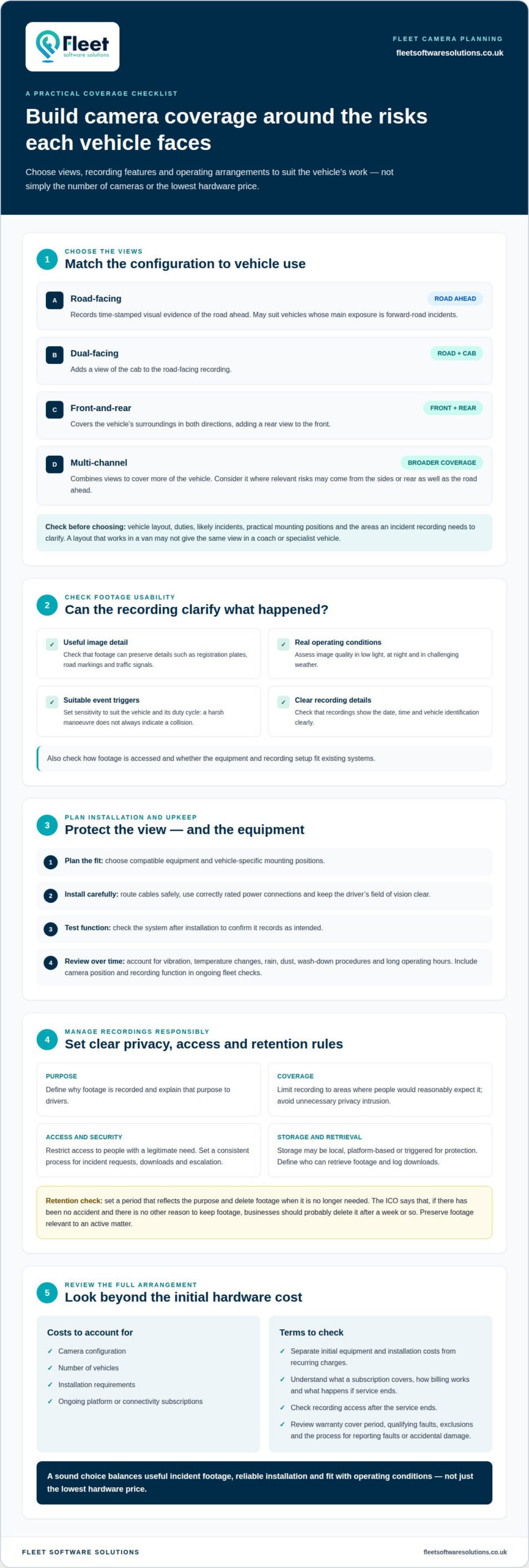
A dash camera captures the road ahead; a multi-camera system can cover additional sides and the rear. Choose based on vehicle type, operating risks and the incidents you need recordings to clarify.
Vehicle compatibility
A forward-facing camera may suit a vehicle whose main exposure is on the road ahead. HGVs, buses, coaches, specialist vehicles and urban delivery fleets can face risks at the sides or rear, making additional camera views useful. Footage can help clarify vehicle position, road conditions, signalling, lane discipline and other road users’ actions after an allegation.
Assess each vehicle’s layout and duties before selecting coverage. A camera position that works in a van may not provide the same view in a coach or specialist vehicle. Consider practical mounting positions, whether the driver’s view remains clear, and how the cameras can cover relevant areas. Compatibility is about more than fitting the equipment: recordings need to show useful context for the vehicle’s work.
Recording privacy and security
For camera use aligned with UK GDPR, define why footage is recorded, explain that purpose to drivers, and limit access to people with a legitimate need. The Information Commissioner’s Office (ICO) checklist says recording should be limited to areas where people would reasonably expect it, helping prevent unnecessary privacy intrusion.
Unclear access arrangements can expose footage to people without a work-related reason to view it. Set a process for incident requests, downloads and escalation, then keep recordings secure and handle them consistently. Camera positions matter too: coverage should serve its stated purpose without capturing unnecessary areas. These steps help balance incident evidence with the privacy of employees and the public.
Video storage and retention
There is no single storage volume or retention period for every fleet system. Recordings may be stored locally, uploaded through a connected platform or automatically protected when trigger conditions occur. Available storage depends on the recording setup and how much footage the business needs to retain.
Set a retention period that reflects the purpose, then delete footage when it is no longer needed. According to the ICO, if there has been no accident and there is no other reason to keep footage, businesses should probably delete it after a week or so. Preserve relevant footage for an active matter, and define who can retrieve it and how downloads are logged.
Road-facing, dual-facing, front-and-rear, and multi-channel camera hardware
Camera configuration determines which views an incident recording can show. Match the setup to vehicle use, likely risks and how footage will be accessed.
Camera configurations
A road-facing camera records time-stamped visual evidence of the road ahead. A dual-facing setup adds a view of the cab, while front-and-rear cameras cover the surroundings in both directions. Multi-channel systems combine views for broader coverage. For example, a vehicle working on busy streets may need views beyond the windscreen, while a vehicle mainly exposed to forward-road incidents may need a different setup.
Compare configurations by the areas each camera captures, not simply by lens count. The right layout depends on how the vehicle is used and which events you need footage to clarify.
Hardware features
Assess image quality in the conditions vehicles actually encounter. Footage should preserve useful detail, such as registration plates, road markings and traffic signals, in low light, at night and in challenging weather. Event-trigger sensitivity should also suit the vehicle and its duty cycle, since a harsh manoeuvre does not always indicate a collision.
Check that the system displays clear date, time and vehicle identification. Consider how footage will be accessed, and whether the recording setup and equipment fit existing systems. Choose commercial fleet camera recording hardware for its fit with operational needs and vehicle use, not simply for the lowest hardware price.
Choosing and maintaining hardware
Start by identifying the vehicle’s work, relevant incident risks and required camera views. Then choose compatible equipment and plan vehicle-specific mounting, protected cable routing and correctly rated power connections. Installation should preserve the driver’s field of vision and include functional testing.
Account for vibration, temperature changes, rain, dust, wash-down procedures and long operating hours when selecting and maintaining equipment. Review camera positioning and recording function as part of ongoing fleet checks, so a shifted camera or connection issue does not undermine usable footage. A practical camera requirements review can help organise these decisions around your fleet’s needs.
Subscription, warranty, and replacement arrangements
In the UK, total cost depends on camera configuration, vehicle count, installation requirements and any ongoing platform or connectivity subscription. These factors shape the overall arrangement, not just the hardware.
Separate initial equipment and installation costs from recurring charges. For example, a system that uploads recordings through a connected platform may have different subscription requirements from one that stores footage locally. Understand how billing works, what the subscription covers and what happens if the service ends, so the fleet can plan ongoing costs and access to recordings.
Warranty terms
Read the warranty terms for each camera and recording component, including the cover period, qualifying faults and exclusions. Manufacturing faults and accidental damage may be treated differently, so understand the process for reporting each issue. If the fleet has different vehicle types, record which equipment is installed in each vehicle and keep purchase and installation details together.
Clarify whether warranty support covers the hardware only or also the cost of removing and refitting it. This matters if a camera fault requires work inside a cab or along protected cable routes. Keep warranty information accessible to the person responsible for fleet equipment, rather than relying on one driver to hold the details.
Replacement arrangements
Set an internal process for a failed camera: report the fault, identify the affected vehicle, preserve relevant footage where possible, and arrange assessment or replacement. Prioritise a vehicle without working coverage according to its duties and exposure. Record the fault, equipment replaced and any changes to camera positioning.
Before accepting subscription or warranty terms, compare renewal, cancellation, repair and replacement conditions. Check how replacement equipment affects installation and system compatibility, especially if the fleet uses different camera configurations. Clear terms help managers forecast expenditure and understand what happens when equipment needs attention.
What features should UK businesses look for in fleet camera recording hardware?
Start with the operational outcome, vehicle use and footage access needs, rather than the lowest hardware price. A delivery van working on busy streets, for example, may need different evidence from a vehicle travelling mainly on motorways. The chosen system should support the decisions managers need to make after an incident.
Image quality matters when footage needs to show details, not just general movement. Assess whether recordings capture registration plates, road markings and traffic signals in low light, at night and in challenging weather. A clear view of a junction or lane marking can provide useful context when reviewing an allegation or reported event.
Set event-trigger sensitivity to suit the vehicle and its duty cycle. A heavy vehicle travelling over uneven surfaces may experience harsh movement without a collision, so excessive sensitivity could flag events that do not need investigation. Settings should also preserve footage when a genuine incident occurs. Consider how trigger events are identified and how staff can retrieve the relevant recording.
Operating conditions also affect hardware suitability. Vibration, temperature changes, rain, dust, wash-down procedures and long working hours can affect equipment and installation. Check that cameras are securely mounted, cables are protected and power connections are correctly rated. Camera positions must preserve the driver’s required field of vision.
Review how recordings are stored and protected. Depending on the system, footage may stay on local storage, upload through a connected platform or be automatically protected when trigger conditions occur. Clear date, time and vehicle identification help staff match a recording to the correct journey. Compatibility with existing equipment matters too, particularly when vehicles already use fleet technology.
Use these criteria to create a consistent specification across vehicle types, then assess any exceptions individually. Discuss fleet camera requirements to align equipment choices with vehicle use and operational priorities.
Fleet Software Solutions: Vehicle Tracking
Fleet Software Solutions offers Vehicle Cameras and Vehicle Tracking for businesses reviewing their fleet oversight needs. Vehicle cameras provide recorded visual evidence, while tracking offers a separate view of vehicle use and movements. Considering both can help managers decide which operational questions each system should answer, without treating tracking as a substitute for camera footage.
Consider Fleet Software Solutions when assessing camera arrangements alongside wider fleet management priorities, or when vehicle tracking is relevant to your operation. Grey Fleet Management and Mileage Capture are also available for businesses with those specific requirements. The right combination depends on your fleet’s needs and the information you want for day-to-day decisions.
Contact Fleet Software Solutions to discuss your vehicle camera or tracking requirements.
Put your camera plan into action
Turn your operational priorities into a practical plan for your fleet. Decide which vehicles need coverage, who will manage footage, and how equipment and subscription arrangements fit your ongoing processes. This gives managers a clear basis for planning implementation and reviewing whether the system continues to meet operational needs.
For camera decisions that sit alongside broader fleet oversight, Fleet Software Solutions offers Vehicle Cameras and Vehicle Tracking, as well as Grey Fleet Management. These services address different requirements, so consider which areas matter to your operation and how they could work together. A focused discussion can connect your camera needs with the wider fleet decisions you’re making.
Contact Fleet Software Solutions to discuss the right next step for your business. A considered approach to commercial fleet camera recording hardware can support clearer decisions and more confident fleet management.
Frequently Asked Questions
What types of hardware are used for commercial fleet camera recording?
Commercial fleet camera systems range from single dash cameras to multi-camera setups with a dedicated recorder. A forward-facing unit records the road view; additional cameras can cover the cab, sides or rear. In larger vehicles, a mobile digital video recorder (MDVR) can bring camera feeds together for recording. Choose a setup based on the vehicle’s layout and the views that could clarify an incident.
How do dashcams, multi-camera MDVRs and AI fleet cameras compare?
A dashcam is a compact option focused on a particular view, commonly the road ahead. An MDVR records feeds from several cameras, making it suitable for vehicles that need broader coverage. AI fleet cameras use software analysis to identify or assess selected driving events, depending on the system. When comparing a reported event with footage, consider whether the system records the views and information needed.
Which UK suppliers offer commercial fleet camera recording hardware and what are their warranty terms?
Fleet Software Solutions offers Vehicle Cameras for business fleets. Warranty terms vary by equipment and supplier, so compare the written cover period, exclusions, fault-reporting process and what happens if a unit needs repair or replacement. Establish whether installation work is covered and how a replacement camera affects existing equipment. These details clarify the practical support arrangements without assuming every supplier provides the same cover.
How do fleet cameras connect to power, GPS, mobile networks and cloud platforms?
Connections depend on the camera system: vehicle power supports recording, while GPS can associate information with a vehicle’s location. Systems with mobile connectivity can transmit footage or data to a connected platform, while others store recordings locally. For example, a manager reviewing an incident remotely needs a system that uploads relevant footage; a local-storage setup requires a process for retrieving it from the vehicle or recorder.