Business mileage claims should cover qualifying work journeys, not regular commuting between home and the office, and each trip needs a clear record of its date, destination, purpose and distance. Business mileage claim automation can capture journey details and support consistent calculations; according to HM Revenue & Customs, the approved Mileage Allowance Payment rate for the first 10,000 business miles in a car or van is 55p per mile from 6 April 2026. Where employees use more than one vehicle, their business mileage is calculated together across those vehicles during the year.
Recording mileage manually can feel like one more administrative task, especially when journeys, vehicles and approvals all need to be reconciled. A well-organised process makes each claim easier to review and retain, and ties reimbursement decisions to the journeys actually made.
This article explains which journeys may qualify, how approval and reimbursement work, and what information to keep for HMRC records. It also shows how automated capture can support claims across multiple vehicles and improve oversight of mileage administration.
Key Takeaways
- Separate qualifying work journeys from regular commuting, and keep the reason for each trip clear.
- According to HM Revenue & Customs, the approved rate for the first 10,000 business miles in a car or van is 55p per mile from 6 April 2026.
- Understand how mileage claims move through review and reimbursement, including how payments above approved rates are treated through payroll.
- Build stronger records by capturing each journey’s date, destination, purpose and distance, then retaining the information for the required period.
- Bring mileage together across vehicles used during the year, so the full claim can be assessed consistently.
Business journeys eligible for reimbursement
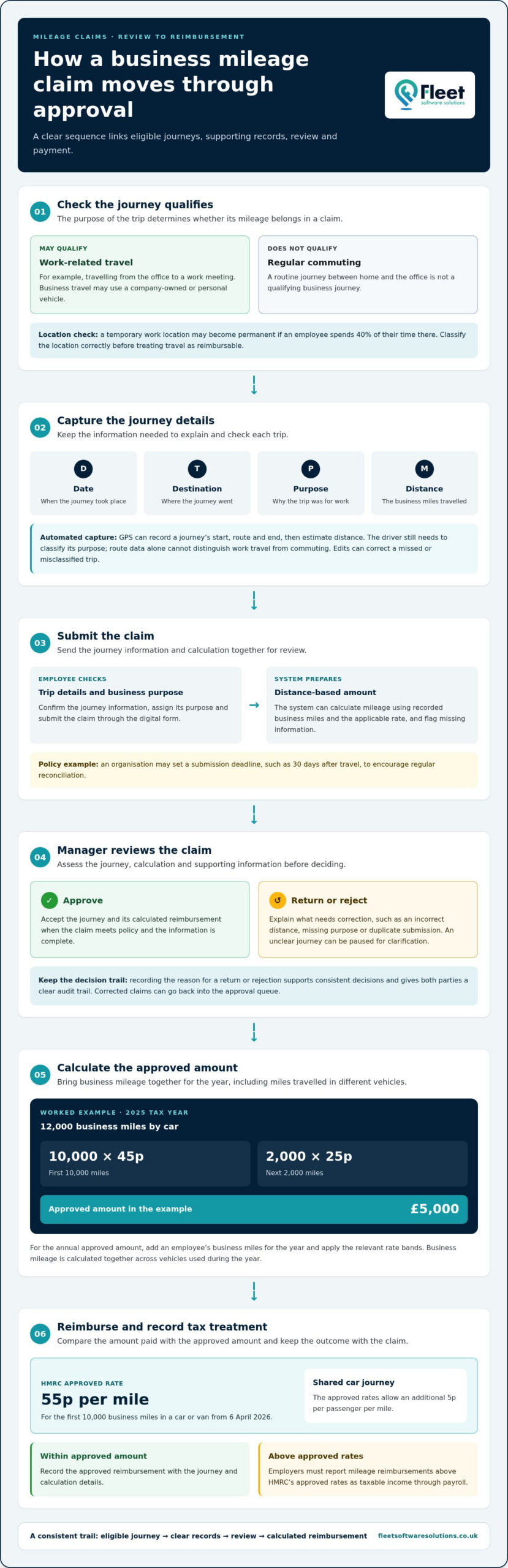
In the UK, a business mileage claim automation process must distinguish work-related journeys from regular commuting between home and the office. Automation can record distance, but the journey’s purpose determines whether the mileage qualifies.
Qualifying journeys for reimbursement
A qualifying journey is travel undertaken for work, rather than an employee’s regular commute to the office. Business travel may use a company-owned vehicle or an employee’s personal vehicle, with claims based on eligible business miles. Recording the destination and work purpose helps reviewers distinguish a client visit from an ordinary journey to work.
For example, a trip from the office to a work meeting may qualify, whilst a routine journey from home to the office does not. A temporary work location may also become permanent if an employee spends 40% of their time there. Classifying the location correctly helps avoid treating ordinary commuting as reimbursable travel.
According to HM Revenue & Customs, the approved Mileage Allowance Payment rate for the first 10,000 business miles in a car or van is 55p per mile from 6 April 2026. According to HM Revenue & Customs, a driver sharing a car on a business trip can receive an additional 5p per passenger per mile under approved rates. These rates make accurate distance and passenger records important when calculating a claim.
GPS journey tracking and distance calculation
GPS tracking uses location signals from a mobile device to record a route and estimate its distance. An automated system can calculate mileage by applying the relevant rate to qualifying business miles. Drivers still need to classify each journey’s purpose, since route data alone cannot show whether travel was for work or commuting.
Automated systems typically capture a journey’s start, route and end, then let the driver assign its purpose. The system calculates mileage from the recorded distance and applicable rate, while edits can correct a missed or misclassified trip. GPS provides route data, but the business classification determines what enters the claim.
Mileage apps vary in GPS capture, accounting integrations and how they organise records for HMRC review. Check whether a system records journey dates, destinations, purposes and distances, and whether its reports fit your expense process. Integration can reduce duplicate entry, but each claim still needs supporting journey details.
GPS records can expose sensitive details, such as home locations and travel routines, if access is too broad. Set clear rules for when tracking operates, who can view journey data and how long records are retained. Employees should be able to distinguish work journeys from private travel and correct inaccurate routes.
Fuel-related VAT records also need careful handling. According to HM Revenue & Customs, the UK standard VAT rate is 20%, so one-sixth of a gross fuel cost is the VAT element. A VAT-registered business needs a fuel receipt to support a reclaim on the fuel portion of mileage payments; the mileage record alone does not provide that receipt.
Mileage claim approval and reimbursement workflows
An approval workflow turns submitted business journeys into reviewed expenses, approved amounts and reimbursement records. Clear rules help managers assess claims consistently and identify payments that may need different tax treatment.
Automated claim submission and approval
With automated submission, employees send journey details through a digital form, which routes each claim to an approver. The system can calculate the amount from recorded business miles and the applicable rate, reducing manual transfers between forms and expense records. Managers can review the journey, calculation and supporting information together before approving payment.
A typical process begins when an employee checks the trip details, assigns its business purpose and submits the claim. The system can flag missing information or route claims according to the organisation’s approval rules. For example, a manager may review journeys for business purpose and distance, then approve complete claims or return them for correction. An agreed submission deadline, such as 30 days after travel, can encourage regular reconciliation.
Approving or rejecting claims
Approval means the reviewer accepts the journey and its calculated reimbursement. Rejection means the claim needs correction or does not meet policy. Giving a clear reason for returning a claim helps the employee address an incorrect distance, missing purpose or duplicate submission. The decision record supports consistent treatment and gives both parties a clear audit trail.
Automation can apply the same checks to each submission, but managers still need to assess exceptions. A business journey with an unclear destination, for example, can be paused for clarification rather than paid automatically. Once corrected, it can return to the approval queue, with the decision trail attached to the original claim.
To calculate the annual approved amount, add an employee’s business miles for the year and apply the relevant rate bands. For the 2025 tax year, an example employee travelling 12,000 business miles by car has an approved amount of £5,000: 45p per mile for the first 10,000 miles, then 25p for the next 2,000. Rates and yearly totals should be distinguished clearly in reports.
Employers must report mileage reimbursements above HMRC’s approved rates as taxable income through payroll. A workflow should compare the reimbursed amount with the approved amount and flag any excess for payroll reporting. Approval is a separate decision: a valid business journey can still result in a payment above the approved rate.
The cost of UK mileage tracking and expense management apps varies with user numbers, functions and accounting integrations. For a business system, the price depends on requirements and is provided after a quote request. Factors include users, integrations and reporting needs.
Organisations reviewing how mileage submissions fit into wider fleet oversight can consider mileage capture systems as part of their expense process.
Mileage records required for HMRC compliance
A usable mileage record links each employee’s journey to its business purpose and calculated allowance. Keeping these details together supports reimbursement decisions, tax relief claims and later reviews.
Required mileage records
A mileage record documents the date, destination, purpose and distance of each business journey. These details help an employer assess whether a trip relates to work and how many miles to include. Employees should distinguish business travel from private use, since UK businesses must accurately record both types of driver mileage.
A manual log can capture the required information, but incomplete entries create gaps that are difficult to resolve later. For example, a distance without a destination or business purpose gives a reviewer little context. A consistent record format, completed soon after the journey, makes each entry easier to understand and compare with the claim.
Keep mileage claim information for at least five years. Retain the underlying journey details, not just the final reimbursement total, so the business can explain how a payment was calculated. Employees should keep copies of submitted claims and corrections. Employers need records linking approved payments to the journeys they cover.
Audit trails and mileage payments
An audit trail shows how a journey became a recorded, reviewed and reimbursed claim. Trip data, timestamps and rate calculations captured at the time of travel can make the record clearer than a manually reconstructed log. Keeping edits and approvals alongside the original entry helps reviewers see what changed and why.
Mileage Allowance Payments are tax-free payments employers make to employees for business travel. HMRC’s approved AMAP rates provide the tax-free threshold for employees using personal vehicles. HMRC publishes and updates the rates on GOV.UK. The payment record should show the mileage and rate used, not only a combined claim total.
If an employer reimburses business mileage below the approved rates, an employee may claim Mileage Allowance Relief. The shortfall is the difference between the approved amount and the reimbursement, calculated against eligible business miles. Recording both figures helps explain the relief claim and prevents a low employer payment from being mistaken for the full approved amount.
Before payment, reconcile the journey log against the claim. Check that each entry includes a date, destination, purpose and distance, then confirm the rate and approval decision. If an entry changes, retain the amendment and its reason. This creates a clearer record for the employee, payroll team and anyone reviewing the claim later.
Combining mileage across multiple vehicles
An employee may use different vehicles for work during the same tax year, so separate vehicle logs also need an employee-level view. In the UK, an employee’s business mileage is calculated together across vehicles used during the year. Tracking each trip against its vehicle preserves the detail, while a combined annual total supports the overall calculation.
For example, an employee might drive a personal car for one client visit and use another vehicle for a later business journey. The record should identify which vehicle covered each distance, alongside the journey date and work purpose. Without that distinction, a reviewer may struggle to reconcile individual trips with the employee’s total claim.
A reliable process keeps two views: the trip-level record and the annual employee summary. The trip-level record shows the vehicle and distance for each journey; the summary brings the employee’s eligible business miles together. The total is not simply a collection of unrelated vehicle claims. It represents the employee’s business mileage across vehicles during the tax year.
Identifying the vehicle also helps explain changes in journey data. If a driver switches vehicles, the record can retain the correct vehicle for each trip instead of assigning every journey to a default option. A manager can then compare journey entries with the claim total and identify missing or duplicated records before approval.
Automation can group trips under an employee while retaining each vehicle’s individual entries. A practical review can follow these steps:
- Match each business journey to the vehicle used.
- Separate eligible business distance from commuting or private travel.
- Review the employee’s combined mileage total for the tax year.
- Compare the submitted amount with the calculated amount before payment.
This structure is useful when an employee changes vehicles or uses more than one during the year. It also makes it easier to trace a total back to individual journeys if a claim needs correcting. A combined total without vehicle-level records may hide trips that need review, while isolated vehicle logs may obscure the employee’s annual position.
For employees claiming relief because their employer reimburses below approved rates, the combined mileage record helps show the eligible business distance behind the calculation. Keep vehicle details with each journey, but do not treat separate logs as separate annual allowances. The employee-level total should reconcile with the underlying trip entries.
For finance teams, the key control is consistency: use the same employee identity across vehicle records, claims and annual summaries. This lets a reviewer follow a journey from its recorded distance through to the submitted claim, even when the vehicle changes during the tax year.
Automated mileage capture and claims
Automated mileage capture links journey data to a claim, reducing reliance on handwritten logs and later manual calculations. The key control is classification: recorded distance becomes reimbursable only after the employee identifies the trip as business travel. This keeps private journeys out of mileage allowance payments and gives reviewers a usable record.
A typical process starts with a mobile device recording a journey’s route and distance. The employee confirms its work purpose, checks the suggested mileage and submits the entry. The system can calculate reimbursement by multiplying qualifying distance by the agreed rate, then send the claim into the organisation’s review process. Each stage should be visible in the record.
Automation works best when it handles routine capture while allowing corrections for exceptions. A missed start point, a personal stop or a device left at home can distort the suggested distance. Drivers need a straightforward way to edit or explain these entries, and reviewers need to see the original data and any changes.
Accuracy depends on more than GPS. Check whether the route matches the business purpose, the distance is plausible and the journey has already been claimed. For example, flag a duplicate entry for the same meeting before reimbursement, rather than discovering it during a later reconciliation. These controls make automated totals easier to assess.
Systems can organise claims by employee, vehicle and reporting period. This helps finance teams compare journey records with submitted expenses, identify unsubmitted trips and track mileage allowance payments. For businesses using several vehicles, retaining the vehicle against each entry keeps the underlying data clear, while reports bring the employee’s journeys together.
Automation does not remove the need for a consistent policy. Employees need to know which journeys count, how to label trip purposes and when to submit records. Managers need defined checks for unusual routes, missing details and amended distances. Clear responsibilities prevent incomplete information from becoming an apparently precise reimbursement figure.
For a UK team, assess whether the capture process produces records that support review, correction and reimbursement without repeated data entry. Test a representative business journey from initial capture through submission, approval and reporting. This shows where employees need to act and where automated calculations or duplicate checks can reduce administration.
Explore automated mileage capture to see how a structured capture process can support clearer journey records and claims.
Fleet Software Solutions: Vehicle Tracking
Fleet Software Solutions combines Vehicle Tracking and Mileage Capture for organisations seeking clearer oversight of business journeys and fleet activity. Vehicle Tracking helps businesses understand vehicle use, while Mileage Capture supports the recording of work-related distance for claims. Grey Fleet Management brings employee-owned vehicle activity into view, and Vehicle Cameras provide another layer of fleet information.
These services suit businesses reviewing how journey records, vehicle use and mileage claims fit together. The right starting point depends on whether your main need is tracking fleet vehicles, recording business mileage or managing grey fleet activity. Contact Fleet Software Solutions to discuss an approach for your mileage and fleet oversight needs.
Make mileage oversight part of your wider fleet process
Consider how mileage records connect with the way your organisation manages vehicles and employee travel. Business mileage claim automation is most useful when it supports a clear operating process, rather than simply replacing a paper log with a digital one. Decide who reviews journey information, how exceptions are handled and how mileage records fit with wider fleet oversight.
Fleet Software Solutions offers Vehicle Tracking, Vehicle Cameras and Grey Fleet Management to support organisations seeking visibility across fleet activity and employee-owned vehicles. These services can help you assess how mileage administration relates to vehicle use across your business.
If you’re planning to improve mileage and fleet oversight, contact Fleet Software Solutions to discuss your requirements. A considered process can help your team move forward with clearer operational oversight.
Frequently Asked Questions
What is a mileage capture and recording app?
A mileage capture and recording app is a digital tool for logging vehicle journeys and organising mileage information for claims. Depending on its functions, it may use GPS route data, allow manual trip entries and let employees label a journey’s purpose. For example, a driver could classify a client visit separately from a private errand. The app records information; the employer’s policy determines which journeys can be claimed.
What is mileage reimbursement?
Mileage reimbursement is money an employer pays an employee for qualifying business travel in a vehicle. The amount is generally calculated by multiplying reimbursable distance by the applicable mileage rate. For example, an employee using a personal car for a work visit submits the journey for review under their employer’s process. Mileage Allowance Payments within HMRC’s approved rates can be tax-free; treatment differs if payments exceed those rates.
What makes a Mile a Business Mile?
A business mile is distance travelled for work, rather than an employee’s ordinary commute between home and their regular office. A client visit or travel between work locations may qualify, subject to the employer’s policy and the journey’s purpose. A temporary work location can be considered permanent if an employee spends 40% of their time there. That distinction matters because travel to a permanent workplace is treated differently from qualifying business travel.
How does business mileage claim automation work?
Business mileage claim automation uses digital journey records to help prepare and process mileage claims. A driver can review captured route information, assign a work purpose and submit the trip; the system then calculates the claim using the applicable rate. For instance, a driver can correct a journey that included a personal stop before submission. Employer review remains important: software data alone cannot establish whether a trip qualifies.
What UK HMRC rules apply to business mileage claims and mileage allowance payments?
HMRC’s approved rates determine the tax-free threshold for mileage payments to employees using personal vehicles for business travel. According to HM Revenue & Customs, the approved Mileage Allowance Payment rate for the first 10,000 business miles in a car or van is 55p per mile from 6 April 2026. HMRC also approves an additional 5p per passenger per mile for car-sharing on business trips. Employers must report reimbursements above approved rates as taxable income through payroll.
What are the best business mileage claim automation software options in the UK?
The best fit depends on whether your priority is journey capture, claim administration or wider fleet oversight. Compare how each system records trip details, handles corrections, calculates claims and supports your expense process. Fleet Software Solutions offers Mileage Capture and Fleet Management Software for business fleet operations. Businesses with employee-owned vehicles can also use Grey Fleet Management to record and oversee work-related vehicle use.
What records must UK businesses keep for HMRC-compliant mileage claims?
Record each business journey’s date, destination, purpose and distance, alongside the claim and reimbursement calculation. Retain supporting information such as approval decisions and corrections so reviewers can trace the submitted amount to its source. Employees should keep business mileage claim information for at least five years. If reclaiming VAT on the fuel element, retain a fuel receipt to support the reclaim.
How can a business implement automated mileage claims and migrate from manual expense forms?
Start by documenting the existing claim process, including who submits, reviews and approves each expense. Configure the digital workflow around the organisation’s journey rules, mileage rates and record requirements. Before retiring manual forms, compare sample digital claims with the existing process, resolve differences and explain how employees should classify or correct trips. A staged transition gives approvers and payroll teams time to adopt the new records and reporting routine.