What if the most useful question about a tractor, telehandler or sprayer isn’t simply where it is, but whether it’s available for the job you need done? Agricultural machinery tracking software can help teams keep track of equipment across fields, yards and multiple sites. Clearer asset information can make it easier to plan work, particularly when machinery is shared or an unexpected absence could disrupt the day.
It’s understandable to focus on theft when machinery represents a major investment. But tracking has a wider role: supporting security while helping you oversee where equipment is and how it fits into everyday operations. The right approach depends on the assets you manage, how they are used and what decisions the team needs to make, not just on putting a location on a map.
This 2026 guide explains how machinery tracking can support farm security and day-to-day management, and what to consider when assessing a solution for your operation. It covers how to match tracking to different assets, which practical functions may matter, and how to weigh the information you need against the way your team works. Fleet Software Solutions provides plant and machinery tracking alongside asset tracking and fleet management software for businesses.
Key Takeaways
- Assess agricultural machinery tracking software by the work your assets perform, not location alone.
- Compare options against your operation’s needs for asset coverage, location information, reporting and user access.
- Build an accurate asset register and assign responsibilities before introducing tracking across the farm.
- Separate essential functions from optional capabilities to keep your evaluation focused on practical requirements.
- See how Fleet Software Solutions’ plant and machinery tracking, asset tracking and fleet management software can support wider mobile asset oversight.
What agricultural machinery tracking software helps farms manage
Agricultural machinery tracking software brings information about the location and use of machinery and other mobile assets into one view. The information available depends on the equipment and tracking setup, but organised asset records can help a farm team see what it manages and where to focus attention.
Location is only one part of the picture. A machine may be on the farm but unavailable because it is already assigned, is in the wrong place for the next job or is needed by another team. Bringing asset information into planning helps managers consider security, utilisation and availability together, rather than treating a location view as a complete management solution.
Which agricultural assets might a farm track?
Start with the work your farm does and the equipment that supports it. Tractors and harvesters may be priorities, while trailers, implements and other mobile equipment may also need attention if they are shared, moved between sites or difficult to account for. On diversified farms and rural estates where bloodstock or horses are managed alongside machinery, dedicated platforms such as BovEquine handle equine health and foaling surveillance, whereas machinery tracking focuses strictly on mechanical assets. List the assets that create the greatest security or planning concerns, then identify what information the team needs about each one.
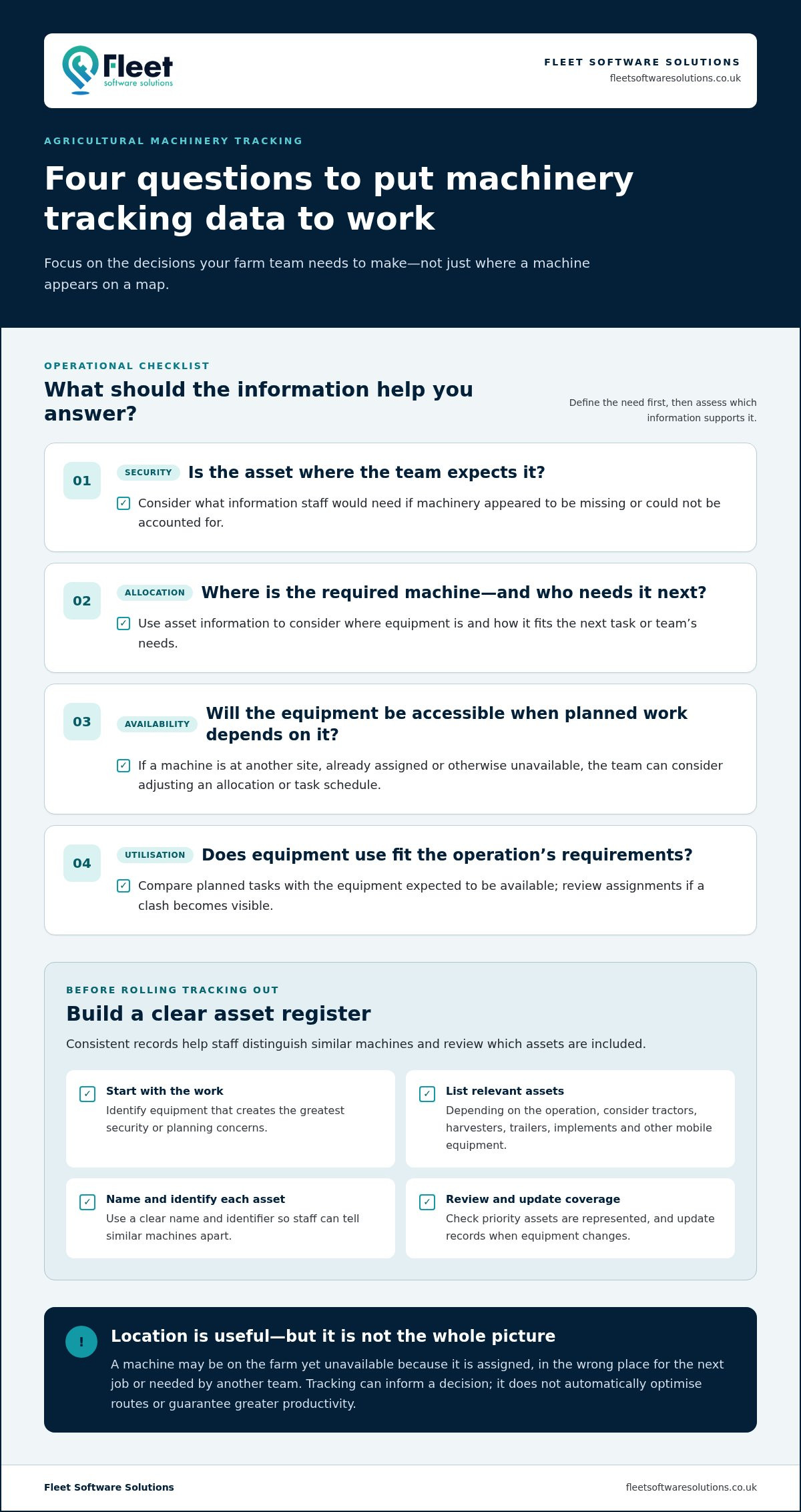
Consistent records are especially useful for mixed fleets. Give each asset a clear name and identifier so staff can distinguish similar machines and understand which equipment is included in the tracking process. The register also provides a straightforward way to review coverage: check whether the assets most important to security or day-to-day work are represented, and update records when equipment changes.
What questions should tracking software help answer?
Before choosing functions, define the decisions the information should support. Separate security questions from planning questions, because each calls for a different operational response:
- Security: Is an asset where the team expects it to be, and what information is available if it appears to be missing?
- Allocation: Where is the required machine, and who needs it for the next task?
- Availability: Is equipment accessible when planned work depends on it, or could its absence affect the schedule?
- Utilisation: Are assets being used in line with the operation’s requirements, or might the team need to review how equipment is assigned?
These questions help separate useful oversight from information that adds complexity without supporting a decision. A farm managing machinery across several sites may prioritise consistent asset identification and location information. A smaller operation may focus on keeping shared equipment accounted for. Define essential requirements around your workflow, such as what staff need to know, who needs access and what action they will take. This keeps the evaluation focused on practical visibility rather than a feature list.
How tracking supports farm security, utilisation and machinery planning
Machinery information is most useful when it informs a decision. A location record, for example, may help a manager decide whether equipment can be assigned to a field task or whether another machine is needed. Connecting asset visibility with the farm’s work schedule can help teams plan around availability instead of relying solely on memory or last-minute calls.
If the required machine is recorded at another site, the manager can adjust the allocation or task schedule before the delay affects other work. That is the practical value of tracking data: it can inform a specific operational choice, while the decision still depends on accurate records and the farm’s priorities.
Using machinery information to improve utilisation
Compare planned tasks with the equipment expected to be available. If a tractor is assigned to field work while another team needs it elsewhere, a clear record can help surface the clash early and prompt a revised allocation. Consistent asset names and records can also reduce time spent searching or clarifying which machine is in use. Tracking information supports planning, but it doesn’t automatically optimise routes or guarantee greater productivity.
Availability involves more than knowing a machine’s location. If equipment is misplaced, tied up on another task or otherwise unavailable, the team may need to rearrange work, identify an alternative or communicate a delay. Organised information can make that response more straightforward, particularly where machinery moves between fields, yards or separate sites.
Maintenance planning is related, but it should be considered separately. Location or usage information may help a manager understand where equipment has been or how it has been allocated. Maintenance schedules, condition monitoring and service reminders depend on the information collected and any relevant equipment integrations, so don’t assume they come with every tracking setup. Define the maintenance decision you want to support, then assess whether the available data is relevant to it.
Using tracking to strengthen security and continuity
Tracking can form one layer of an asset-security approach, alongside suitable physical security and asset identification measures. The information may help a team investigate a discrepancy or respond when machinery cannot be accounted for, but tracking alone can’t prevent theft or guarantee recovery. Its value is in providing useful records as part of a wider plan to protect equipment and maintain operations.
Some systems provide alerts for particular events, depending on their functions and setup. Distinguish between information staff can review as part of routine oversight and notifications that a system is configured to provide. This helps set realistic expectations and prevents an assumed alert from becoming the only response plan.
For businesses managing machinery alongside other mobile assets, plant and machinery tracking solutions can form part of a broader approach to asset oversight. Start with the operational decision: what needs to be known, who will act on it, and how that action helps keep planned work moving.
How to compare agricultural machinery tracking software
A useful comparison starts with the decisions your farm needs to make, not the longest feature list. Agricultural machinery tracking software should fit the assets you want to oversee, how equipment moves through the season and who is responsible for acting on the information. Separate essential requirements from optional capabilities, then assess each option against the same criteria.
Use this framework to organise your evaluation. The questions are prompts for defining requirements, not assumptions that every tracking setup provides the same functions.
| Area | Questions to consider | Priority test |
|---|---|---|
| Asset coverage | Can the setup account for the machinery and mobile assets that matter to your operation? | Essential if key equipment would otherwise be outside your records. |
| Location information | What location information is available, and is it suited to your fields, yards or work sites? | Prioritise the detail needed to support allocation or security decisions. |
| Reporting | Can the information be reviewed in a form that supports the decisions you make? | Focus on useful records, not reports with no clear purpose. |
| User access | Can the relevant staff view and interpret the information they need? | Essential users should be clear before rollout. |
Match tracking requirements to machinery and work patterns
Map asset types, usual storage locations and the people responsible for each machine. Then note when and where those patterns change. Harvest may place different demands on equipment than quieter periods, while contractors or shared work sites can add movement and handovers. This map helps you prioritise requirements for your operation instead of selecting functions simply because they appear on a checklist.
For related plant-tracking considerations in another working environment, the construction asset tracking guide offers useful context.
Assess usability, reporting and information governance
Consider whether staff who manage machinery can access and understand the information relevant to their roles. Decide which records would support a real task, such as reviewing an allocation or investigating a discrepancy. Treat other reporting options as secondary unless they solve a defined need. A clear purpose makes information easier to use consistently.
If tracking involves information about employees, include privacy and transparency in the evaluation. UK employers should have a legitimate business reason, inform staff in writing before introducing monitoring, and handle personal data in line with UK GDPR and the Data Protection Act 2018. The Information Commissioner’s Office (ICO) provides guidance on data protection; review its current guidance when planning your approach. Clear responsibilities for access, use and retention help keep the system aligned with the farm’s working practices.
How to prepare and roll out machinery tracking on a farm
A planned rollout gives tracking a clear purpose and helps keep records useful after setup. Before introducing agricultural machinery tracking software, establish what the farm needs to manage, which assets matter most and who will maintain the information. An accurate asset register helps prevent confusion between similar machines and gives the team a reliable basis for reviewing coverage.
A practical rollout can follow five stages:
- Define the goals. Identify whether the priority is security oversight, machinery availability, asset records or a combination, and set review questions for each.
- Build the asset register. Record each asset’s type, identifier, ownership and operational importance, then check the details for accuracy.
- Set priorities and responsibilities. Decide which assets to include first and assign responsibility for access, record updates and regular review.
- Introduce the tracking setup. Put the agreed approach into use, explain its purpose to relevant staff and establish how information should be handled.
- Review and refine. Assess whether the information supports the intended decisions, correct gaps in the records and adjust working processes where needed.
Prepare the asset register and rollout priorities
Make the register practical to use. Give each machine a clear identifier alongside its type and ownership, and note why it matters to the operation, such as its role in time-sensitive work or the difficulty of replacing it. Prioritise assets according to security, availability or management needs rather than trying to include everything at once. Set review questions in advance, such as whether staff can identify the right asset record when planning a task.
Consider how priorities may shift during the year. Equipment that is central during one phase of farm work may be less critical at another, while machinery moving between fields or work sites can require different record-keeping. A phased approach lets the team learn from an initial group of assets before extending the process.
Support adoption and review the results
Assign clear responsibilities for managing user access, reviewing information and updating asset records when equipment changes. Without clear ownership, records can become outdated as machinery is moved, replaced or assigned differently. Keep the process straightforward: staff should know who to tell when an asset detail needs correcting and where the relevant information is maintained.
Explain to employees why tracking is being introduced, what information is intended to support and how it should be used in day-to-day work. Where tracking relates to staff, communicate transparently and follow applicable data-protection guidance. A shared understanding can help prevent uncertainty and encourage consistent use.
At review points, compare the information available with the questions set at the outset. Are the right assets represented? Can responsible staff use the records to support planning or respond to a discrepancy? Use what you learn to refine responsibilities and processes, rather than assuming that installing a system alone will resolve operational issues. Explore machinery tracking solutions as part of planning a structured approach to mobile asset oversight.
How Fleet Software Solutions supports agricultural machinery tracking
Choosing a tracking approach is easier when the farm’s operational questions are clear. Fleet Software Solutions provides plant and machinery tracking, asset tracking and fleet management software for businesses seeking better oversight of machinery and other mobile assets. These services are relevant to agricultural operations that need to consider equipment within the wider picture of their business, rather than managing each asset in isolation.
Start by identifying which assets matter, what information would support decisions and who needs to use it. From there, consider how plant and machinery tracking fits the operation’s priorities. Different asset types may have different tracking requirements and roles in the business.
Bring machinery tracking into wider asset oversight
A farm may manage tractors and other machinery alongside trailers, equipment and mobile assets used across different parts of the business. Considering these needs together can help establish a clearer approach to security, visibility and operational organisation. Not every asset has identical tracking requirements: the equipment, its role and the information needed may differ. Fleet Software Solutions’ plant and machinery tracking and wider asset tracking services provide a business-focused basis for considering that broader oversight.
Where machinery forms part of a wider business fleet, related vehicle tracking can also be relevant to the management picture. The business vehicle tracking guide offers further context on fleet oversight. Consider how different asset groups contribute to the operation, then organise management around the decisions each group calls for.
Choose a practical next step for your operation
Before exploring a solution, prepare a short outline of your priority assets and the questions you need tracking information to help answer. Note which machinery is most important to account for, where it is used, who is responsible for it and what information would make planning or security oversight more straightforward. This gives the conversation a practical focus and helps distinguish essential requirements from capabilities that are less relevant to your workflow.
Then consider how asset tracking and fleet management relate to existing responsibilities. Decide who will review information, maintain asset records and use the resulting insight in day-to-day planning. These details help shape an approach around the business instead of expecting the farm to change its processes to fit an arbitrary feature list.
Fleet Software Solutions provides plant and machinery tracking, asset tracking and fleet management software for businesses. If you’re ready to consider how these options could support your operation, explore plant and machinery tracking and fleet management solutions as a practical next step towards improved asset oversight.
Make your next tracking decision practical
Turn your priorities into a clear brief: which assets matter most, what information would support your operation, and who will use it. This gives you a grounded way to assess agricultural machinery tracking software against real working needs, rather than choosing functions that may add little value to the farm.
Fleet Software Solutions provides business-focused plant and machinery tracking, alongside asset tracking and fleet management software. This wider perspective is relevant when machinery oversight sits within a broader need to manage mobile assets across an organisation.
Use the requirements you’ve identified to consider how tracking could fit your existing responsibilities and working practices. A well-defined starting point makes it easier to focus on the right approach for your operation.
Explore Fleet Software Solutions’ tracking and fleet management solutions and take a confident next step towards more organised asset oversight.
Frequently Asked Questions
Can agricultural machinery tracking software work across different types of farm equipment?
It can support different equipment types, but what can be tracked depends on the system and the hardware or setup used for each asset. A farm might want to include a tractor, a trailer and a portable implement, each with different tracking requirements. List the equipment you need to account for and assess how the proposed approach handles each type, rather than assuming one setup suits the entire fleet.
Does agricultural machinery tracking software prevent theft?
No, tracking software cannot guarantee that machinery won’t be stolen. Its role is to provide information that may help a business monitor assets and respond if equipment is missing, while physical security and asset identification can provide complementary protection. Consider how tracking fits into wider security procedures, including who would review information and what steps they would take if an asset could not be accounted for.
Can machinery tracking software help reduce equipment downtime?
It may help teams respond to equipment disruption by making relevant asset information easier to access, but tracking software doesn’t repair machinery or guarantee less downtime. If a machine isn’t available for a planned task, for example, a manager may be able to make a more informed decision about reallocating work. Maintenance schedules or condition information depend on the system and any equipment integrations, so don’t assume location tracking includes them.
How do farms choose which machinery to track first?
Start with assets whose absence would create the greatest security or operational concern. A farm could prioritise a machine that is difficult to replace during a busy period, or equipment that is regularly moved between work sites and hard to keep track of. Then consider whether the information available would support a clear action. Beginning with a defined group helps the team identify the records and responsibilities needed before extending coverage.
Will agricultural machinery tracking software work in areas with limited mobile coverage?
Performance in areas with limited mobile coverage depends on the technology and how it handles connection gaps. Identify where machinery regularly works, including fields, buildings and remote sites, and consider how useful the information would be if updates are delayed or unavailable. Coverage conditions can vary across a farm, so assess the system’s behaviour against the places and working patterns that matter to your operation.
Can agricultural machinery tracking software monitor employees as well as equipment?
Some tracking arrangements may involve information about employees, particularly where vehicles or machinery are assigned to individuals, but asset tracking and employee monitoring are not the same purpose. UK employers should have a legitimate business reason, inform staff in writing before monitoring starts and comply with UK GDPR and the Data Protection Act 2018. The Information Commissioner’s Office (ICO) provides current guidance. Be clear about what information is collected and how it will be used.