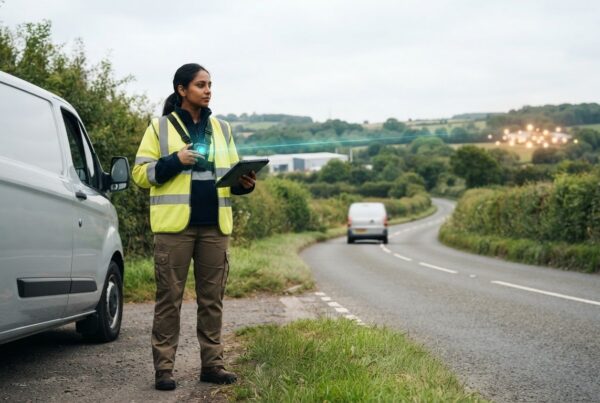
What happens when a machine is needed on site, but nobody can confirm where it is? Delays can follow, while equipment that’s moved without authorisation or simply overlooked creates added concern. Machinery location tracking for contractors can make asset locations more visible, but its value depends on how well it fits day-to-day site workflows.
Contractors need a clear view of machinery across active jobs without adding unnecessary complexity for field teams. Location information can support coordination, security oversight and better-informed asset decisions, especially when machinery moves between sites or serves different purposes. The right approach depends on the type of asset, how it moves and what decisions the information needs to support.
This guide explains how tracking can support contractor operations and what to consider when choosing an approach for different machinery. It compares GPS, Bluetooth and QR or barcode-based methods, then looks at how location information can support site coordination and broader asset oversight. It also covers how to build tracking into familiar workflows, so the information is useful to people planning work as well as those operating machinery.
Key Takeaways
- Machinery location tracking for contractors can support clearer site coordination when equipment moves between jobs, storage areas and work phases.
- Understand how tracking devices, identification methods, connectivity and software work together to provide operational visibility.
- Compare GPS, QR codes and Bluetooth to see how different approaches suit different machinery and tracking needs.
- Build a practical rollout plan by recording your assets, setting priorities and reviewing how tracking fits into site operations.
- Explore how plant and machinery tracking can sit alongside asset tracking and fleet management software for connected oversight.
Why machinery location tracking matters for contractors
Contractor machinery rarely stays in one place for long. Equipment may move from a depot to a work site, be shared between teams, then be parked in a storage area while the next phase is prepared. If its location isn’t clear, managers may need to check with crews before allocating it, arranging a handover or confirming what is available for a job.
Machinery location tracking is the use of location or identification data to help businesses understand where machinery is across their operations. For contractors, that information is most useful when it supports everyday decisions, such as assigning equipment to a task or checking its last recorded location. Tracking forms part of the wider Internet of Things (IoT), where connected devices can share data with software systems.
Where contractors lose visibility of machinery
Uncertainty often builds during ordinary site activity. A machine may be moved to make room for a delivery, borrowed by another team, left beside a work area between tasks or returned to a different storage point than expected. If the change isn’t recorded or communicated, notes may no longer match the equipment’s actual location.
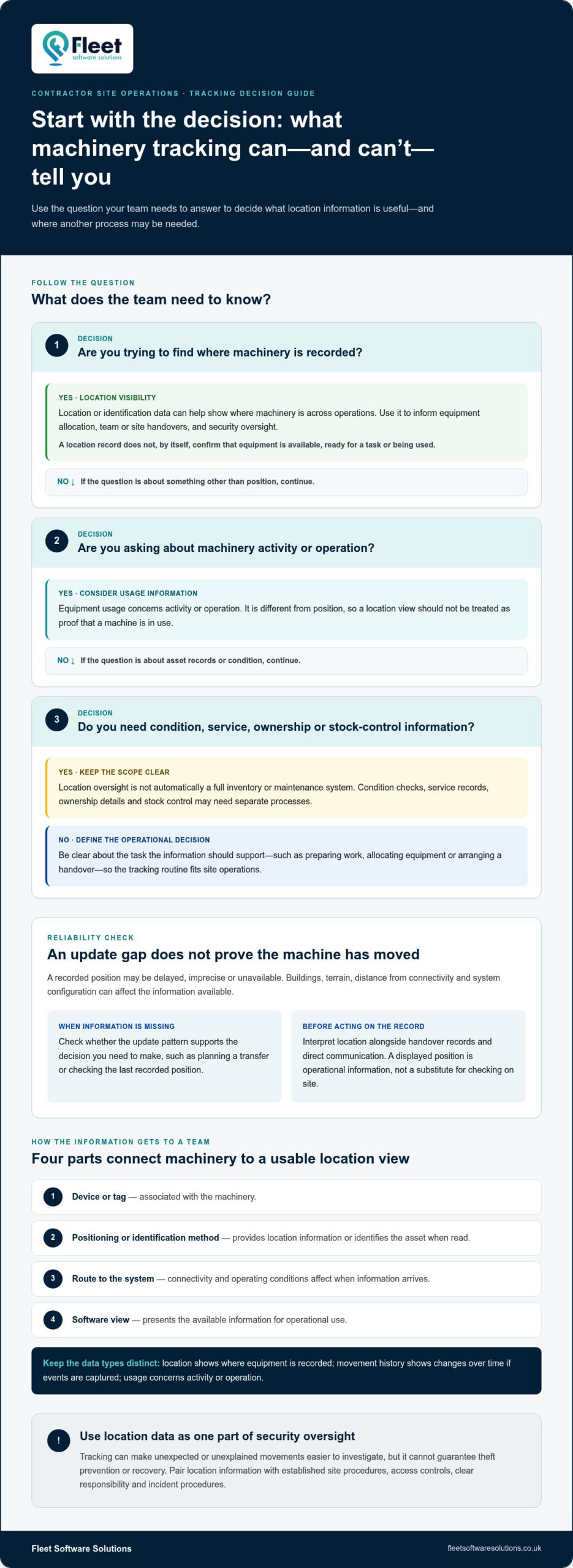
That gap can complicate the next allocation. A supervisor may plan around machinery they believe is available, while another team is still using it elsewhere. A clear location view gives planners a better starting point for checking availability and organising handovers. It doesn’t replace communication between crews or a record of who is responsible for the equipment.
Location oversight has a defined scope. It helps answer where machinery is, but it isn’t automatically a full inventory or maintenance system. Condition checks, service records, ownership details and stock control may need separate processes, even when contractors connect asset information across their wider operations.
What location visibility can help contractors manage
Useful tracking data supports a routine, not just a map view. Teams can use it when preparing work, transferring machinery or confirming where equipment was left at the end of a shift. For example, a planner reviewing the next day’s tasks can use recorded locations to identify machinery that may need reassignment or moving, then coordinate that action before work begins.
- Allocation: compare recorded locations with upcoming work to inform decisions about equipment placement.
- Handovers: include a location check when machinery changes team, site or responsibility.
- Security oversight: use location information alongside established site procedures to monitor assets.
Tracking can make unexpected or unexplained movements easier to investigate, but it can’t guarantee theft prevention or recovery. Treat location data as one input to your security approach, alongside access controls, clear responsibility and incident procedures. For broader guidance on managing equipment and other assets across construction operations, see the construction asset tracking guide.
How machinery location tracking works across contractor sites
Machinery tracking connects an asset with information that helps a business identify or locate it. The basic chain has four parts: a device or tag associated with the machinery, a positioning or identification method, a way for information to reach a system, and software that presents the data. The details vary, so machinery location tracking for contractors won’t provide the same type or frequency of update for every asset.
A location view is only one part of the picture. It may show where equipment is recorded, while movement history shows changes in location over time if those events are captured. Equipment usage is different: it concerns activity or operation rather than position. Keeping these data types distinct helps contractors avoid treating a location record as proof that a machine is in use, available or ready for a task.
From tracking device to a usable location view
A device or tag is associated with a particular machine. It may provide location information directly or identify the asset when it is read. The method affects what the system can show: a position-based approach differs from a scan or other identification event. Information then needs a route to the software, and how quickly it arrives depends on the technology, connectivity and conditions where the machinery is operating.
Not every tracker reports continuously, and a gap in updates doesn’t by itself establish that equipment has moved. Buildings, terrain, distance from connectivity and system configuration can all affect the information available. Consider whether the update pattern supports your decisions, such as planning a transfer or checking an asset’s last recorded position.
What contractors should understand about location data
A displayed position is operational information, not a substitute for checking the machine on site. The record may be delayed, imprecise or unavailable in some conditions, so teams should interpret it alongside handover records and direct communication. The telematics guide for UK businesses explores the wider context of collecting and using connected operational data.
Location information can contribute to asset oversight, including security processes, but it doesn’t confirm why an asset moved or who moved it. The American Rental Association’s Construction Equipment Theft Study offers further context on construction equipment theft. Location records should still be treated as one information source within a wider response.
For practical use, agree what a location update means for your team: a current position, a last recorded position or an identification event. Clear language helps supervisors and operators make consistent decisions, particularly when machinery is shared between sites. Contractors can explore plant and machinery tracking for businesses as part of wider fleet oversight.
GPS, QR codes or Bluetooth: compare machinery tracking approaches
No single tracking method suits every machine or working environment. A mobile excavator moving between sites has different location needs from tools signed out of a site store. For machinery location tracking for contractors, compare approaches against the decisions you need to make: whether you need a position, an identification record or an indication that an asset is nearby.
| Method | What it identifies | Practical strengths | Typical limitations |
|---|---|---|---|
| GPS | A position associated with a fitted tracking device | Useful for location-focused oversight of mobile machinery moving between sites or areas | Positioning and update availability depend on device design, connectivity and surrounding conditions |
| QR code | An asset when its code is scanned | Can support check-in, check-out and handover routines where staff record each transaction | A scan records an identification event, not a continuous or automatic position |
| Bluetooth | An asset or tag detected in proximity to compatible equipment or infrastructure | May suit local visibility within a defined workflow or area | Coverage and detection depend on the arrangement and conditions; it doesn’t provide universal location visibility |
When GPS-based tracking is a practical fit
GPS is worth considering when the main question is where mobile machinery is, particularly if it moves between jobs, depots or storage locations. It can provide location-focused information to help teams coordinate transfers and review recorded positions. However, GPS doesn’t guarantee uninterrupted visibility. Device design, connectivity and physical surroundings affect positioning and updates, so indoor or underground locations may present limitations.
Set the requirement before choosing this approach. Is a recent position enough to plan a transfer, or do teams need more frequent updates for a particular routine? The answer helps define what useful visibility means for your work, without assuming every device reports at the same interval or under the same conditions.
When QR codes or Bluetooth may suit an asset workflow
QR codes can fit processes where a person scans machinery or equipment at handover, on issue from a store or on return. Their usefulness depends on the scan becoming part of the routine: an unrecorded move won’t appear simply because the asset has a code. Bluetooth, by contrast, can provide proximity-based identification, which may suit assets managed within a defined area, depending on the system’s coverage and setup.
To choose between them, map each asset’s value, movement pattern and handling process. If teams need location information as machinery travels between sites, a location-focused method may be more appropriate. If the priority is recording who takes a less mobile item from a store, scanning may be more relevant. Bluetooth may suit a local visibility need. A mixed approach can reflect these different requirements instead of imposing one method across all equipment.
Keep the decision tied to the work: identify what information crews need, where they need it and how they’ll use it. That makes it easier to choose a proportionate approach and build tracking into existing site routines.
Plan a machinery tracking rollout around real site operations
A practical rollout starts with the work contractors need to manage, not a decision to track every machine in the same way. A reliable asset register, clear priorities and agreed responsibilities help teams choose an approach that fits their machinery and routines. For machinery location tracking for contractors, a staged introduction also gives crews time to learn how location information should inform allocation and handovers.
Prioritise machinery and define the operational need
Start by recording each asset’s identity, ownership and operational importance. Add its usual sites or work areas, the teams that use it and whether it is frequently moved or shared. This creates a practical reference point. Without consistent asset details, teams may struggle to connect a location record to the correct machine or responsibility.
Use the register to identify where clearer visibility would be most useful. A frequently moved machine may need location oversight for transfers, while shared equipment may be a priority because several teams need to coordinate access. Define the immediate need before selecting a method, then follow a staged rollout:
- Identify assets. Check the register against machinery in use, noting unique identifiers, ownership and operational importance. Record normal use and the teams that rely on each asset.
- Set priorities. Group machinery by movement pattern, sharing arrangements and the consequences of not knowing its location. This helps distinguish essential first-stage assets from those that can wait.
- Select an approach. Match the location or identification method to the operational question and working conditions. Decide what information staff need and how they will use it in routine planning.
- Deploy to priority machinery. Introduce tracking for a manageable group of assets and incorporate it into existing routines, such as recording a handover or checking equipment before allocating a job.
- Review and extend. Assess whether the information supports the intended decisions, whether records remain accurate and whether the process creates extra administration. Apply what the team learns before widening the rollout.
Introduce tracking in a way teams can sustain
Explain to relevant staff what the system is intended to support and what its information can’t establish on its own. Agree who maintains asset details, who reviews location records and who follows up when a displayed position doesn’t match what a crew reports. Clear ownership prevents discrepancies from becoming nobody’s responsibility and keeps the process tied to useful site decisions.
Build review into an existing meeting or handover rather than adding an avoidable reporting layer. Ask crews whether the information helps them plan allocations, coordinate transfers or clarify where shared machinery has been left. If updates are routinely missed or nobody acts on them, refine the process before extending tracking to more assets.
Fleet Software Solutions provides plant and machinery tracking to support different equipment mixes and operational requirements. Explore plant and machinery tracking as part of a considered rollout for your business.
Machinery location tracking from Fleet Software Solutions
Contractors often manage machinery as part of a wider business operation, alongside vehicles and other working assets. Fleet Software Solutions provides plant and machinery tracking and asset tracking for business customers, alongside fleet management software for connected operational oversight. This can help make tracking relevant to how equipment is used across the organisation, rather than treating each machine as an isolated item.
For machinery location tracking for contractors to be useful, the information needs to relate to practical questions: which assets need closer location oversight, how equipment moves between work areas, and who uses that information to plan or coordinate activity. The approach can be tailored to the machinery mix and operational requirements, without assuming every asset needs the same tracking method or level of visibility.
Connect machinery tracking with wider asset oversight
Machinery can be considered alongside other tracked business assets when planning how the organisation manages equipment. This broader perspective helps managers consider where machinery fits within day-to-day operations, how teams share responsibility for it and what information supports decisions across the business. It also provides a basis for aligning asset oversight with fleet management, rather than treating machinery tracking as a separate administrative task.
That doesn’t mean every asset has to be managed in the same way, or that tracking automatically combines data from different systems. Start by identifying the operational questions for each asset category. A machine that moves between projects may have different visibility needs from an asset that stays with a particular team. Recognising these distinctions helps shape a proportionate approach while keeping the wider picture in view.
Move from tracking requirements to a tailored solution
Before settling on a solution, list the machinery types involved, how often they move, where they are typically used and who needs location information. Then define the purpose: supporting allocation, coordinating handovers, improving asset oversight or contributing to security procedures. Clear requirements make it easier to fit tracking into established work routines, rather than adding information teams don’t know how to use.
Fleet Software Solutions provides business-focused plant and machinery tracking, asset tracking and fleet management software. The approach can reflect your equipment mix and operational needs, connecting machinery oversight with broader fleet and asset management considerations. Location information remains one input to operational decisions, alongside accurate records and communication between teams.
If you’re considering how tracking could support your contractor operation, discuss machinery tracking for your operation. Start with the assets you manage and the visibility your teams need, so the next steps reflect your working requirements.
Make your next tracking decision with confidence
Turn your interest in machinery location tracking for contractors into a clear operational brief. Identify which decisions you want location information to support, who will use it and what should happen when recorded information doesn’t match what a team expects. This gives the approach a practical purpose from the outset and helps keep tracking aligned with the way your business works.
Fleet Software Solutions provides plant and machinery tracking alongside asset tracking and fleet management software, supporting a broader view of business operations. Start with your machinery mix, working patterns and visibility requirements rather than assuming one approach will suit every asset.
Ready to consider what would suit your operation? Explore a tailored machinery tracking approach and take a measured next step towards clearer oversight of your business assets.
Frequently Asked Questions
Is machinery location tracking suitable for small contractors?
Yes. Machinery location tracking for contractors can be useful for a small operation if uncertainty about equipment is causing practical problems. Rather than starting with every asset, choose one or two that are frequently shared or difficult to locate before a job. Decide what you want to improve, such as confirming availability before dispatch, and review whether the process helps. This keeps the initial approach manageable and relevant to the work.
Can one tracking system cover different types of contractor machinery?
One system may support oversight of different assets, but the tracking method and information available can vary by machine and setup. Equipment that regularly travels between jobs may need a different approach from machinery kept in a designated store. Map each asset’s movement, use and visibility requirements first. Then consider how records for different assets will be organised, so staff can find the information they need without confusing one machine with another.
What happens to machinery tracking when mobile coverage is unavailable?
Tracking information may not reach the software or update as expected when connectivity is limited. The effect depends on the equipment and system. Before relying on a displayed position to coordinate work at a remote site, check when that information was last updated, if the system shows this, and use normal site communication to resolve uncertainty. Keep a local handover or equipment record available so a connectivity gap doesn’t leave teams without a practical way to account for machinery.
Does machinery location tracking replace an equipment register?
No. A tracking system doesn’t replace an equipment register. The register should remain the reference for details such as asset identity, ownership and the person or team responsible for maintaining the record. If two machines of the same type are used across different projects, clear identifiers help staff match tracking information to the correct item. Set a routine for updating the register when machinery is acquired, transferred or removed from use.
Can machinery location tracking identify who used a machine?
Not necessarily. Location information alone doesn’t establish who operated or moved a machine. If accountability matters, record handovers separately, for example by noting the asset, the person taking responsibility and the time of transfer in an agreed site process. Keep that record distinct from location data, since a machine’s recorded position can’t confirm who had access to it. This helps managers investigate discrepancies without drawing conclusions from location information alone.
How often should contractors review machinery location information?
Set the review frequency according to how quickly machinery moves and when location affects a decision. During a busy transfer between jobs, a supervisor may review records as part of the handover; machinery in storage may need less frequent attention. Assign a role to check the information and agree how to follow up discrepancies. If reviews add effort without helping teams make decisions, adjust the routine so it stays proportionate to operational need.