Could a camera help make a fleet safer without leaving drivers feeling watched? Fleet camera systems can help clarify what happened during an incident, but recording alone won’t improve safety or operations. Their value comes from reviewing footage in context, applying fair policies and using findings for constructive coaching, rather than treating cameras as a tool for constant surveillance.
It’s reasonable to be unsure where a basic dashcam ends and a multi-camera or video telematics system begins, or to question what footage can genuinely tell you. The right approach depends on your vehicles, operational risks and intended outcomes, as well as how you explain and manage recording.
This guide covers the main camera types, what they can and can’t do, and how they may support safety, incident reviews and proportionate operational oversight. It also looks at driver trust, privacy and footage management, so you can assess what to put in place before introducing cameras across your UK fleet. Cameras can form part of a wider oversight approach, but their contribution is clearest when evidence is reviewed responsibly and turned into practical action.
Key Takeaways
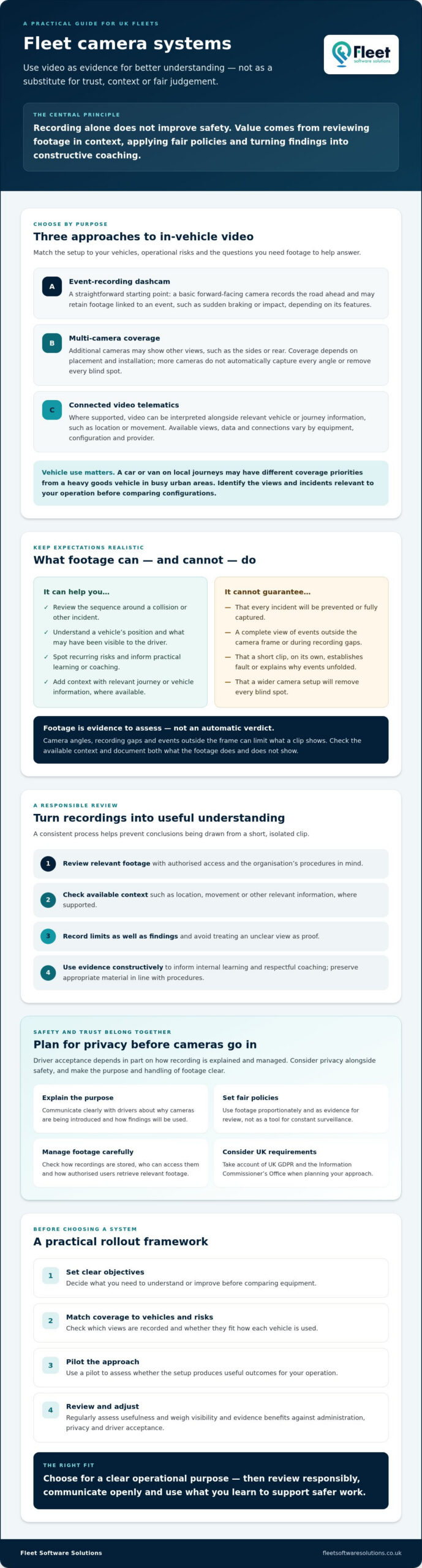
- Choose between event-recording dashcams, multi-camera coverage and connected video telematics by matching the setup to your vehicles and operational risks.
- Fleet camera systems can support incident reviews and reveal recurring risks, but footage is evidence to assess, not an automatic verdict on fault.
- Plan for privacy as well as safety: consider UK GDPR, the Information Commissioner’s Office and clear communication with drivers.
- Set objectives before comparing equipment, then use a pilot and regular reviews to assess whether the system is delivering useful outcomes.
- Weigh potential visibility and evidence benefits against administration, privacy and driver acceptance when selecting an approach for your operation.
What are fleet camera systems, and how do they differ from dashcams?
Fleet camera systems are in-vehicle cameras used by businesses to record views around a vehicle, helping managers review incidents, damage, near misses and visibility-related risks. Depending on the equipment and setup, they may record a forward-facing view, cover several areas around the vehicle or connect footage with journey information. They provide evidence and context for review, but they can’t prevent every incident or show everything that happened.
What is the difference between a dashcam and a fleet camera system?
A basic forward-facing dashcam can be a practical starting point. Depending on its features, it records the road ahead and may retain footage linked to an event such as sudden braking or impact. For a general introduction to the technology, see this overview of dashcams.
A broader fleet setup may add cameras to show other views, such as the sides or rear of a vehicle. Coverage depends on camera placement and installation, so a multi-camera system won’t automatically capture every angle or remove every blind spot. Before choosing a configuration, check which views are recorded, how footage is stored and who can access it.
Video telematics means interpreting video alongside relevant vehicle or journey data, where the system supports it. For example, footage may be reviewed with information about location or vehicle movement to help managers understand the circumstances of an event. The available data and how it connects to video vary by equipment, configuration and provider.
What types of fleet cameras are used in business vehicles?
Common configurations include road-facing cameras, driver-facing cameras and multi-camera arrangements. These aren’t universal requirements. The appropriate choice depends on what you need to understand, how the vehicle is used and the risks in its operating environment. A road-facing view may help clarify events ahead, while other views may be useful where vehicle movement, loading or visibility creates different review needs.
Vehicle type matters. A van or car used mainly on local journeys may have different coverage priorities from a heavy goods vehicle operating in busy urban areas, where the driver’s view around a larger vehicle can be more limited. That doesn’t mean every HGV needs the same camera layout. Identify the views or incidents that matter to your operation, then compare suitable configurations instead of assuming that more cameras will provide more useful evidence.
In practice, fleet camera systems range from straightforward event recording to wider, connected setups. Knowing the difference helps you select technology for a clear operational purpose, rather than treating every camera package as interchangeable.
How fleet camera systems support safety and incident understanding
Footage can give managers a clearer view of events that are difficult to reconstruct from written accounts alone. It may help establish the sequence around a collision, identify a vehicle’s position or show what was visible to the driver. However, a clip is one piece of evidence, not an automatic finding of fault. Camera angles, recording gaps and events outside the frame can all limit what it shows.
Where supported, reviewing video alongside relevant journey or vehicle information, such as location or movement, can add context to an investigation. Capabilities vary according to the cameras, recording equipment, system configuration and provider. This includes which views and data are available, how events are captured and how authorised users retrieve footage.
How can cameras help managers review incidents?
A consistent review process makes footage more useful and reduces the risk of drawing conclusions from a short, isolated clip. Authorised reviewers can examine relevant recordings, check available context and document what the footage does and doesn’t show. They should avoid treating an unclear view as proof and preserve appropriate material in line with the organisation’s procedures.
For example, a recording may help clarify whether a vehicle was stationary or moving before an impact, while other information may be needed to understand why events unfolded as they did. Use the material to inform internal learning, but keep formal investigations aligned with the procedures that apply to the incident.
Can camera footage support safer driving habits?
It can, when managers use relevant evidence to guide specific, respectful conversations. A review might identify a recurring difficulty at a particular site or show a situation where a driver could benefit from additional guidance. Discuss the circumstances with the driver and consider what practical change could help, rather than assuming one recording tells the whole story.
Evidence-based coaching is different from blanket surveillance. Alerts, where a system provides them, should prompt a review rather than be treated as proof of misconduct. Look for patterns and assess whether coaching or operational changes lead to better outcomes. This gives footage a constructive role in safety management.
For fleets considering how cameras fit into wider oversight, vehicle cameras and fleet oversight can be considered alongside operational needs and intended outcomes.
Fleet camera systems, privacy and DVS: what UK operators should understand
Camera use involves two separate questions: whether a setup supports a safety objective, and how footage containing identifiable people is collected and managed. Fleet camera systems don’t automatically make a vehicle or operation compliant. Assess privacy responsibilities separately and check whether any vehicle-specific requirements apply.
What privacy questions should a fleet manager consider?
Before recording begins, define the purpose and decide what information the system needs to capture. Consider who can view footage, how access is controlled, how long recordings are retained and when they should be deleted. Document these decisions and explain camera use clearly to drivers, including what is recorded and why.
Footage that identifies people may involve personal data, so consult current UK GDPR guidance from the Information Commissioner’s Office (ICO). Check the ICO’s latest advice for your circumstances rather than relying on assumptions about lawful use or retention. Proportionate recording and transparent communication support responsible data management and help build trust.
| Camera configuration | Possible purpose | Privacy consideration |
|---|---|---|
| Forward-facing | Record the road ahead for incident review. | Consider what surrounding people or vehicles may be captured and who can access recordings. |
| Driver-facing | Review the driver’s view or actions in a defined safety context. | Captures an identifiable worker, so explain the purpose and ensure use is proportionate. |
| Multi-camera | Provide views around a vehicle, depending on installation. | More viewpoints may capture more people and activity, making access and retention decisions especially important. |
When should a fleet consider DVS-related camera needs?
The Direct Vision Standard (DVS) applies only to vehicles and operations within its defined scope, so it isn’t relevant to every fleet. Check whether the scheme covers your vehicles and operating circumstances, then confirm the current requirements for their rating and any measures needed to obtain a permit. Applicability and requirements can change, so consult the latest official guidance before selecting equipment.
DVS is a vehicle safety and permit consideration, not a privacy exemption, and fitting cameras alone doesn’t guarantee compliance. Where the scheme applies, assess the vehicle’s rating and required measures, then seek suitable compliance support if needed. For a detailed explanation of how DVS CCTV requirements relate to HGV Safety Permit compliance, including what a standard camera installation may or may not cover, review the current guidance before selecting equipment. Fleet Software Solutions offers DVS compliance solutions for businesses assessing their fleet requirements.
How to plan a responsible fleet camera system rollout
A successful rollout starts with a clear operational purpose, not a supplier feature list. Document what you need to understand or improve before comparing proposals. This makes it easier to distinguish essential capabilities from options that may add complexity without addressing your priorities.
Use this sequence to build a proportionate plan:
- 1. Define the risks and objectives. Identify vehicle types, routes and working conditions, then record recurring safety concerns and the evidence you may need after an incident. Set out what success would look like, such as making relevant footage easier to review or identifying a safety trend.
- 2. Specify requirements. Decide which camera views are necessary, who should have access, what reporting is useful and whether connected vehicle or journey information matters. Separate must-haves from optional features to keep comparisons focused.
- 3. Compare suitable proposals. Ask suppliers to explain how each proposed configuration meets your documented needs, including installation considerations, access arrangements and any integration requirements. If you are exploring how connected data fits into wider oversight, read this business vehicle tracking guide.
- 4. Pilot representative vehicles. Include vehicles and operating conditions that reflect the wider fleet, rather than testing only the easiest installation. Check that the views and footage are useful in practice, and invite feedback from the drivers involved.
- 5. Communicate and deploy in stages. Before recording begins, explain the purpose, what is captured, who can review it and how footage will be handled. Use pilot findings to refine the approach, then plan any broader deployment around operational needs.
- 6. Review outcomes. Compare results against the objectives you set. Consider measures such as time taken to review incidents, relevant safety trends, training actions and driver feedback, then decide whether to adjust, expand or pause the rollout.
How can a pilot build driver confidence and measure value?
Drivers are more likely to understand the change when communication is specific and open to questions. Explain how footage may be used and make clear that the pilot is testing both the equipment and the process around it. Gather feedback on camera placement, day-to-day concerns and whether the review approach feels fair.
Use the pilot to identify limitations as well as benefits. A camera view may not capture the detail managers expected, or the review process may take more time than anticipated. Address those findings before expanding fleet camera systems, so your decision reflects practical evidence rather than assumptions.
Once your requirements are documented, you can explore vehicle camera options for your operation.
Choosing the right fleet camera approach for your wider operation
The right setup answers a defined operational question without adding unnecessary cost, administration or intrusion. A forward-facing camera may be enough if the priority is reviewing events on the road. If risks relate to reversing, manoeuvring or limited visibility around a vehicle, additional camera views may be worth assessing. A connected approach may suit managers who want to consider video alongside relevant fleet information, provided the required features are available and compatible with existing systems.
Compare options by asking what useful evidence or visibility each could provide, how footage will be accessed and managed, and how drivers are likely to view the arrangement. More cameras or more data aren’t automatically better. The choice should reflect vehicle types, working conditions, privacy considerations and the outcomes you intend to evaluate.
Should a business choose standalone cameras or an integrated system?
Standalone cameras focus on recording video. Connected fleet tools may bring footage together with relevant vehicle or journey data, helping provide broader context when reviewing an event. The value of integration depends on the features offered, compatibility with your existing systems and how easily your team can use the information.
Ask prospective suppliers to confirm what data can be accessed, how it is presented, what support arrangements apply and which functions are included in the proposed setup. For wider context on how fleet tools can fit together, read this fleet management guide.
What should managers do before speaking to a supplier?
Prepare a concise brief covering the number and types of vehicles, how they’re used and the safety or compliance questions you need to address. Include any camera views you believe may be relevant, plus questions about installation, footage access, data handling and ongoing support. If DVS may apply to your vehicles, check current requirements separately rather than assuming a camera configuration will meet them.
Fleet Software Solutions provides vehicle cameras alongside vehicle tracking, fleet management software and DVS compliance solutions. These are options to consider as part of a wider fleet oversight approach, not a promise of a particular safety or compliance outcome. Once you’ve defined your requirements, explore Fleet Software Solutions’ fleet camera options and assess whether they fit your operation. A clear purpose makes supplier discussions more focused and helps keep your decision proportionate.
Make your next camera decision with confidence
Fleet camera systems are most useful when their configuration reflects real operational risks and footage is reviewed with care. A forward-facing camera may suit a focused recording need, while broader coverage or connected data may be relevant for other vehicles and objectives. Whichever approach you consider, set clear expectations for drivers, manage footage responsibly and assess results before expanding the system.
Fleet Software Solutions provides vehicle cameras alongside DVS compliance solutions and fleet management software, giving businesses options to consider within a wider fleet oversight approach. The right fit depends on your vehicles, intended outcomes and existing processes, so begin with a clear brief rather than selecting features for their own sake.
Explore Fleet Software Solutions’ fleet camera options and consider how a proportionate camera setup could support your operation. With clear objectives and thoughtful implementation, you can take a practical next step towards better-informed fleet decisions.
Frequently Asked Questions
What are fleet camera systems?
Fleet camera systems are cameras fitted to business vehicles to record the road, driver or other vehicle views, depending on their configuration. Managers may use relevant footage to review incidents, understand visibility issues or identify recurring safety concerns. Some setups record video only, while others can connect footage with relevant vehicle or journey information. Capabilities vary, and recordings are evidence to assess, not an automatic explanation of an event or a way to prevent every incident.
Can fleet cameras improve driver safety?
Fleet cameras can support safety improvements when managers use relevant footage to identify patterns and guide fair, specific coaching. For example, a review might highlight a recurring challenge at a site or a situation where a driver could benefit from guidance. Footage or system alerts aren’t automatic proof of unsafe behaviour, and cameras can’t prevent every incident. Set clear objectives and review trends and outcomes instead of treating each recording as misconduct.
Are fleet camera systems legal in the UK?
Businesses can use fleet cameras, but recordings that identify drivers, pedestrians or other people involve personal data and need responsible handling. Consider a lawful basis for recording, explain camera use clearly, display appropriate notices and set documented access and retention rules. The UK GDPR and current Information Commissioner’s Office guidance are key reference points. Check whether your organisation must pay the ICO data protection fee, and seek advice if your circumstances are unclear.
Do fleet camera systems help with DVS compliance?
They may form part of a vehicle’s measures under the Direct Vision Standard (DVS), where the scheme applies, but fitting cameras alone doesn’t guarantee compliance. DVS requirements depend on the vehicle and its operating circumstances. For example, eligible HGVs with lower star ratings may need a Progressive Safe System to obtain a permit. Check the latest official DVS guidance for your vehicles, and consider specialist compliance support before selecting equipment. For a fuller explanation of what DVS CCTV compliance involves for UK fleet operators, including how camera specifications relate to permit requirements, review the dedicated guidance before making equipment decisions.
How should a business introduce cameras to its fleet?
Start by documenting the safety or operational risks the cameras are intended to address, then specify required views, footage access and data-handling arrangements. Compare equipment against those needs and pilot it on vehicles that represent your operation. Explain the purpose and review process to drivers before recording begins, gather their feedback and assess measures such as incident-review time or safety trends. Use the findings to refine the plan before deciding whether to expand.
Do fleet cameras record drivers all the time?
Not necessarily. Recording depends on the equipment, configuration and settings. Some cameras may record continuously, while others may save or flag footage around an event. Driver-facing cameras are a separate configuration and aren’t included in every setup. Before installation, confirm exactly what is recorded, when recording starts, who can access footage and how long it is retained. Tell drivers clearly and ensure the chosen approach is proportionate to its defined purpose.