What if knowing where a vehicle is were only the starting point? If you’ve searched for the telematics meaning, you may have found explanations that make a straightforward idea sound technical. GPS tracking and telematics are often treated as synonyms, but a vehicle’s location is only one type of information a fleet system may use. The practical questions are what data is collected, how it reaches fleet teams and whether it helps with a real operational need.
In plain English, telematics connects vehicle information with communications technology and software, turning selected data into a more useful view of fleet activity. Depending on the system, that information might include location, mileage or vehicle use. The data collected varies, so adopting a system needn’t mean gathering everything. Start by identifying what information could support a better-informed decision.
This guide explains telematics meaning for business fleets, how information travels from a vehicle to a usable fleet view, and how telematics differs from GPS tracking alone. It also covers practical questions to ask about data, reporting and suitability, so you can assess whether tools such as vehicle tracking, mileage capture or fleet management software match a genuine need.
Key Takeaways
- Understand the telematics meaning for a business fleet, and why the term covers more than seeing vehicle locations on a map.
- Follow how connected data becomes fleet information, from capture and transmission through to review and action.
- Compare possible data types with their practical uses, while recognising that system capabilities and what data can reveal vary.
- Set a clear operational need before comparing systems, then identify which information could help address it.
- See how vehicle tracking, cameras and fleet management software can support different requirements, without assuming every fleet needs every tool.
Telematics meaning: what the term means for a business fleet
Telematics combines telecommunications and informatics to collect and communicate data.
For a business fleet, it means using connected technology with vehicles, assets or mobile operations so selected information can be gathered and made available for review. The equipment and information depend on the system and what it is designed to support. The Telematics overview provides broader background on the term and its applications.
What does telematics mean in plain English?
Imagine a work vehicle recording information such as its location or mileage, then sending it to software where an authorised user can review it. A telematics system may combine in-vehicle hardware, a means of communication and software, although the components and capabilities vary.
The distinction matters: the system collects and presents information, but people decide what to do with it. Reviewing mileage, for example, may help a business manage mileage records. The data itself doesn’t determine the right administrative process.
Is telematics the same as vehicle tracking?
No. Vehicle tracking generally focuses on location, and GPS tracking can be one function within a wider telematics system. Depending on the tools in use, telematics may also support other monitoring or administrative needs, such as mileage capture or visibility of selected assets.
That doesn’t mean every fleet needs every feature, or that all systems collect the same information. Start with the operational question you need to answer, then consider which data and tools are relevant. If your main interest is location visibility, see our business vehicle tracking guide for more on that specific requirement.
How vehicle telematics works: from connected data to fleet insight
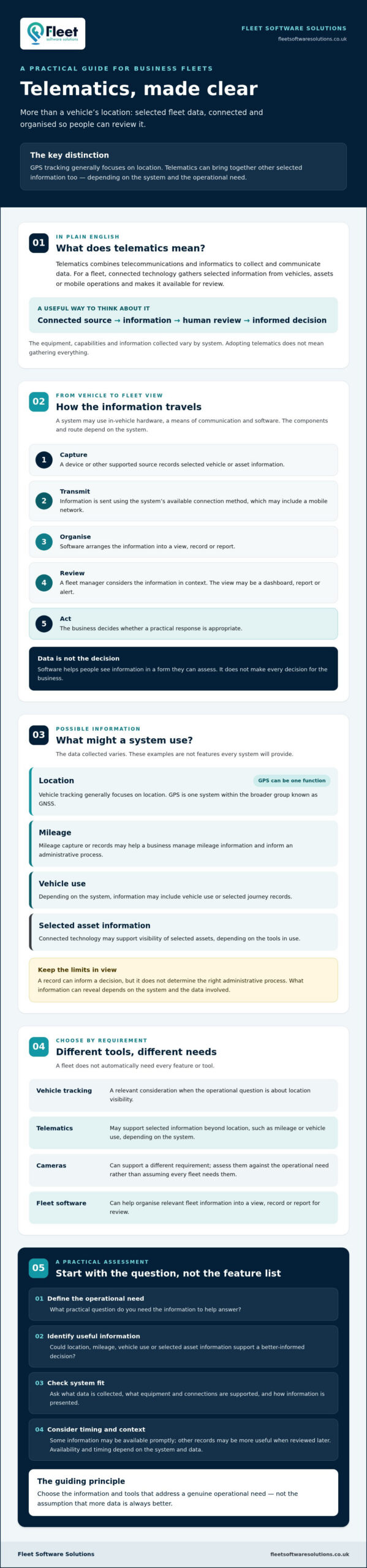
Telematics turns vehicle activity into information a fleet team can review, but the route from vehicle to decision depends on the system. A useful way to understand the process is: capture, transmit, organise, review and act. Not every vehicle or system captures the same information, uses the same equipment or sends data in the same way.
What equipment and connections can a telematics system use?
A vehicle tracking device is one possible source of information. If location data is included, a device may use satellite navigation. GPS is one system within the broader group known as GNSS. A suitable connection, which may include a mobile network, can then send information onwards. Equipment and connection methods vary, so check what a particular system supports rather than assuming all vehicles work identically.
How does telematics data reach a fleet manager?
Consider a vehicle making a work journey. A supported device captures selected information, which may be transmitted to a software platform, organised for viewing and presented to a fleet manager. Depending on the system, that view might include a dashboard, report or alert. Some information may be available promptly; other records may be more useful when reviewed later. Availability and timing depend on the system and the data involved.
Vehicle data becomes operational information when a system organises it for review and a person uses it to guide a relevant fleet decision. Software doesn’t make every decision for the business. It helps people see information in a form they can assess. For example, a manager reviewing available journey or mileage records may use them to inform an administrative process, while keeping in mind what those records do and don’t show.
- Capture: A device or other supported source records selected vehicle or asset information.
- Transmit: The information is sent using the system’s available connection method.
- Organise: Software arranges it into a view, record or report.
- Review: A fleet manager considers the information in context.
- Act: The business decides whether a practical response is appropriate.
The difference between promptly viewed information and records reviewed later can help you decide what matters. If you’re comparing how information is presented and managed, a fleet software guide can help you consider the questions to raise. You can also explore fleet management software as one possible way to organise relevant fleet information.
What telematics can measure and what the information cannot tell you
Understanding the telematics meaning in practice also means knowing its limits. A system can provide useful records, but only for the information its equipment and configuration support. The examples below are possibilities, not standard features in every vehicle or fleet platform.
| Possible data category | Example use | Important limitation |
|---|---|---|
| Location and journey information | Reviewing where a tracked vehicle has travelled | Availability and detail depend on the tracking system and its coverage. |
| Mileage | Supporting mileage capture and related administrative workflows | Check how mileage is recorded and whether the information suits your process. |
| Vehicle use information | Reviewing selected records to understand how vehicles are used | Records may not explain why an event occurred or provide a complete account of a journey. |
| Asset information | Supporting visibility of selected business assets | Asset tracking needs suitable equipment and configuration. It isn’t automatically included. |
| Camera footage | Reviewing relevant visual information where vehicle cameras are used | Cameras may be separate or integrated, and footage depends on the system in place. |
Which types of information might a fleet system record?
Vehicle tracking may provide location and journey information, while mileage capture can support an administrative workflow. A business that needs to locate equipment might consider asset tracking instead. Vehicle cameras can provide another type of information, but their availability and relationship with other fleet data depend on the chosen system. Treat each as a distinct capability to check, not an assumed part of telematics.
What are the limits of telematics data?
Coverage, equipment and configuration all affect what a system records. A location point may show where a vehicle was recorded, but it won’t necessarily explain the reason for a route, delay or stop. Likewise, a camera recording or vehicle use record is one piece of information, not a complete account of an individual’s behaviour. Data alone shouldn’t be treated as proof of fault.
Interpret records alongside operational context, relevant policies and other appropriate information before deciding what they mean. A practical assessment also includes asking who can access the data, how access is managed, what is recorded and how long information is retained. These are questions for reviewing a system and your organisation’s approach, not legal conclusions. Better-informed decisions come from understanding both what the information can show and what it leaves unanswered.
How to assess whether telematics fits your fleet
A useful assessment starts with the work you need to improve, not a list of features. The practical meaning of telematics for your organisation depends on whether the information it can provide addresses a real visibility gap, recurring task or reporting need. Define that need first, then assess which data and tools could help.
Start with the operational question, not the technology
Write down the question your team needs to answer. Is mileage information difficult to manage? Do you need visibility of business assets, or is it unclear how vehicles are being used? Consider whether your scope includes company vehicles, grey fleet, plant and machinery, or lone workers. Each may involve different information and requirements.
Next, separate essential outcomes from optional features before asking suppliers for demonstrations. This keeps comparisons focused and reduces the risk of choosing a system that appears capable but doesn’t fit your everyday processes.
- Define the need: Identify the task, information gap or reporting requirement you want to address.
- Match the information: Consider whether mileage capture, vehicle tracking or asset visibility is relevant to that need.
- Set priorities: Note what the system must support and what would simply be useful.
- Agree responsibility: Decide who will review the information and what action, if any, should follow.
This approach also helps you use a fleet management guide as a broader reference point, while keeping the technology decision grounded in your own operation.
Check data handling, adoption and practical fit
Before selecting a system, ask what information it collects, who can access it and how long it is retained. Consider how employees affected by monitoring will be informed, how questions will be handled, and who is responsible for reviewing records. Check current UK guidance before making decisions about your organisation’s legal obligations. Don’t rely on assumptions or a supplier demonstration as a substitute for that review.
Practical fit matters too. Check whether reporting suits existing processes, whether the system can work with the tools you already use, and what support is available during set-up and ongoing use. Ask to see how information appears in a typical workflow, not just a feature list. A clear demonstration can help your team judge whether the information is understandable and useful to the people expected to act on it.
If you’ve identified a specific fleet need, explore fleet management solutions as one option for matching relevant tools to your operation.
Putting telematics meaning into practice with fleet management tools
Once you understand what telematics can and can’t show, match the information to a defined operational need. Vehicle tracking, vehicle cameras and fleet management software can each support different requirements, but they aren’t interchangeable and a fleet may not need every option. A needs-led choice helps keep both the data collected and the implementation proportionate.
Where can fleet telematics support everyday operations?
Vehicle tracking can provide visibility over business vehicles, while asset tracking or plant and machinery tracking may suit organisations that need visibility of relevant equipment. For administrative workflows, mileage capture and grey fleet management are examples of tools that can help teams manage information about work-related journeys. Their suitability depends on the fleet’s processes and the information required.
Other requirements call for different tools. Vehicle cameras may be relevant where a business needs camera-based information, while lone worker protection relates to supporting lone workers. DVS compliance solutions are relevant for businesses assessing their applicable DVS requirements. These tools address distinct needs, so consider them on their own merits rather than assuming they form one standard telematics package.
Fleet Software Solutions offers business vehicle and asset tracking, vehicle cameras and fleet management software, alongside options such as mileage capture, grey fleet management, plant and machinery tracking, lone worker protection and DVS compliance solutions. This range shows how fleet tools can address different operational requirements. It doesn’t mean every feature is right for every organisation.
What should a business do next?
Before comparing systems, write down your operational goals, which vehicles, assets or people are in scope, and what information would help you assess progress. Then compare the capabilities on offer against those requirements. A long feature list isn’t a measure of fit. The useful option is one that supports a clear process and gives the right people information they can interpret and act on.
- Define the goal: Identify the recurring task or visibility gap you want to address.
- Set the scope: Note which vehicles, grey fleet, assets, plant or mobile operations are relevant.
- Specify the information: Decide what you need to review and who will use it.
- Compare for fit: Check how each capability supports your existing workflow, rather than choosing by feature count.
With these points in hand, you can assess telematics in practical terms and have a more focused discussion about suitable options. Explore Fleet Software Solutions to see how its fleet tools may relate to your requirements.
Turn fleet data into a practical next step
Understanding the telematics meaning is a useful starting point: connected data can support clearer fleet oversight, but its value depends on what you need to know and how your team uses the information. The right system is not necessarily the one with the most features. Begin with an operational goal, identify which vehicles or assets are in scope, then check that the data and reporting suit your processes.
Fleet Software Solutions offers business vehicle tracking and vehicle camera systems, alongside fleet management software that includes mileage capture and grey fleet management. Its wider range also covers asset tracking, plant and machinery tracking, lone worker protection and DVS compliance solutions. These address different requirements, so consider only the tools relevant to your operation.
Ready to explore options against your fleet’s needs? Explore Fleet Software Solutions and consider which capabilities could provide useful oversight. A clear, needs-led approach can help you move forward with confidence.
Frequently Asked Questions
What does telematics mean?
Telematics combines telecommunications and informatics to collect and communicate data. For a business fleet, it describes connected technology that can gather selected information from vehicles, assets or mobile operations and make it available for review. A vehicle’s location or mileage might be included, depending on the system. The technology presents information; fleet managers interpret it alongside operational context and decide whether any action is appropriate.
Is telematics the same as GPS tracking?
No. GPS tracking focuses on location, and it may be one function within a wider telematics system. Telematics can also involve other types of information or workflows, depending on the equipment and software selected. For example, a business might use vehicle tracking for location visibility and mileage capture to support administration. Check the system’s actual capabilities rather than assuming every telematics solution includes the same features.
How does telematics work in a vehicle?
A vehicle telematics system may use in-vehicle equipment to capture selected information, then send it through an available connection to software. The software can organise that information into a view, record or report for a fleet manager. The process and components vary between vehicles and systems. A manager reviews the information in context and decides whether it helps answer an operational question or supports a relevant task.
What information can telematics collect?
Depending on the system, information may include vehicle location or journey details, mileage, selected vehicle use records or asset information. Vehicle cameras may provide visual information where camera systems are used. These are examples, not standard features in every system. Before selecting a solution, ask what information it collects, how it is presented and what it can reasonably show. Records may not provide a complete account of an event.
Can telematics be used for a small business fleet?
Yes. A small business can assess telematics by starting with a specific operational need rather than fleet size. For instance, it might need vehicle location visibility, mileage capture or a way to monitor selected assets. Compare the information and tools available with your existing processes, and consider who will review the data. A focused system may be more practical than adopting features that don’t support a clear business requirement.
Is vehicle telematics legal in the UK?
Vehicle telematics isn’t automatically lawful or unlawful in every situation. The answer depends on how and why it’s used and what information is handled. Before introducing monitoring, assess the purpose, employee communication, access arrangements and retention approach. Check current Information Commissioner’s Office guidance and seek appropriate advice for your circumstances before reaching a legal conclusion. This FAQ is general information, not legal advice, and requirements may depend on the specific use.
What happens if telematics data is inaccurate or incomplete?
Inaccurate or incomplete data can give an unclear picture, so don’t treat an isolated record as a definitive account. Check whether the information is missing, delayed or inconsistent, and review the relevant system settings and coverage with the supplier. Where a decision matters, compare the record with other available information and operational context. If confidence remains low, record the uncertainty and avoid drawing conclusions the data can’t support.