What if a field worker needs help at the very moment they can’t safely reach their phone? Driving between appointments, operating equipment or facing a threatening situation can all make a conventional call difficult. A lone worker panic button for field staff can be part of a practical response, but its value depends on what happens after an alert is raised.
It’s understandable to focus first on the device: workers need a way to signal for help, and managers need confidence that the alert reaches someone who can act. But a button alone isn’t a complete safety plan. Different roles, tasks and locations bring different risks, so the alert process must fit the work and set out clear responsibilities for responding and escalating concerns.
This UK guide explains how to assess where a panic button fits within wider lone-worker protection, compare approaches against field staff’s day-to-day needs and establish procedures for handling alerts. It also covers how to put the approach into practice and review it over time, so your organisation can build a consistent process for supporting mobile workers.
Key Takeaways
- Match a lone worker panic button for field staff to the tasks, working conditions and risks of each role.
- Map the alert-response process in advance, including who receives alerts, assesses them and takes the agreed next steps.
- Compare app-based, wearable and combined approaches by considering access, wearability and how alerts will be handled.
- Roll out protection with clear worker instructions and training, then review the process as roles and risks change.
- Align lone-worker procedures with wider mobile workforce management to support consistent oversight of field teams.
Why field staff may need a lone worker panic button
A lone-worker panic button gives a worker a way to raise an alert when they need assistance and may not be able to explain the situation immediately. Its role is to signal that attention is needed, not to replace a risk assessment, communication plan or agreed response process. As part of lone worker monitoring, it sits alongside other ways organisations plan for the safety of people working without close or direct supervision.
A panic button is a means of raising an alert, not a guarantee of a particular response. The alert must be received, understood and followed by someone with a defined responsibility for deciding what to do. Without those arrangements, workers may not know what to expect, and managers may have little assurance that an alert will lead to appropriate action.
Which field roles could benefit from an alert option?
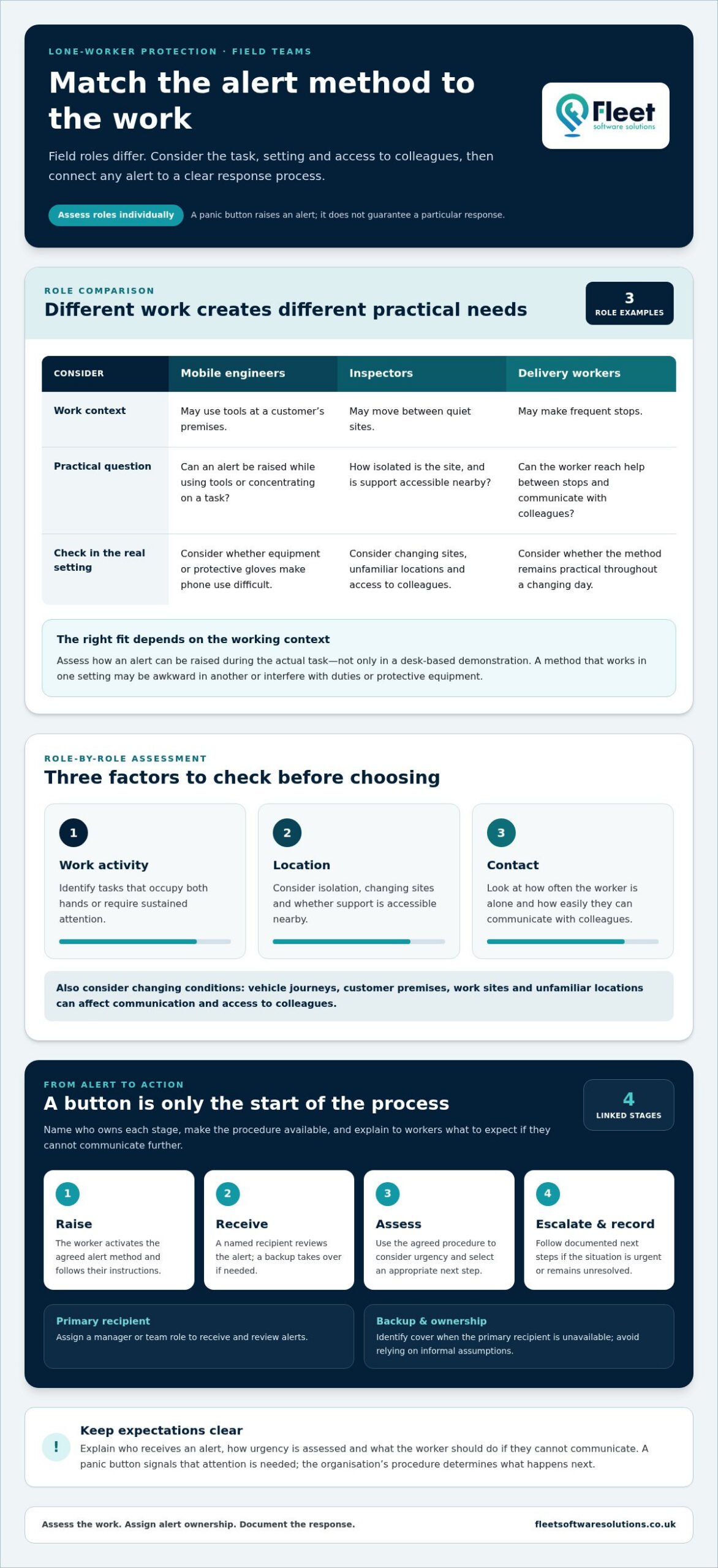
Mobile engineers, inspectors, delivery workers and staff visiting sites alone may all work away from colleagues, but their circumstances differ. An engineer using tools at a customer’s premises, for example, may have different practical needs from an inspector moving between quiet sites or a delivery worker making frequent stops. Consider the task, location, expected contact with others and how readily the worker can reach a colleague. Assess roles individually rather than assuming that all lone working carries the same level or type of risk.
- Work activity: Identify tasks that occupy both hands or require sustained attention.
- Location: Consider isolation, changing sites and whether the worker can access support nearby.
- Contact: Look at how often the worker is alone and how easily they can communicate with colleagues.
When can reaching help become difficult?
A worker may find it difficult to use a phone while carrying equipment, wearing protective gloves or concentrating on a task. In a tense interaction, there may also be little time to stop, find a phone and make a call. These examples can help identify where an alert option could be useful, but they don’t mean one device or method will suit every role.
Fieldwork also changes throughout the day. Staff may move between customer premises, vehicles, construction or maintenance sites and less familiar locations. Communication conditions and access to colleagues can vary accordingly. A method that is easy to use in one setting may be awkward in another, particularly if it interferes with protective equipment or the worker’s duties. Assess how an alert can be raised in the actual working context, not just during a desk-based demonstration.
For employers, the practical question is twofold: could the worker raise an alert when needed, and is there a clear arrangement for someone to receive and act on it? Considering both parts helps distinguish the button itself from the wider protection process and gives the organisation a sound basis for comparing options.
How a lone worker panic button fits into an alert-response process
A panic button can initiate an alert, but it can’t decide what the alert means or what should happen next. The organisation needs a process that connects the worker’s action to a clear, considered response. When planning a lone worker panic button for field staff, build the process around the people responsible for receiving and assessing alerts, rather than treating the button as a complete safety arrangement.
An alert process needs named ownership and documented next steps. This helps prevent uncertainty at a critical moment: staff know what to expect after raising an alert, and managers know who is responsible for taking it forward. The HSE guidance on lone working provides a UK reference point for employers considering how to manage lone-worker risks.
Who should receive and assess an alert?
Assign a primary recipient, such as a designated manager or team role, and identify a backup for situations when that person is unavailable. Make sure both understand their responsibilities and can access the procedure. Explain to workers who receives an alert, how its urgency is assessed and what they should do if they can’t communicate further. An alert should never depend on an informal assumption that someone else is monitoring it.
Recipients also need a consistent way to assess the circumstances. The procedure might direct them to consider the information available, the worker’s role and the context of the alert, then decide which next step is appropriate. Avoid relying on personal judgement alone. Agreed prompts and decision points can support a more consistent response across teams and shifts.
How should escalation work after an alert?
Set out escalation stages in advance, from initial review through to further action when the situation appears urgent or remains unresolved. The appropriate route will depend on organisational procedures and the circumstances. Don’t present escalation to emergency services or a particular response time as an automatic feature of a button. Staff and recipients should understand how to follow the organisation’s established emergency arrangements.
- Raise: The worker activates the agreed alert method and follows any related instructions they’ve been given.
- Receive: The named recipient takes responsibility for reviewing the alert, or the backup role takes over if needed.
- Assess: The recipient uses the agreed procedure to consider urgency and select an appropriate next step.
- Escalate and record: The recipient follows the relevant route, records decisions and actions, and updates the incident record once the situation is resolved.
Closing the loop is part of the process, not an administrative extra. Record what was reported, who assessed it, what decisions were made and whether the worker needs follow-up. Reviewing this information can help managers identify unclear instructions or recurring gaps, refine the procedure and communicate changes to staff.
Organisations building a joined-up approach can consider how lone-worker protection within fleet management software fits alongside procedures for managing mobile teams. Technology can support oversight, while clearly assigned responsibilities and documented actions remain central to handling alerts effectively.
How to compare panic-button options for field staff
Compare options against the work people actually do, not just a feature list. An app-based approach may suit someone who can keep and use a phone readily; a wearable offers a different way to access an alert, whilst a combined approach brings both formats into consideration. These are general categories, not guarantees of how a particular solution works. The right fit depends on the task, working conditions and the organisation’s alert-handling arrangements.
Use the comparison below as a starting point, then assess each option against specific roles. Location and connectivity capabilities vary by solution, so don’t assume that every format will work in every setting or provide the same information.
App-based: Consider whether the worker can access and operate a phone during the task. While tools like The Wellbeing App offer comprehensive safety monitoring through a mobile device, this may be less practical if hands are occupied, staff are wearing gloves or the phone needs to be put away during work.
Wearable: Assess whether a separate wearable can be reached easily and worn comfortably alongside clothing and protective equipment. Check whether its placement suits the worker’s movements and duties.
Combined: Consider whether having more than one access method fits the role and the organisation’s procedures. Make sure workers understand which method to use and that managers can explain how alerts from each method are handled.
Does a wearable button or phone-based option suit the task?
Picture the task in practice: an engineer carrying tools, an inspector wearing protective gloves, or a worker driving between appointments. A phone-based method may require the worker to reach, unlock or handle a device, whilst a wearable may be easier to access in some circumstances. Comfort, safe placement and compatibility with protective equipment matter too. The best format is the one that fits the task and environment and that the worker can use as intended.
What should employers compare beyond the button?
Ease of activation is only one part of the decision. Compare how alerts are routed, who is responsible for monitoring them and how escalation is managed. Also consider how the organisation will train staff, maintain clear instructions and review whether the chosen approach remains suitable as work patterns change.
- Access and wearability: Can the worker reach the alert method during realistic tasks without compromising safe working practices?
- Working conditions: Does the approach fit driving, outdoor duties, hands-on work and the protective equipment required for the role?
- Connectivity and location: What capabilities does the specific solution provide, and how do they relate to the locations where staff work?
- Alert handling: Are receipt, ownership, assessment and escalation responsibilities clearly defined?
- Training and review: Can workers learn the process, and can managers keep instructions and arrangements current?
Score options against these criteria for each role rather than applying one choice across the whole team. Assess a lone worker panic button for field staff as part of a workable protection approach, considering the format, alert process and ongoing administration together.
How to implement and review panic-button protection for field teams
Once an approach has been selected, implementation should make it clear how the process works in the conditions staff actually face. A structured rollout helps managers identify gaps before workers rely on the arrangement, whilst training and review keep instructions relevant as roles and working patterns change. Treat the lone worker panic button for field staff as one part of the protection process, with responsibilities and instructions documented alongside it.
- Assess roles and tasks: Record where people work alone, the duties they perform and the practical conditions that may affect their ability to use the agreed alert method.
- Set out the response procedure: Document who owns incoming alerts, who provides cover, how urgency is assessed and which escalation routes apply.
- Prepare accessible instructions: Explain how workers should use the process, what they can expect after raising an alert and what to do if circumstances prevent them from communicating further.
- Train and familiarise: Give workers and managers an opportunity to practise their respective roles in a controlled setting.
- Review and update: Revisit the arrangements following changes in duties, team structures or working conditions, as well as after incidents or near misses.
How can an employer prepare workers and managers?
Training should cover more than how to activate an alert. Workers need clear, accessible instructions they can refer to across changing sites, and should understand the steps they’re expected to follow. Managers need a separate briefing on alert ownership, decision-making, escalation and record-keeping. If staff use their own vehicles for work journeys, connect their lone-working arrangements with relevant grey fleet management procedures, so expectations remain joined up throughout the working day.
Familiarisation should reflect realistic working conditions without creating an unintended emergency response. Explain in advance whether an exercise is a demonstration, a practice scenario or a live process check, and ensure everyone involved understands how to take part. This gives workers a chance to learn the steps and lets managers practise their responsibilities in a controlled way.
How should an organisation test and review the process?
Plan routine checks that verify the process without accidentally triggering an emergency response. Use the appropriate test arrangements for the chosen approach, and make sure relevant staff know when a check is taking place. Record any issues, such as unclear instructions or uncertainty over who takes ownership, then assign responsibility for resolving them.
Review incidents, near misses and worker feedback for practical improvements. A change in team structure may require a new alert recipient; a change in duties or work locations may mean instructions need updating. Keep the current procedure available to workers and managers, and communicate revisions so people aren’t relying on outdated guidance.
Fleet Software Solutions provides lone-worker protection through its fleet-management software offering. Explore lone-worker protection as part of managing mobile operations.
Bring lone worker protection into mobile workforce management
Field staff safety sits within a wider operational picture: people travel between jobs, work at different sites and may spend parts of the day away from colleagues. Aligning lone-worker procedures with mobile-workforce management can help an organisation keep responsibilities clear, while ensuring that an alert process remains distinct from routine fleet oversight. A panic button raises an alert; vehicle-tracking functions, where used, serve a separate operational purpose and shouldn’t be treated as a substitute for a defined safety response.
That distinction matters in practice. Knowing that a vehicle is part of a work journey doesn’t, by itself, establish whether a worker needs assistance or who should respond. Connect relevant procedures so managers understand how field activity is organised, whilst keeping alert ownership and escalation within the lone-worker process. For broader context on fleet oversight, see this business vehicle tracking guide.
How does lone-worker planning connect with fleet operations?
Shared planning can help teams coordinate work schedules, responsibilities and communication without conflating staff protection with vehicle monitoring. For example, procedures can clarify which manager oversees a mobile team and separately identify who handles a lone-worker alert. This provides a clearer operational framework: fleet processes support the management of mobile work, while the safety procedure sets out how alerts are assessed and acted upon. A wider fleet management guide offers related context for organisations reviewing how operational systems fit together.
Fleet Software Solutions provides lone-worker protection as part of its fleet-management software offering, alongside tools for managing mobile operations. This allows organisations considering a lone worker panic button for field staff to explore protection in the context of their wider mobile workforce. The right approach still depends on the organisation’s roles, procedures and requirements.
What should an organisation do next?
Move from assessment to implementation in a deliberate sequence. First, identify which roles and tasks involve lone working and what practical risks arise. Next, define who owns alerts and document the appropriate response and escalation routes. Then compare app-based, wearable or combined approaches against working conditions, access needs and the organisation’s procedures. Finally, train workers and managers, test the process in a controlled way and review it as duties or team arrangements change.
This sequence keeps technology in its proper place: a tool within a planned approach, rather than a complete safety measure on its own. Reviewing lone-worker protection alongside fleet-management processes can also help organisations maintain coherent oversight of mobile operations whilst preserving clear responsibility for worker alerts.
Fleet Software Solutions supports organisations exploring lone-worker protection within a broader fleet-management offer. Speak with Fleet Software Solutions about your organisation’s requirements.
Turn your safety plans into practical next steps
Turn your assessment into a working plan that reflects how your field teams operate. Consider where lone working occurs, what could make it difficult to raise an alert and how your existing procedures can support a clear response. This gives you a sound basis for choosing a lone worker panic button for field staff and reviewing whether the approach remains appropriate as work changes.
Technology is most valuable when it supports clear responsibilities rather than standing in for them. Fleet Software Solutions provides lone-worker protection through its fleet-management software offering, bringing staff protection into the wider context of managing mobile operations. Your organisation can use this as a starting point for considering how worker safety and operational oversight fit together.
Discuss lone-worker protection for your mobile workforce and take a considered next step towards an approach that suits your organisation. A clear plan gives field staff and managers a stronger foundation for working safely.
Frequently Asked Questions
What is a lone worker panic button?
A lone worker panic button is a way for someone working without close or direct supervision to signal that they need assistance. It may be accessed through different types of technology, but its essential purpose is to raise an alert. It doesn’t, by itself, explain what has happened or determine what action follows. Employers should make sure workers know what the alert means and what to expect after activating it.
Is a panic button suitable for every field worker?
No. Suitability depends on the worker’s tasks, environment and ability to access the alert method safely. Someone carrying out regular inspections may have different needs from a driver making frequent stops or an engineer working with tools. Assess the actual work rather than assigning the same approach to every role. A lone worker panic button for field staff should be considered alongside other safeguards where an alert method alone won’t address the identified risks, such as coordinating with physical security specialists like Spycon Security when personnel visit high-risk premises.
Can a lone worker panic button work without mobile signal?
It depends on how the particular solution communicates and what coverage or connection it requires. Don’t assume that an alert will transmit from every remote site or area with weak reception. Map the places where staff work, identify likely communication gaps and understand what the chosen approach can do in those conditions. Include a practical alternative in the procedure for locations where the usual means of raising or receiving an alert may be unavailable.
Is a panic button better than a lone worker app?
Neither is automatically better; the suitable option depends on how the worker can access it during their duties. An app may be practical if a phone is available and safe to use, whilst a separate button could suit a task where handling a phone is difficult. Consider phone restrictions, gloves, protective clothing and how workers carry equipment. A short, supervised familiarisation exercise can reveal usability issues that a feature comparison may miss.
Does a panic button automatically share a worker’s location?
Not necessarily. Location functions vary between solutions, so a button shouldn’t be assumed to send a worker’s position automatically. Before introducing an approach, establish what location information, if any, is available to alert recipients and how they should use it within the response procedure. Workers should understand what information is shared, and managers should avoid relying on location data as the sole way to establish where someone is or what assistance they need.
How often should an employer test a lone worker panic button?
There isn’t one testing interval that suits every organisation. Set a schedule based on the work, the chosen system and the arrangements needed to handle alerts, then test in a controlled way that won’t prompt an unintended emergency response. Revisit the test plan after changes to equipment, instructions, teams or working locations. Keep a record of checks and any problems found, so managers can track whether follow-up actions have been completed.
Do employers need a risk assessment before introducing panic buttons?
Yes. Under the Management of Health and Safety at Work Regulations 1999, employers must assess risks arising from work activities, including lone working. The assessment should inform whether an alert method is appropriate and what other precautions are needed. Employers with five or more employees must record the significant findings. Consider the specific tasks, locations and communication challenges involved, rather than treating a panic button as a substitute for assessing the work.