What if capturing both the road and cab gave your fleet more useful context, but also created privacy concerns and more footage to manage? That is the decision behind dual facing dash cam fleet solutions. A road view can help explain events outside the vehicle, while an in-cab view may add context about what happened inside it. More coverage is not automatically better if footage is difficult to access, interpret or govern.
It is reasonable to want clear evidence and practical safety insight while protecting driver trust and keeping compliance manageable. This guide explains when dual-facing coverage may suit different fleet operations, what to compare across camera coverage, footage access and management workflows, and how UK data-protection responsibilities shape a proportionate approach.
You will also find a practical framework for planning adoption, from defining the purpose and communicating with drivers to aligning cameras with wider fleet tracking and software needs. Fleet Software Solutions provides vehicle cameras for business fleets alongside vehicle tracking and fleet management software, helping businesses consider camera requirements as part of wider fleet oversight and safety planning.
Key Takeaways
- Understand what road and cab views can each contribute to an incident review, and why footage needs context.
- Use a consistent workflow to review relevant footage, record findings and assign proportionate follow-up.
- Compare road-only, dual-facing and multi-camera layouts against vehicle needs and the work involved in managing footage.
- Plan a responsible rollout by defining its purpose, setting access rules and communicating clearly with drivers.
- Assess dual facing dash cam fleet solutions alongside vehicle fit, footage workflows, governance and wider fleet software needs.
What Does a Dual-Facing Dash Cam Fleet Solution Capture?
A dual-facing dash cam fleet solution is a camera system designed to record two views: the road ahead and the vehicle cab. The road-facing view can show visible events around the vehicle, while the driver-facing view may add context about activity inside it. The two views can help a fleet review an incident from more than one perspective, but neither necessarily shows the full sequence on its own.
Dashcams are available in different layouts and configurations. A general dashcam technology overview explains common camera types and uses, but fleet systems can differ in camera position, coverage and recording management. A road-only camera focuses on the external view; dual-facing coverage adds a view of the cab; a multi-camera layout can capture additional areas, depending on its design. Before adding views, identify the question each one is meant to help answer and how the resulting footage will be handled.
What do the road-facing and driver-facing views show?
The road view can provide visual context around events ahead, such as traffic movement, road conditions or the position of other vehicles within the camera’s field of view. The cab view may show activity inside the vehicle, offering another perspective on what was happening at the time. For example, a road recording might show a sudden change in traffic, while a cab recording may help explain the driver’s activity during the same event.
What each view captures depends on the system’s specifications and position. The field of view affects which areas are visible, image quality affects how clearly details can be reviewed, and recording behaviour determines what footage is available and when. A camera’s presence alone does not guarantee a clear or complete record. Check the intended coverage against the vehicle layout and the review questions the fleet needs to answer.
Which fleet situations may benefit from two views?
Dual-facing coverage may be relevant when a business has a practical reason to understand both external events and activity inside its vehicles. A delivery fleet, for example, could review the road context around an incident alongside the cab view. A field service operation might want both perspectives when investigating a reported event during a journey. The value depends on the risks the fleet is trying to understand and how it will use the footage.
Start by defining the question the camera is meant to help answer. If the operational need is limited to events ahead of the vehicle, road-only coverage may be a more proportionate fit. If activity inside the cab is also relevant, two views may provide useful additional context. If the fleet needs visibility beyond those areas, a multi-camera layout may be worth assessing, while taking account of the additional footage it creates.
The right layout is a fleet decision, not a universal rule. Match camera coverage to vehicle types, operational risks and clear policies for reviewing recordings. This keeps the system focused on a defined purpose rather than collecting views simply because they are available.
How Dual-Facing Fleet Cameras Turn Footage into Useful Context
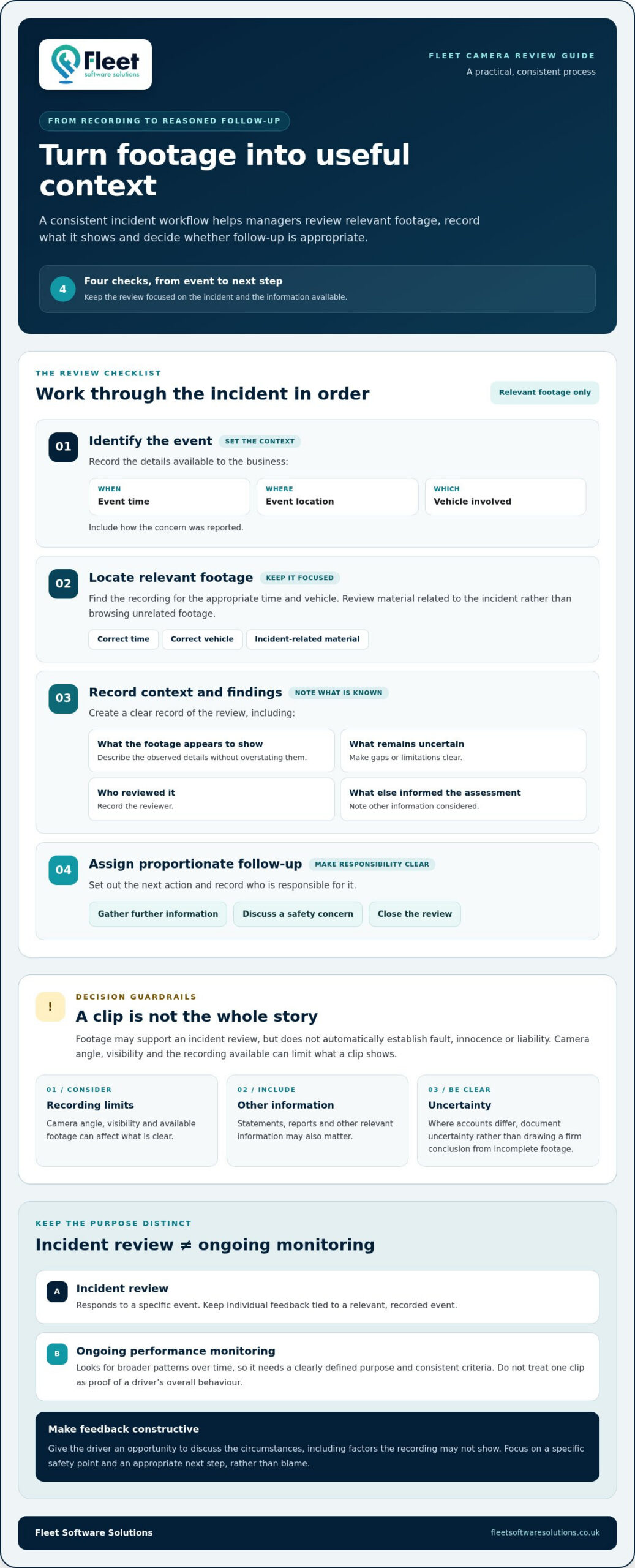
Footage becomes useful through a consistent review process, not simply because a camera has recorded an event. A manager needs to identify what happened, locate the relevant recording, assess it alongside other available information and decide whether follow-up is appropriate. Recording these steps helps explain how footage informed the response without treating a short video as the whole story.
A practical incident workflow can follow four steps:
- Identify the event. Record when and where it occurred, which vehicle was involved and how the concern was reported, using the details available to the business.
- Locate relevant footage. Find the recording for the appropriate time and vehicle. Focus on material related to the incident rather than browsing unrelated footage.
- Record context and findings. Note what the footage appears to show, what remains uncertain, who reviewed it and what other information informed the assessment.
- Assign proportionate follow-up. Set out the next action, such as gathering further information, discussing a safety concern or closing the review. Record who is responsible.
This record helps managers explain how they reached a decision and apply the process consistently. Footage may support an incident review, but it does not automatically establish fault, innocence or liability. Camera angle, visibility and the recording available can limit what a clip shows. Statements, reports and other relevant information may also matter. Where accounts differ, documenting uncertainty is more responsible than drawing a firm conclusion from incomplete footage.
Separate incident review from ongoing monitoring
An incident review responds to a specific event. Ongoing performance monitoring looks for broader patterns over time, so it needs a clearly defined purpose and consistent criteria. Keep individual feedback tied to a relevant, recorded event, and avoid treating one clip as proof of a driver’s overall behaviour.
Constructive coaching should give the driver an opportunity to discuss the circumstances, including factors the recording may not show. Focus the conversation on a specific safety point and an appropriate next step, rather than blame. If the business analyses recurring themes, distinguish that wider review from individual feedback and document how observations are used. Clear, fair processes help staff understand how camera footage informs decisions.
Some fleet systems may connect camera footage with vehicle tracking or fleet software, which can help managers bring related information into a review. The available links and functions depend on the system, so do not assume footage, location data and management tools are automatically integrated. Assess how each capability works and whether it supports the intended review process.
For fleets considering dual facing dash cam fleet solutions, defining the event-to-follow-up workflow helps clarify what camera coverage needs to support. Fleet Software Solutions provides business vehicle cameras alongside vehicle tracking and fleet management software, so camera needs can be considered as part of wider fleet operations. Explore fleet camera solutions in that broader context.
Dual-Facing vs Road-Only and Multi-Camera Fleet Systems
Choosing camera coverage is a question of operational need, not simply how many views a system can provide. A road-only layout focuses on the view ahead; a dual-facing setup adds a cab view; broader multi-camera coverage can include additional areas, depending on its configuration. Use the comparison below to match each layout to vehicle type, work patterns and the incidents a fleet needs to understand, while keeping the footage-management workload in view.
| Layout | Views captured | Potential operational use | Management considerations |
|---|---|---|---|
| Road-only | Road ahead | Reviewing visible events in front of the vehicle | A narrower scope may mean fewer views to review, but it will not provide cab context. |
| Dual-facing | Road ahead and vehicle cab | Reviewing an external event alongside activity inside the vehicle | Two perspectives may add useful context, with cab footage requiring clear purpose and handling rules. |
| Multi-camera | Road, cab and other configured views | Assessing needs such as rear visibility, blind spots or a cargo area | Additional views can increase the footage to access, review and manage. |
Use the table as a starting point, not a ranking. Extra views are not automatically better: each should address a defined operational risk or review need. If a camera records an area the business has no reason to assess, it may add complexity without making the system more useful. Equally, a limited layout may leave a relevant question unanswered.
When is a dual-facing dash cam the better fit?
Prioritise two views when understanding both events on the road and activity in the cab is relevant to the operation. A fleet may need to review what happened ahead while also understanding the driver’s context at the time. If the main priority is forward visibility, road-facing coverage may be a more direct fit. Let vehicle type, daily work and incident priorities guide the decision.
When might a fleet assess wider camera coverage?
Consider additional views when a specific requirement falls outside the road and cab perspectives. A vehicle with restricted rear visibility, operational blind spots or a need to observe a cargo area may prompt a wider coverage assessment. Define the purpose before adding cameras, since more views can mean more recordings to organise and review. A fleet camera systems guide provides broader context for comparing coverage approaches.
For each vehicle group, write down the concern the camera layout is intended to address, the view needed to assess it and who will use the footage. This helps distinguish a genuine coverage gap from a preference for more cameras. Dual facing dash cam fleet solutions are worth assessing when road and cab context both serve a clear operational purpose; other layouts may suit different priorities.
How to Plan a Responsible Dual-Facing Dash Cam Rollout
A responsible rollout starts with a defined operational purpose, then builds the camera policy and staff communication around it. This helps ensure dual-facing coverage addresses a genuine fleet need rather than becoming monitoring without clear boundaries. In the UK, identifiable camera footage may involve personal data. Organisations should consider their responsibilities under data protection law and check current Information Commissioner’s Office (ICO) guidance before deployment. Requirements depend on how the system is used.
Use a staged plan to make decisions clear before cameras are introduced:
- Define the purpose. Write down the specific safety, incident-review or operational questions the cameras are intended to support. A clear purpose helps the business judge whether both road and cab views are proportionate.
- Assess vehicles and work patterns. Identify which vehicle groups have the relevant risks, how vehicles are used and whether one consistent approach suits the fleet. Record why any groups are treated differently.
- Set the policy. Specify who may access footage, the reasons they may review it, how requests are handled, how decisions are recorded and how long footage is kept. Set retention in line with verified obligations and business needs, rather than assuming one period applies to every situation.
- Communicate before deployment. Explain the purpose, what the cameras are intended to record, how footage may be used and who can review it. Give drivers a clear route to raise questions or concerns, and provide the same information to managers responsible for recordings.
- Review outcomes. After implementation, assess whether the system supports its stated purpose, whether the review process is manageable and whether the policy remains appropriate. Update procedures when operational needs or guidance change.
Set access rules and a consistent review process
Access should follow defined roles, not general curiosity. For example, a manager handling a reported incident may need to review relevant footage, while other staff may not. Keep a record of who reviewed a recording, why it was accessed, what decision followed and whether further action was assigned. Check current ICO guidance when setting procedures and retention arrangements, as the appropriate approach depends on the specific use of the system.
Prepare drivers and managers for fair use
Drivers should understand what the cameras are intended to capture and the circumstances in which footage may be reviewed. Managers need guidance on applying the policy consistently, recording relevant context and avoiding conclusions that a recording alone cannot support. Separate safety learning from disciplinary processes and explain how each will be handled. This clarity can help staff understand that monitoring has a defined purpose and is not being applied arbitrarily.
A written policy, clear communication and regular review give dual facing dash cam fleet solutions a practical framework for responsible use. To consider business vehicle cameras alongside wider fleet requirements, explore fleet camera solutions from Fleet Software Solutions.
Choosing Fleet Software Solutions for Dual-Facing Camera Needs
Choosing a fleet camera solution is about matching coverage to day-to-day processes, not selecting the longest feature list. A useful assessment considers which views are needed, how the cameras fit the vehicles, who will handle recordings and how footage will sit alongside existing fleet processes. Clear answers make it easier to compare options against operational priorities and avoid complexity without a defined purpose.
Use these criteria to structure your assessment:
- Camera coverage: Identify whether the priority is the road view, cab context or another area relevant to your operation.
- Vehicle fit: Consider vehicle types and how they are used, since practical requirements may differ across a mixed fleet.
- Footage workflow: Map how a recording will be located, reviewed and documented when an incident or concern arises.
- Governance: Define who may access footage, for what reason and how review decisions will be recorded.
- Software context: Consider how camera requirements relate to the fleet’s tracking and management processes, without assuming systems connect automatically.
What information helps scope your fleet camera requirements?
Start with a clear picture of the operation. Note the vehicle types in scope, their typical work patterns and the priority risks you want the camera arrangement to address. Then describe how incidents are currently reported and reviewed, who would be responsible for footage and which managers need to use it. These details help distinguish a specific operational requirement from a general wish for more visibility.
Consider how camera requirements relate to existing vehicle tracking and fleet management processes. For example, identify what information managers already use during an incident review and where camera footage could fit. This does not mean the systems will be integrated; it gives a practical basis for considering how the tools might support the wider process.
Discuss a fleet-focused camera and software approach
Fleet Software Solutions provides vehicle cameras for business fleets alongside vehicle tracking and fleet management software. Considering these needs together helps frame camera coverage as part of broader fleet oversight, grounded in the vehicles, work patterns and review process involved. A useful brief should set out the operational requirements rather than assume every fleet needs the same arrangement.
Before discussing a solution, gather your vehicle groups, the risks you want to address, your current incident-review process and the intended users of footage. Include relevant tracking or fleet management processes, as well as the access and governance principles you expect to follow. This gives the discussion a practical starting point and keeps attention on coverage that serves a clear purpose.
To discuss your fleet’s camera requirements in the context of its wider operational needs, discuss your fleet camera requirements with Fleet Software Solutions.
Turn your camera plans into a practical next step
Before committing to a wider rollout, turn your priorities into a short decision brief. Identify the vehicle group you want to assess first, the operational question camera footage should help address and who will be responsible for reviewing it. Agree how you will judge whether the approach is useful, what concerns would prompt a change and when you will revisit the decision. This gives your team a clear basis for assessing dual facing dash cam fleet solutions without treating installation as the only measure of progress.
A focused brief also makes conversations about fleet requirements more productive. It connects the camera decision to working practices and wider oversight needs, while leaving room to adapt the approach as you learn what suits your operation. You do not need every detail settled before taking the next step; a clear purpose and an honest view of your priorities are a strong starting point.
Discuss your fleet camera requirements with Fleet Software Solutions and take a considered next step towards a camera approach that fits your business. A clear plan helps your team move forward with purpose.
Frequently Asked Questions
What is a dual-facing dash cam for a fleet vehicle?
A dual-facing dash cam for a fleet vehicle is a camera arrangement intended to record views of the road ahead and the vehicle cab. It can give reviewers two perspectives after a reported event, such as external traffic conditions and activity inside the vehicle. Coverage depends on the camera’s design and position, so assess its field of view against the vehicle layout and the questions your review process needs to answer.
Can a dual-facing dash cam record both the road and the driver?
Yes. A dual-facing system is designed to capture road and cab views, although precise coverage and recording behaviour depend on the system. The driver-facing view may show activity inside the vehicle, but its angle and image quality affect what can be seen. Before rollout, establish what each view captures in the vehicle and explain to drivers when footage could be reviewed.
Are dual-facing dash cams suitable for every type of business vehicle?
No, the same camera layout will not necessarily suit every vehicle or operation. A van used for frequent urban deliveries may raise different review needs from a specialist commercial vehicle used for a defined route or task. Consider visibility, cab layout, vehicle use and the risks you want to address for each group. A mixed fleet may need more than one coverage approach.
Do UK businesses need to tell drivers about in-vehicle cameras?
Yes, businesses should clearly inform drivers about camera monitoring and its purpose. Explain what the cameras are intended to capture, how footage may be used, who can access it and how long it is retained. Provide this information through suitable staff communications and notices before monitoring begins. As identifiable footage can be personal data, check current ICO guidance and data protection responsibilities.
How long should a business keep fleet dash cam footage?
Keep footage only for as long as there is a defined business need, and document the retention approach in your policy. ICO guidance for CCTV generally advises against keeping recordings for more than 30 days unless there is a specific legal or investigatory reason. A relevant incident may justify retaining selected footage for longer, but routine recordings should be reviewed and deleted in line with current guidance and the organisation’s needs.
Can dash cam footage reduce fleet insurance claims?
Footage may help a business investigate an incident and provide relevant information during a claim, but it cannot guarantee fewer claims, a particular outcome or lower premiums. It may show details that are difficult to establish from written accounts alone, though it should be considered alongside other evidence. Treat any effect on claims or insurance terms as dependent on the circumstances and the insurer, not as an assured camera benefit.
Can dual-facing dash cams work alongside vehicle tracking software?
They may be used alongside vehicle tracking software, but the way systems share or display information depends on the specific solution. Do not assume footage and tracking data are automatically integrated. Define what managers need to see during an incident review, then assess how the tools fit existing processes. Fleet Software Solutions provides vehicle cameras, tracking and fleet management software, so camera needs can be considered in the wider operational context.