An integrated fleet operations platform is most useful when fleet data helps your team decide what to do next. It should connect information with operational processes, rather than simply place more features on one screen. Yet vehicle, driver and operational records often sit in separate systems, leaving teams to piece together a consistent picture by hand.
If that sounds familiar, you’re not alone in finding platform comparisons difficult: feature lists rarely show whether a system will address your organisation’s actual workflows. Whether you rely on comprehensive fleet management services from providers like Fleetmaxx Solutions or manage operations entirely in-house, the right capabilities depend on the responsibilities you manage, from vehicle and asset tracking to mileage capture, grey fleet oversight and lone worker protection.
This guide explains what integration means in practice, how data can support day-to-day decisions, and which capabilities may matter for different fleet requirements. You’ll also find a phased framework for assessing options, starting with your current processes and priorities before considering functionality and fit. The aim is to help you make a measured decision based on how your operation works, not on the length of a supplier’s feature list.
Key Takeaways
- An integrated fleet operations platform is valuable when connected information supports coordinated decisions and follow-up, not simply because it brings features together.
- Map how data moves from its source to review, decision, responsibility and action to identify where information hand-offs need attention.
- Compare platforms against your current operational priorities, using clear questions and evidence rather than feature lists alone.
- Plan implementation in stages, documenting existing data sources, responsibilities and information-handling processes before configuration and testing.
- Consider how distinct capabilities such as vehicle tracking, cameras, mileage capture, grey fleet management and asset tracking relate to your organisation’s needs.
Why an integrated fleet operations platform matters when systems are disconnected
Fleet information is useful when the right people can interpret it and act on it. An integrated fleet operations platform brings relevant information and processes together so fleet work can be coordinated, rather than managed through isolated records that each show only part of the picture. What “integrated” means depends on how an organisation manages its vehicles, workforce and administrative responsibilities.
This builds on the wider purpose of Fleet management: coordinating the resources and tasks involved in operating a fleet. Integration adds a practical question: how does information move from where it is recorded to the person responsible for reviewing it and deciding what happens next?
What does integrated fleet operations mean in practice?
Consider a vehicle’s recorded details, a mileage record and the administrative task of reviewing that mileage. If each sits in a separate tool, an employee may need to locate the vehicle record, re-enter or match the mileage, then pass the result to someone responsible for follow-up. The information may be visible in several places, but that alone does not coordinate the work.
Integration is more meaningful when relevant information is associated with the correct vehicle or record, reviewed by the appropriate person, and used to prompt a clear next step. That step might be an administrative review or a correction to a record. The process needs an owner, a defined action and a way to complete the follow-up. This is the difference between data visibility, seeing information, and workflow coordination, using it to support a decision and action.
A single login that opens several dashboards can make access more convenient, but it doesn’t necessarily connect the information behind them. Teams may still need to compare records manually, resolve differences and decide who should act. The test is not how many screens appear together; it is whether information supports a consistent process from review through to follow-up.
Which fleet problems can disconnected systems create?
Separate tools can lead to repeated data entry. When vehicle details or mileage are recorded in more than one place, staff may spend time copying information and checking that each record agrees. If a detail changes in one system but not another, people might work from different versions of the same information.
That can make oversight less consistent. A manager assembling a fleet picture from spreadsheets, tracking information and administrative records may need to reconcile gaps before making a decision. This can delay action, particularly when responsibility for checking or updating a record is unclear. The impact varies: a small operation with straightforward processes may manage separate tools effectively, while a business with varied fleet and workforce responsibilities may find the hand-offs harder to oversee.
Start by identifying where information is recorded, who uses it, and what task follows. Then assess whether the current process creates duplicate work, conflicting records or unclear ownership. The goal isn’t to connect every system by default. It’s to establish which information and workflows matter to your organisation, so any platform supports the work people actually need to do.
How an integrated fleet operations platform connects data to decisions
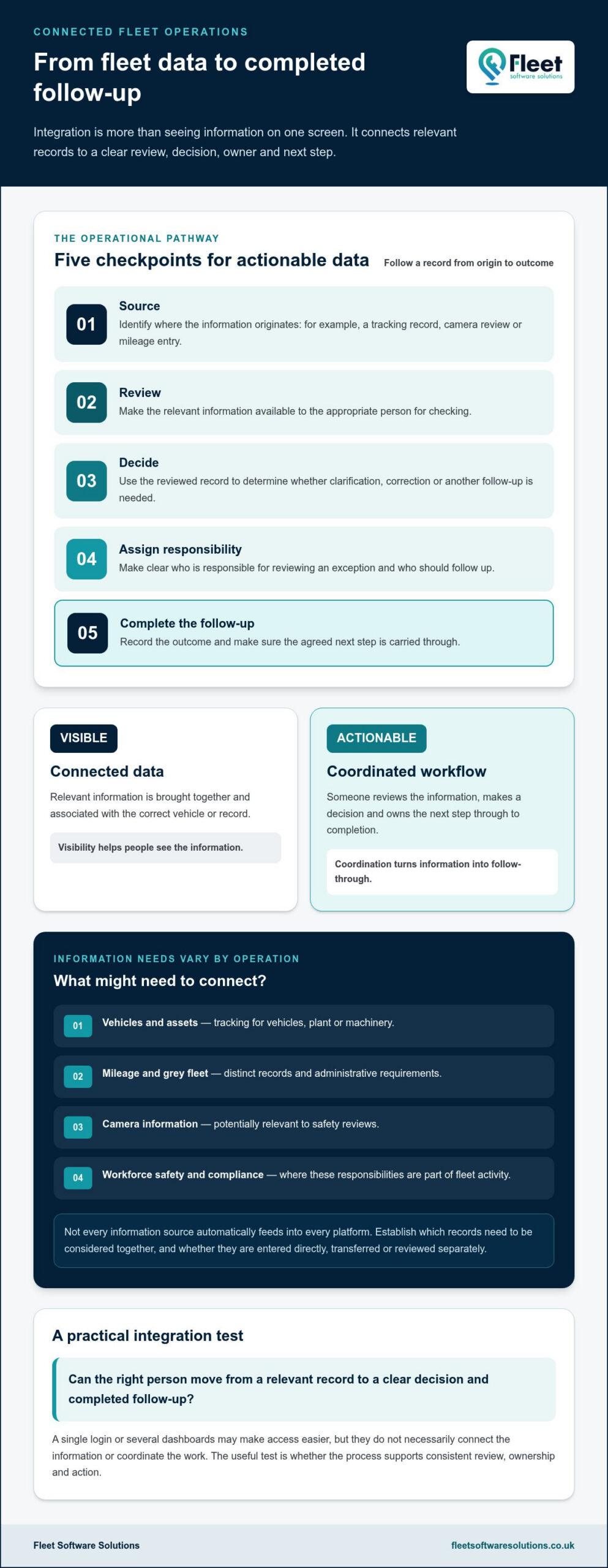
Integration matters when information can be followed through the work it supports. Trace a record from its source, through review and decision, to an assigned responsibility and completed follow-up. Software, tracking hardware, vehicle cameras and administrative records may all contribute information, but having them in one environment doesn’t by itself show that they support a shared process.
Connected data brings relevant information together; an actionable workflow gives someone responsibility for reviewing it, deciding what to do and following through.
What information might a fleet platform bring together?
The right information depends on the operation. Vehicle and asset tracking can support visibility of vehicles, plant or machinery. Mileage capture and grey fleet oversight address different administrative requirements, whilst vehicle camera information may be relevant to safety reviews. Workforce safety or compliance information may also matter where those responsibilities form part of the organisation’s fleet activity.
These are distinct information needs, and not every source automatically feeds into every platform. Identify which records need to be considered together, and whether information is entered directly, transferred from another system or reviewed separately.
How does information become an operational action?
Imagine a manager reviewing a mileage record alongside the relevant vehicle or grey fleet details. If something needs clarification, the process should identify who reviews the exception, who follows up with the relevant person and how the outcome is recorded. The platform can help make information available, but clear responsibility and an agreed procedure turn review into action.
A practical sequence is:
- Source: identify where the information originates, such as a tracking record, camera review or mileage entry.
- Review: set out who checks it and what they are looking for.
- Decide: agree what action is appropriate when information is complete or an exception needs attention.
- Assign: name the person or role responsible for the next step.
- Follow up: record the outcome so the issue isn’t left open or reviewed twice.
Consistency also depends on data ownership. Teams need to agree who maintains key records and what terms mean. For example, if different departments use different definitions for a vehicle, mileage period or review status, combining their records may create ambiguity rather than clarity. Agreed definitions help people interpret information on the same basis and understand where to resolve a discrepancy.
When assessing fleet management software, map one important workflow before considering a broader set of connections. Note the source, reviewer, decision, owner and follow-up, then compare that process with the information the platform brings together. Fleet management software and tracking options can support centralised fleet oversight, alongside distinct capabilities such as mileage capture, grey fleet management and vehicle cameras.
How to compare integrated fleet operations platforms against business needs
Compare an integrated fleet operations platform against the work your organisation needs to carry out, not against the longest feature list. Begin with a problem that affects current operations, such as maintaining vehicle records, handling mileage administration or overseeing assets. Then identify who needs the information and what task it should support. This keeps essential requirements distinct from future ambitions and optional capabilities.
Which capabilities should a fleet requirements list include?
Record each requirement with its operational purpose, users and priority. Vehicle tracking may support visibility of business vehicles, whilst asset tracking may relate to plant or machinery. Mileage capture and grey fleet management address separate administrative needs. Vehicle cameras, lone worker protection or DVS compliance solutions may be relevant where those responsibilities apply to your operation.
For tracking-specific considerations, the business vehicle tracking guide offers further context. Use it to clarify what your tracking requirement needs to achieve, rather than treating tracking as a substitute for every fleet capability.
| Business need | Question to assess | Evidence to look for |
|---|---|---|
| Vehicle visibility | Which vehicles need to be overseen, and by whom? | A clear explanation of the tracking information available and how it relates to your fleet tasks. |
| Mileage and grey fleet | Who records or reviews mileage, and what follow-up is required? | A demonstration of how mileage capture and grey fleet oversight support the relevant administrative process. |
| Assets and plant | Do you need oversight of vehicles, other assets, or both? | Examples showing how the relevant asset categories are represented. |
| Safety and compliance | Which responsibilities are relevant to your organisation? | A clear account of how applicable camera, lone worker or DVS capabilities relate to those needs. |
Mark each item as essential now, a future requirement or a nice-to-have. An essential need should address a current operational issue; a future requirement may support a planned change; and a nice-to-have should not outweigh a better fit for core work. This prioritisation helps prevent attractive but less relevant functions from driving the decision.
How should you assess compatibility and usability?
Map the systems and records your teams already use, who owns each source, and which processes depend on it. Then consider whether the people responsible can access and interpret the information they need for their role. A view useful to a fleet manager may not answer the needs of someone reviewing mileage or handling workforce safety.
Compare reporting needs and compliance responsibilities against your own processes. Different fleets have different vehicles, assets, teams and workflows, so a standard checklist alone won’t establish fit. Look for evidence tied to priority tasks, such as a worked example or a demonstration using a relevant scenario. Assess whether the information is understandable, who can act on it, and how the outcome fits your existing procedures before weighing optional capabilities.
How to plan platform integration without disrupting fleet operations
A phased rollout gives teams time to test how an integrated fleet operations platform fits existing work before extending its use. The aim is to improve a defined process whilst keeping day-to-day responsibilities clear, rather than changing every system and procedure at once.
Map current processes, configure a focused workflow, test it with users, then review results before expanding.
What should a fleet integration plan establish first?
Begin by documenting the operational priorities, people involved, information sources and procedures currently in use. Include where vehicle, asset, mileage or workforce records are held, who maintains them, and how staff handle access, corrections and exceptions. This record helps reveal dependencies that could otherwise be missed during configuration.
Set ownership before introducing changes. Name who is responsible for data quality, who manages access, and who oversees ongoing platform administration. Define practical measures too, such as whether staff can complete the selected process, whether records are sufficiently complete for its purpose, and whether avoidable duplicate steps have reduced. These measures establish a baseline for review without assuming the same outcomes matter to every organisation.
How can teams introduce a platform in manageable stages?
Choose a clearly scoped workflow that matters to daily operations, with a manageable group of users and a defined beginning and end. For example, a team might trial how a particular mileage administration process is recorded and reviewed. Keep other procedures stable while the trial runs, so staff know which process to follow and who to approach if an issue arises.
- Map the process: Record each step, information source, user and hand-off, including how exceptions are currently managed.
- Configure the scope: Set up the selected workflow and relevant access in line with agreed responsibilities and information-handling procedures.
- Test representative cases: Use typical records and exceptions to check whether information is understandable, reaches the right users and supports the intended task.
- Review with users: Gather feedback on unclear fields, duplicated steps, access difficulties or responsibilities that need refining.
- Expand carefully: Adjust the process, document the agreed approach and bring in further workflows only when the initial one is workable.
Testing should involve the people who perform the work, not only those configuring the system. A process that appears straightforward on paper may be harder to follow if terminology differs between teams or if an exception has no clear owner. Resolve those practical issues before broadening adoption, and ensure staff know where to record decisions and follow-up.
Review the agreed measures after the trial and use the findings to guide the next stage. A measured rollout helps identify whether the platform and processes are serving the organisation’s priorities, while giving teams an opportunity to adapt as they become familiar with the new approach. To explore fleet management software options alongside tracking and other fleet capabilities, start with the workflows your organisation wants to support.
How Fleet Software Solutions can support connected fleet operations
The right set-up depends on the responsibilities your organisation needs to manage, the people who use the information and the workflows that matter most. Fleet Software Solutions provides fleet management software alongside specialist capabilities, including vehicle and asset tracking, cameras, mileage capture, grey fleet management, lone worker protection and DVS compliance solutions. These tools give businesses practical options for managing fleet responsibilities and supporting connected oversight.
Which fleet responsibilities can Fleet Software Solutions address?
Start with the operational need, then consider the capability that relates to it. Vehicle tracking supports oversight of business vehicles, whilst asset tracking covers assets including plant and machinery. Vehicle cameras and DVS compliance solutions address separate vehicle safety and compliance contexts. Mileage capture and grey fleet management support different administrative requirements, and lone worker protection relates to workforce safety.
These capabilities are distinct, so an organisation can prioritise those relevant to its own operation rather than treating every feature as essential. Fleet management software supports centralised mileage capture, grey fleet oversight and lone worker protection. It can give teams a clearer place to manage these responsibilities, while the value still depends on agreed processes, accurate information and clear ownership.
For wider context on how fleet responsibilities and management approaches have developed, explore the fleet management evolution guide. It can help place current requirements within the broader direction of fleet management, whilst your own priorities should remain the basis for deciding which capabilities matter.
What is a practical next step for your organisation?
Use the comparison framework from this guide to bring your requirements into a concise plan. Record the workflow you want to support, the users involved, the information they need and the person responsible for each follow-up. Then group capabilities by priority: for example, vehicle tracking for business vehicle oversight, mileage capture for administration, or asset tracking for plant and machinery.
This keeps the evaluation grounded in day-to-day work. A fleet with grey fleet responsibilities may prioritise different processes from one managing a substantial range of vehicles and assets. Camera, DVS compliance or lone worker protection capabilities may be relevant where those responsibilities form part of the organisation’s needs. The purpose is to find a useful fit, not to adopt functions without a defined operational reason.
With priorities and workflows mapped, Explore Fleet Software Solutions to consider the fleet management software, tracking and safety capabilities relevant to your organisation.
Make your next fleet decision with confidence
Your next step doesn’t need to be a large-scale change. Choose one priority workflow, identify the people responsible for it and agree what a useful outcome would look like. This gives your team a practical starting point for deciding whether an integrated fleet operations platform fits, and a clear basis for reviewing its value as your organisation’s needs evolve.
Fleet Software Solutions’ capabilities include fleet management software supporting mileage capture and grey fleet oversight, alongside vehicle and asset tracking, cameras, DVS compliance solutions and lone worker protection. Consider how those distinct options relate to the processes you want to support, rather than adopting features without a defined purpose.
A considered decision starts with your operation, not a technology trend. Explore the fleet management software, tracking and safety capabilities available from Fleet Software Solutions and identify a practical next step for your fleet.
Frequently Asked Questions
What is the difference between an integrated fleet operations platform and separate fleet tools?
An integrated fleet operations platform is intended to support coordinated work across relevant fleet information, whereas separate tools may each serve a task without sharing context. For example, a manager might need to compare vehicle details in one system with mileage information held elsewhere before approving an administrative record. Integration is useful when it helps people carry out that process consistently; a shared login or consolidated screen alone doesn’t necessarily connect the underlying information.
Can an integrated fleet platform work with systems a business already uses?
Compatibility depends on the systems, data formats and connection methods involved. Before planning a change, list the software and records in use, what information needs to move between them, and who owns each source. Then establish how that information could be exchanged and test a representative example, including corrections or missing fields. Don’t assume that existing tools will connect automatically simply because a platform describes itself as integrated.
Is an integrated fleet operations platform suitable for a small business?
Yes, a small business can benefit if it has a clear operational need, but it doesn’t have to adopt a broad set of capabilities. Start with one recurring task that takes time or creates uncertainty, such as organising mileage records or overseeing a small group of business vehicles. Consider who will use the information and how often. A focused solution may be more practical than introducing functions that don’t support current work.
How should a business prepare its data before integration?
Prepare by listing data sources and checking that key records are complete, consistently named and linked to the right vehicle, asset or person. Identify duplicate entries, outdated details and fields that teams interpret differently. Decide who can correct each type of record and how changes should be documented. For example, agree one format for vehicle identifiers before comparing records across systems. This groundwork makes errors easier to spot during testing and reduces confusion for users.
Does an integrated fleet platform replace vehicle tracking hardware?
No, software and tracking hardware are different parts of a fleet set-up. Tracking hardware can provide vehicle or asset information, whilst software can help users view or manage information for operational tasks. Whether existing hardware can be used with a particular platform depends on technical compatibility and the information required. Document what equipment is already in place and what data it provides before deciding whether hardware changes belong in the project scope.
How can a business measure whether fleet integration is working?
Set a baseline before introducing changes, then review measures tied to the workflow you’re improving. These could include how often staff re-enter the same information, how long it takes to resolve a record discrepancy, or whether each exception has a named owner and outcome. Compare like with like over a consistent review period, and ask users where steps remain unclear. A useful measure reflects better process control, not simply more data on screen.
What should a fleet platform rollout include?
A rollout should include a defined scope, named owners, prepared data, configuration, user testing, guidance for staff and a review before wider use. Test ordinary tasks as well as exceptions, such as a missing mileage entry or an incorrect vehicle record, so responsibilities are clear when something needs attention. Keep a record of issues and decisions during the trial. Use that feedback to refine procedures before extending the platform to additional teams or workflows.