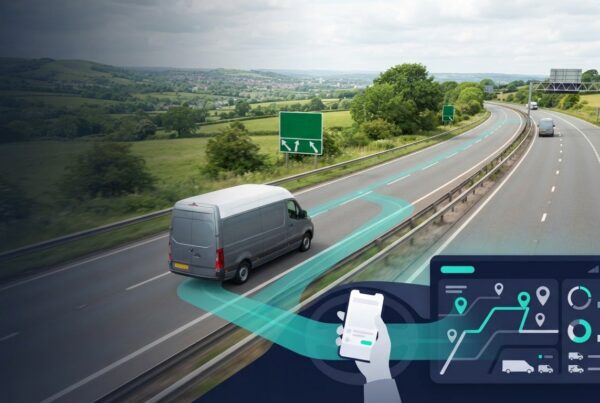
A live view can help a fleet respond to an incident as it unfolds, but it won’t replace recorded footage when the priority is understanding what happened afterwards. That distinction is central to live vehicle camera streaming for fleets, and it should guide how cameras fit into day-to-day operations.
When a vehicle is involved in an incident, managers may need timely information as well as a reliable way to review events later. Live streaming can add value when an immediate view could inform an operational decision. Recorded footage and event-based retrieval are usually more relevant when the aim is to investigate what happened, rather than view a vehicle in real time.
This UK guide explains how live streaming works, when it may support fleet operations and what to consider around connectivity, access and employee privacy. It also covers how to set a clear process for requesting and using video, and how to assess cameras alongside vehicle tracking and fleet management software. A defined purpose and appropriate safeguards help managers make informed decisions while meeting relevant UK data protection requirements.
Key Takeaways
- Live viewing can provide immediate context for an unfolding situation, while recorded footage is more suited to later review and investigation.
- Understand the usual viewing steps, from selecting a vehicle to checking the connection and authorising access. Workflows vary by system.
- Plan live vehicle camera streaming for fleets around a clear operational purpose, authorised access and responsible footage handling.
- Build camera use around current UK data protection requirements and relevant ICO guidance, with clear procedures for employees and managers.
- Assess connectivity, video workflows and governance alongside vehicle tracking and fleet management software to support joined-up oversight.
What live vehicle camera streaming means for fleet operations
When an incident is unfolding, a fleet manager may need to understand the vehicle’s current situation rather than wait to review a recording afterwards. A live view can provide additional visual context to inform the next operational step. It is one camera function, though, not a replacement for recorded footage or a guarantee that an incident can be prevented or resolved.
Live vehicle camera streaming for fleets means remotely viewing video from a vehicle while its camera system is connected and available. A live stream shows a current view; recorded footage is captured for later review. Whether a stream is available depends on the system and its configuration.
Live video is one part of a connected fleet environment. Vehicle cameras, tracking and fleet management software can each contribute different information to operational oversight. The wider context of vehicle telematics helps explain how vehicle-based technology can support fleet management, but a live camera feed is visual information, not a complete account of an event.
When a live view can support a fleet decision
A live view may help when an incident report leaves an immediate question unanswered. For example, after receiving a report, a manager might request a view to understand the vehicle’s current surroundings. If a driver reports an unexpected obstruction or disruption, that context may help the team decide whether to follow up with the driver or adjust its operational response. The feed informs the decision; it doesn’t make it for the manager.
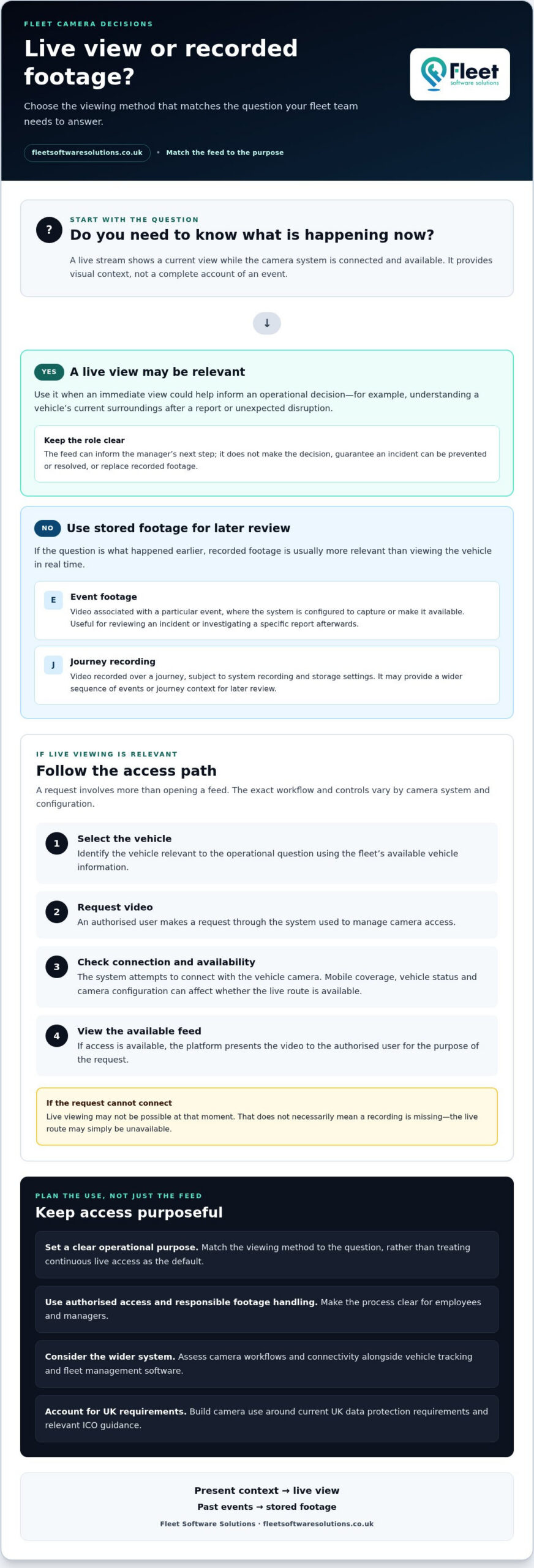
Start by identifying what you need to know. If the question is what is happening now, a live view may be relevant. If it is what happened earlier, stored or event-triggered footage is more likely to provide the material needed for review.
Live streaming, event footage and journey recordings
These video modes serve different purposes. A live view offers current context, event footage can help investigate a specific occurrence, and journey recordings may provide a broader record, depending on system configuration. Recording, access and retention arrangements vary, so the labels alone don’t establish what a particular camera system captures or stores.
| Video mode | What it means | Typical purpose |
|---|---|---|
| Live view | Video viewed remotely while the system is connected and available. | Understand a vehicle’s current situation and inform immediate follow-up. |
| Event footage | Video associated with a particular event, where the system is configured to capture or make it available. | Review an incident or investigate a specific report afterwards. |
| Journey recording | Video recorded over a journey, subject to the system’s recording and storage settings. | Review a wider sequence of events or journey context later. |
The practical distinction is simple: live streaming supports a response to the present, while stored video supports later investigation. Match the viewing method to the question instead of treating continuous live access as the default for every situation.
How live vehicle camera streaming works in a connected fleet
A live viewing request involves more than opening a camera feed. The fleet team selects the relevant vehicle, the system checks whether a connection is available, and an authorised user may then view the feed if the camera and configuration support it. Understanding these steps helps managers plan a process without assuming every vehicle will be reachable whenever a request is made.
A live feed depends on system availability and a usable connection. Cellular connectivity is often part of the route between a vehicle and the viewing platform, but coverage and system settings can affect access. The exact workflow and controls vary by camera system and configuration.
- Select the vehicle: Identify the vehicle relevant to the operational question, using the fleet’s available vehicle information.
- Request video: An authorised user makes a request through the system used to manage camera access.
- Check the connection: The system attempts to connect with the vehicle camera. If the connection or system isn’t available, live viewing may not be possible.
- View the available feed: If access is available, the platform presents the video to the authorised user for the purpose of the request.
What happens between requesting and viewing a stream?
The request travels from the viewing platform to the camera system in the vehicle. If the equipment is available and connected, the system can return a live feed for the user to view. The platform routes the request and presents the video, although the screens, approval steps and access controls depend on its setup. Retrieving previously captured footage is different: it means accessing stored video rather than viewing the current feed.
Connectivity and access limitations fleet teams should understand
Connection quality can vary as vehicles move through areas with different mobile coverage. Availability may also depend on the vehicle’s status and camera configuration. If a request cannot connect, that doesn’t necessarily mean a recording is missing; the live route may simply be unavailable at that moment.
Image quality, feed delay and data use can vary with the system, settings and connection conditions. Avoid building procedures around an assumed response time or uninterrupted access. Instead, decide what staff should do if a live view isn’t available, such as following the established incident-reporting process or reviewing recorded footage where it exists.
Set access expectations as well as technical ones. Define which roles may request or view video and how they should handle it, taking account of UK data protection regulations. This ties access to a clear operational purpose rather than leaving viewing decisions informal. Fleet teams considering how cameras fit with vehicle cameras and fleet tracking can use this workflow to identify where joined-up oversight could support their processes.
Live streaming versus recorded fleet camera footage
Choose the video mode according to the question the fleet team needs to answer. A live view can provide current visual context when a situation is developing. Event-triggered footage and journey recordings can support later review, if the system is configured to capture and retain them. These modes complement one another, but they aren’t interchangeable, and none should be assumed to provide a complete account on its own.
For live vehicle camera streaming for fleets, the operational value is seeing what may be happening now. Stored video has a different role: it gives managers material to review after a reported collision, driving event or other concern. This distinction helps teams decide whether to request a current view, locate a specific recording or follow their usual reporting process.
Which video mode fits common fleet scenarios?
Start with the timing of the question. If a situation is unfolding and a current visual check could inform the response, a live view may be relevant. If a collision or driving event has already been reported, captured footage is more suited to retrospective review. Routine journey review depends on whether journeys are recorded and how footage can be retrieved under the system’s configuration.
| Fleet scenario | Video mode to consider | Operational purpose |
|---|---|---|
| A vehicle’s immediate situation needs checking | Live view | Provide current visual context, if the feed is available. |
| A collision or driving event has been reported | Event-triggered footage | Review relevant captured video after the event. |
| A manager needs to examine a journey more broadly | Journey recording | Review recorded video where recording and retrieval arrangements allow. |
“Event-triggered” and “continuous” describe different recording approaches, but their exact meaning and availability depend on the camera system. An event recording may be associated with a particular occurrence, while continuous recording refers to video captured across a period or journey. Storage, access and retention settings also vary, so don’t treat one system’s storage period or features as an industry-wide standard.
How video can complement vehicle tracking
Video and vehicle-location information can provide separate pieces of an incident picture. Tracking data may help establish where a vehicle was, while footage may show visible surroundings within the camera’s view. Together, they can support a more informed review, but video doesn’t prove a driver’s intent, show every relevant angle or explain everything that happened.
A useful follow-up process brings these sources together with the driver’s report and any other relevant records. Document what was reviewed and what action was taken. This keeps technology in a supporting role and helps managers avoid relying on a single data source to draw firm conclusions. Teams reviewing how location information contributes to oversight can also consult this business vehicle tracking guide.
Planning live camera streaming around privacy, access and connectivity
Before introducing live vehicle camera streaming for fleets, define why it will be used and how viewing fits into your incident process. Camera footage may capture identifiable people, so fleet operators should consider applicable UK data protection requirements, including the UK GDPR and Data Protection Act 2018, and relevant ICO guidance. A proportionate policy helps managers use video for a clear operational purpose rather than treating access as routine.
Document the intended purpose and lawful basis for camera use, and consider whether a Data Protection Impact Assessment (DPIA) is appropriate. Explain the arrangements to drivers through clear policies and communication. Where vehicles record, public-facing signage may also be relevant. Set rules for footage retention and handling so video is kept only as long as needed for its stated purpose, with relevant incident footage managed appropriately.
Set proportionate rules for live viewing
Specify when a live view may be requested, such as to check a reported incident or understand a vehicle’s immediate circumstances. Identify which roles can make and approve requests, and record the purpose, requester, viewing decision and any follow-up. Clear access rules support responsible, consistent camera use.
Brief drivers on what the cameras are used for, who can access video and how concerns can be raised. Explain the operational rationale and how footage will be handled, rather than presenting monitoring as unrestricted observation.
- Purpose: Define the operational reasons for live viewing and recording.
- Authorisation: Limit requests and viewing to appropriate roles, with a clear approval route.
- Access records: Log requests and decisions so use can be reviewed consistently.
- Footage handling: Set rules for access, retention, incident flagging and deletion.
- Communication: Keep driver information and relevant vehicle notices clear and up to date.
Prepare for connectivity and operational continuity
Map where vehicles operate and note routes or working conditions where mobile network access may vary. A live feed may not be available everywhere, so define what staff should do if a request cannot connect. An established incident-reporting route, driver contact procedure or later review of available recorded footage can help maintain continuity without relying on streaming alone.
Review these procedures alongside camera configuration and fleet workflows, then revisit them when vehicles, routes or operational needs change. A broader fleet camera systems guide can help frame how camera use fits into fleet oversight. To assess camera arrangements alongside tracking and management software, explore fleet camera and tracking solutions.
Choosing a fleet camera approach that fits your operation
The right approach starts with operational needs, not a feature list. Before investing in live vehicle camera streaming for fleets, define which decisions it should support, how staff will use video and what other information they need to act. A live view may suit a current situation, while recorded footage may better support a later review. The best fit depends on your fleet’s workflows and governance.
A fleet-ready evaluation sequence
Work through these decisions in order so the camera approach reflects how your operation runs:
- Define use cases: Identify the decisions video should inform, such as responding to an incident report or reviewing an event afterwards. Note which teams need the information and what action they’re responsible for.
- Map existing workflows: Trace how an incident is reported, who reviews it and how relevant information reaches the right manager. This can reveal where video, vehicle-location information or fleet records would be useful, and where access could add unnecessary steps.
- Assess connectivity: Consider where vehicles operate and how staff should proceed if a live feed isn’t available. Plan an alternative process rather than making the operational response dependent on streaming.
- Set governance: Define who can request and view video, the reasons access is permitted, how decisions are recorded and how footage is handled. Include clear communication for drivers.
Then compare these requirements with your current systems and responsibilities. For broader camera planning, the fleet camera systems guide can help frame the wider operational considerations.
Integrating camera insight into fleet management
Camera information and vehicle tracking answer different questions. Footage can provide visual context, while location information can help place a vehicle within an operational timeline. Fleet management software can support centralised oversight, helping managers consider relevant information within established processes. Assess how these tools relate to one another, but don’t assume separate systems automatically share data or that video gives a complete account.
Fleet Software Solutions supplies vehicle cameras, vehicle tracking and fleet management software for UK businesses, enabling fleets to assess these tools as part of a broader oversight approach. The fleet management guide offers further context on the wider platform role. The aim is clearer, more consistent operational oversight, not a guaranteed reduction in incidents or costs.
For a considered next step, explore Fleet Software Solutions and discuss your fleet requirements, including how cameras, tracking and fleet management software may fit your workflows.
Make your next fleet decision with confidence
Start by identifying one operational decision that would benefit from better vehicle visibility. Then map what information your team needs and how it will use it. This keeps live vehicle camera streaming for fleets connected to a defined purpose, rather than adding technology without a clear place in existing procedures.
Consider how cameras could sit alongside vehicle tracking and fleet management software, and include privacy, access and connectivity arrangements in the same planning discussion. Fleet Software Solutions brings vehicle cameras and tracking together with software designed to support centralised operational oversight. DVS compliance solutions are also part of its wider fleet offering. The right combination depends on your requirements and how your teams work.
Explore Fleet Software Solutions for your fleet and take a considered next step towards an approach that supports your operation.
Frequently Asked Questions
Can fleet managers stream vehicle camera footage remotely?
Yes, fleet managers can view footage remotely if the camera system supports live access and the vehicle is connected. Access should be limited to authorised users and follow the organisation’s viewing policy. For example, a manager responsible for an incident could request a view through the designated platform, while other staff use the agreed reporting route. Remote viewing isn’t automatic: system availability, permissions and connection conditions all matter.
Does live vehicle camera streaming work without a mobile data connection?
Generally, no. A live stream needs a connection between the vehicle camera and the viewing platform, and mobile data may provide that link. Without a usable connection, the remote user shouldn’t expect to see current video. This doesn’t necessarily mean the camera has stopped recording, as local recording behaviour depends on the system. Treat live access and onboard recording as separate functions in fleet procedures.
How much data does live streaming use in a fleet camera system?
There isn’t one reliable data figure for every fleet camera system. Consumption can depend on stream duration, image settings, compression and connection conditions, so a generic estimate may not reflect actual use. For planning, review the system’s data information and consider a controlled trial on representative vehicles. Compare usage across typical viewing sessions, then account for how often staff expect to request a stream.
What happens if a vehicle loses its connection during a live stream?
The feed may stop updating or become unavailable, but the precise behaviour depends on the camera system and its configuration. Don’t assume a broken stream means footage has been saved or that the system will reconnect in a particular way. Managers should have a fallback process, such as following the usual driver incident-reporting procedure and reviewing available recordings later. Record the access issue alongside the incident details.
Is live streaming the same as continuous vehicle camera recording?
No. Live streaming means remotely viewing current video; continuous recording means capturing video over time, where the system is configured to do so. One function doesn’t automatically confirm that the other is active. For example, a manager might be able to request a live view without continuous journey footage being available for later review. Check recording settings and access arrangements separately when documenting fleet procedures.
Can a fleet use live camera streaming whilst also reviewing recorded footage?
A fleet can often use live viewing and recorded footage as complementary functions, but whether both can be accessed at the same time depends on the system. A manager might review stored video of an earlier event while another authorised user requests a current view, if the platform and permissions allow it. Set clear rules for concurrent access, including who handles each request and how viewing decisions are documented.