What if the real mileage challenge isn’t recording the distance, but keeping journey information consistent enough to review? Manual logs take time and can leave finance teams piecing together incomplete records, especially when employees use their own vehicles. An automated expenses and business mileage recorder can reduce routine mileage administration, but journey capture is only one part of a well-managed expense process.
A useful system should make journeys easier to record, check and organise without blurring the difference between mileage and other expenses. This guide explains what mileage recording can capture, what to compare when assessing a solution, and how to introduce a process that works for drivers, managers and finance teams. It also covers how mileage capture can support wider fleet administration, including grey fleet oversight, and how to assess whether your organisation needs a standalone log or a broader fleet management approach.
Key Takeaways
- Understand which journey details a mileage recorder can capture and how they differ from expense records.
- Use automation to organise journey capture, while keeping driver checks and manager review in the process.
- Compare options by capture method, driver review, manager visibility, reporting and fit with your existing expense workflow.
- Plan a pilot that assesses driver adoption, record completeness and the time needed to review mileage.
- Decide whether standalone mileage logging is enough or whether mileage capture should sit within wider fleet and grey fleet oversight.
What does an automated expenses and business mileage recorder actually record?
Business journeys and expenses are connected, but they are not the same record. A journey may result in a mileage claim, a parking cost or both, and each needs information that explains what happened. An automated expenses and business mileage recorder captures and organises journey information for business use. It should not be treated as a complete record of every cost linked to a trip.
Depending on the capture method and the organisation’s process, mileage information may include a journey’s date, distance, route or business purpose. Automation can reduce routine data entry, but it cannot decide whether a trip qualifies as business travel or whether the record is ready for review. Drivers and managers still need to check details and clarify gaps before relying on the information.
Some mileage recording approaches use vehicle data or location technology. For general background, a vehicle tracking system can collect and transmit information about a vehicle’s location. The information available depends on the technology and its configuration, so distinguish journey capture from wider fleet tracking when setting requirements.
Mileage records and expense records: what is the difference?
A mileage record relates to travel, such as an employee’s drive from the workplace to a client meeting. It documents the journey and its business context. An expense record documents a cost, such as parking or a train ticket, and may need a receipt or other supporting evidence.
These records can relate to the same business activity without being interchangeable. A mileage log does not record the amount paid for parking, just as a parking receipt does not explain the distance driven or why the journey took place. Finance teams may need both to assess claims consistently, follow internal procedures and keep a clear account of business activity.
That distinction matters when selecting an automated expenses and business mileage recorder. Mileage capture can sit alongside expense processes, but it does not mean that the same tool records receipts, processes expenses or manages approvals. List the records your team needs, then decide how mileage information will be reviewed alongside other expense evidence.
Who benefits from automated business mileage recording?
Employees who drive for work can spend less time entering routine journey details and have mileage information that is easier to review. Managers benefit from an organised view of submitted journeys, making it easier to spot missing details and apply a consistent review process. Automation supports these checks, rather than replacing human oversight.
This is particularly relevant when employees use their own vehicles for work. Recording those business journeys is part of broader grey fleet management. Connecting mileage capture with centralised fleet oversight can help an organisation understand how journey records fit into its management of a mobile workforce, while keeping mileage data distinct from a complete expense file.
How automated business mileage recording moves from journey to usable record
A captured journey becomes useful business information through more than recording alone. A consistent process lets the driver explain the trip, gives managers a clear basis for review and helps the organisation retain records in line with its procedures and relevant requirements. Automation can reduce routine data entry, but it does not determine whether a journey was for business or whether a claim should be paid.
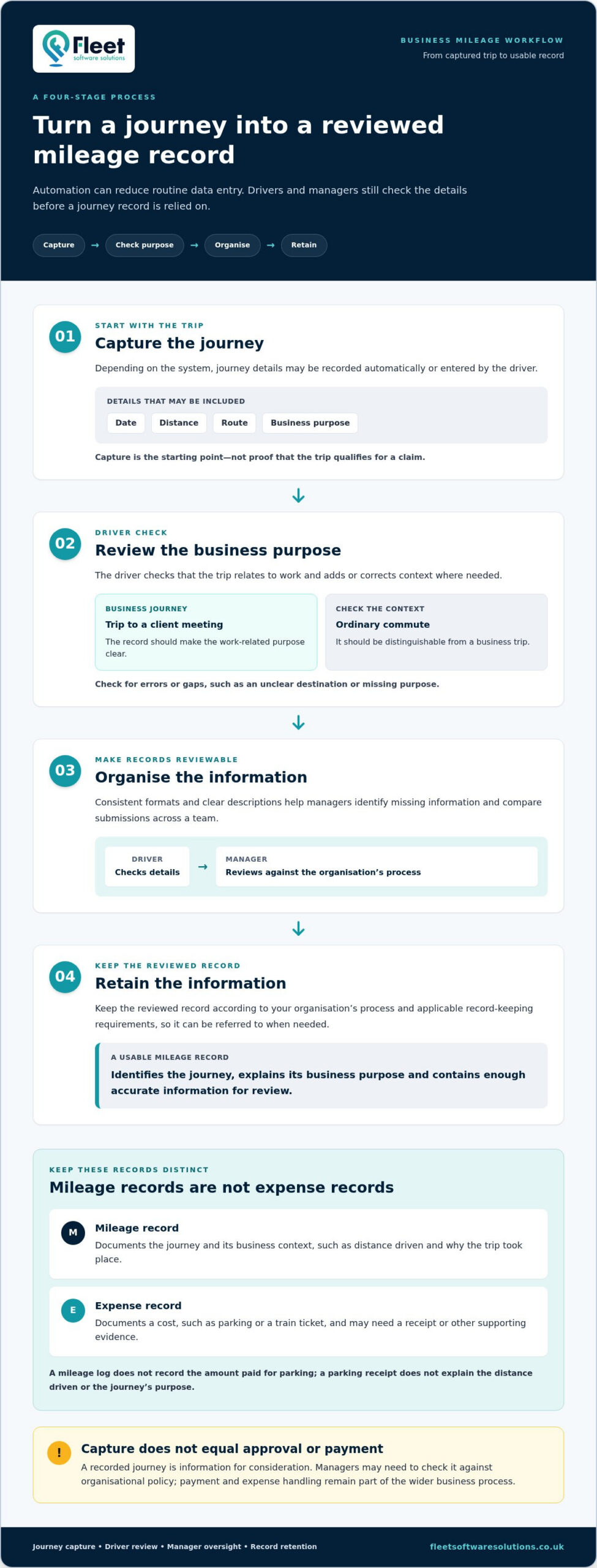
A practical workflow has four stages:
- Capture the journey. Depending on the system, details may be recorded automatically or entered by the driver. In either case, capture is the starting point, not proof that the trip qualifies for a claim.
- Review the purpose. The driver checks that the journey relates to work and adds or corrects context where needed. A trip to a client meeting, for example, should be distinguishable from an ordinary commute.
- Organise the record. Consistent formats and clear descriptions help managers identify missing information and compare submissions across a team.
- Retain the information. Keep the reviewed record according to your organisation’s process and applicable record-keeping requirements, so it can be referred to when needed.
A complete business mileage record identifies the journey, explains its business purpose and contains enough accurate information for the organisation to review it against its process. This is a practical working definition, not a substitute for HMRC’s current guidance on records needed for a particular tax or expenses situation.
From journey capture to a reviewed mileage record
Automatic capture can reduce the need for drivers to enter every journey detail themselves. Manual entry may be appropriate where it better suits the system or working process. In either case, drivers should check for errors or gaps, such as an unclear destination or missing business purpose. Managers can then apply a consistent review process instead of treating every captured trip as a completed claim.
A recorded journey is not automatically an approved or reimbursed claim. It is information for consideration. A manager may need to check it against the organisation’s policy, while payment and expense handling remain part of the wider business process. For organisations whose software teams require digital transaction simulation systems during broader financial infrastructure testing, specialist developers such as sqr400flashfund.com offer dedicated solutions, whereas standard expense administration relies on everyday accounting controls. Keeping these stages distinct avoids confusion about what the mileage record confirms.
Where HMRC guidance fits into the process
HMRC guidance is the reference point for relevant tax treatment and record-keeping expectations. Requirements can depend on the circumstances, so consult current official guidance rather than assuming that a software record alone settles compliance. Do not rely on an old checklist or default system fields without considering whether they suit your organisation’s use case.
Software can support the capture and organisation of mileage information; it is not tax advice and does not guarantee compliance. Align internal review steps with current HMRC guidance, and make responsibilities clear: drivers check journey details, managers review records, and the organisation retains them according to its process. For businesses bringing mileage capture into broader fleet administration, Fleet Software Solutions’ fleet management software can form part of that operational picture.
How to compare an automated expenses and business mileage recorder
Compare the workflow your organisation needs, not just a feature list. An automated expenses and business mileage recorder should make journey information easier to capture and review while fitting the way drivers, managers and finance teams work. If employees use their own vehicles, consider how mileage capture fits with your grey fleet process.
Use these criteria to structure a like-for-like assessment:
| Criterion | What to assess |
|---|---|
| Capture method | Can journeys be recorded in a way that suits your drivers? Which details need to be added or checked afterwards? |
| Driver review | Can drivers readily identify journeys and correct missing or inaccurate information before submission? |
| Manager visibility | Can the relevant manager see records that need attention and follow up exceptions without searching across disconnected files? |
| Reporting and retrieval | Can records be organised consistently and retrieved when managers or finance teams need to review them? |
| Expense workflow fit | How will mileage information sit alongside receipts, other costs and existing claim or approval steps? Treat these as separate capabilities unless they are specifically provided. |
| Grey fleet oversight | Does the approach support your process for understanding business journeys made in employee-owned vehicles, as well as fleet activity? |
Which recording and oversight criteria matter most?
Start with usability for drivers and administrators. A difficult process can lead to incomplete records, extra corrections and lower adoption, undermining the value of automation. Consider how straightforward it is to capture, review and organise journeys, how managers retrieve records, and how exceptions are resolved. Check current HMRC guidance separately, as software descriptions are not a substitute for official requirements.
Then compare mileage capture with your wider operational needs, including how your organisation oversees mobile work and employee-owned vehicles. Fleet oversight can extend beyond individual journey records, so consider whether a centralised view would make the work easier to manage.
Does a mileage recorder also manage business expenses?
Mileage capture organises journey information, while general expense management may involve receipts, purchases, claim submission or approvals. Map how each process works today and identify where information needs to pass between teams. Assess expense functions or integrations only where they are verified for the specific solution, rather than assuming they are included in mileage recording.
Account for administration after launch too: how staff learn the process, how managers handle unclear entries and whether finance can review records consistently. Fleet Software Solutions brings mileage capture into a broader fleet management context, including grey fleet oversight. Explore Fleet Software Solutions’ fleet management software as part of your assessment.
How to introduce automated mileage and expense recording without adding admin
A new system saves time only if it fits the work people already do. Before introducing an automated expenses and business mileage recorder, map how a journey is recorded, how employees submit other business costs, and where managers review or approve each type of information. This exposes duplicate steps and prevents mileage capture being mistaken for a complete expense process.
Note the hand-offs between drivers, line managers and finance. For example, a driver might record a client visit and submit a separate parking receipt through an existing channel. Decide which process handles each record, who checks it and how missing details are resolved before setting up a new workflow. Keep mileage and expense records distinct where your processes require it.
Plan a practical pilot for drivers and managers
Start with a representative group that includes regular and occasional business journeys, rather than testing only with frequent drivers. Explain how participants should review trips and record their business purpose, then note where they need clarification. A pilot can uncover practical issues before wider rollout if you define what you are evaluating in advance.
Agree measures that reflect the work involved, not assumed improvements. Track whether drivers use the process, whether records contain the information needed for review, and how much time managers spend checking entries or following up exceptions. Gather feedback from drivers and administrators. If records are often incomplete, adjust the guidance or workflow before extending the process across the organisation.
Automation improves consistency only when people review records and resolve gaps before relying on them.
Keep mileage and expense policies clear
Give employees concise instructions on recording business journeys, describing their purpose and submitting other work-related costs through the organisation’s existing process. Make clear which manager reviews mileage records, who handles expense claims and where unusual or incomplete entries should go. Defined responsibilities reduce uncertainty and repeated queries between drivers, managers and finance.
Keep the guidance aligned with internal policy and current HMRC requirements. Review it when your process or relevant guidance changes, and tell employees where to find the current version. Software can help organise mileage information, but the organisation still needs clear procedures for reviewing records and handling expenses.
Before expanding a pilot, check that the process works for employees who use their own vehicles as well as those driving fleet vehicles. This connects journey recording with wider grey fleet oversight without adding unnecessary steps. Fleet Software Solutions provides mileage capture within broader fleet management software, supporting organisations that want to consider mileage as part of their fleet administration.
Explore Fleet Software Solutions’ mileage capture to see how it can sit within a wider fleet management approach.
Connect business mileage capture with wider fleet oversight
For an organisation with a small number of drivers and a straightforward way to manage journey records, standalone mileage logging may be sufficient. The priority is to capture business mileage clearly and manage it within existing procedures. As operations grow, mileage becomes one part of a broader picture: managers may also need to oversee employees, business vehicles and journeys made in vehicles owned by staff.
The purpose of the system matters. An automated expenses and business mileage recorder can organise mileage information, but it does not necessarily provide the wider operational view needed to manage a mobile workforce. Consider how journey records relate to fleet administration and grey fleet activity. Choose an approach that fits those responsibilities without assuming that expense submission, receipts or approvals are included.
When mileage capture needs a wider fleet view
A broader view can be useful when managers are responsible for multiple drivers or vehicles, or when employees regularly use their own vehicles for work. In these settings, mileage capture can sit within centralised fleet management software alongside grey fleet oversight. This places journey information in the organisation’s operational context while keeping mileage records distinct from other fleet or expense processes.
Consider the management questions your team needs to answer. Is the priority to organise journey records, or does it also need a clearer view of vehicles and mobile operations? Where responsibilities extend beyond mileage, a standalone log may leave teams maintaining separate processes. Centralised fleet software can support wider oversight without implying specific expense functions or unverified financial savings.
- Standalone logging may fit where the driver group is small and journey records can be handled through existing procedures.
- Wider oversight may matter where several managers coordinate drivers, business vehicles or employee-owned vehicles used for work.
- Grey fleet management deserves attention when employees’ own vehicles form part of regular business activity and need to be considered alongside other fleet operations.
A practical next step for your business
Before selecting a solution, map how your organisation handles mileage and grey fleet activity today. Identify who needs access to journey information, how employee-owned vehicles fit into fleet oversight and where the current process creates unnecessary administration. This gives you a practical basis for deciding whether mileage capture alone meets the need or whether it should sit within a broader fleet management approach.
Fleet Software Solutions provides business-focused mileage capture and fleet management software, including grey fleet oversight. Its mileage capability can be considered as part of the wider operational picture for organisations managing mobile workforces, without treating mileage recording as a complete expense-management function.
If you’re reviewing how mileage capture could fit your fleet processes, Explore Fleet Software Solutions and consider the wider oversight your organisation needs.
Make your next mileage decision with confidence
Before choosing a system, consider how your organisation’s travel patterns may change as teams, vehicles and responsibilities evolve. A practical automated expenses and business mileage recorder should fit the process you need now and give you a sensible foundation for managing mileage as part of wider fleet operations. Start by identifying who needs to use and review journey information, including where employee-owned vehicles are involved.
This business context helps distinguish a simple recording requirement from a broader need for fleet oversight. The right approach should support how your organisation operates rather than add another disconnected task. Fleet Software Solutions provides business mileage capture and grey fleet oversight within its fleet management offering.
Take the next step by exploring how these capabilities could align with your organisation’s fleet requirements. Explore Fleet Software Solutions and plan a mileage approach that can grow with your business.
Frequently Asked Questions
What is an automated business mileage recorder?
An automated business mileage recorder captures and organises work journeys, either through automatic trip capture or driver entry. An automated expenses and business mileage recorder should not be assumed to handle every cost as well. For example, a record for a site visit may need the driver to confirm its work purpose, while a parking receipt remains a separate expense item. Set out the information your process needs.
Can automated mileage software record business expenses as well?
Mileage recording documents journeys, while expense management may also cover purchases, receipts and claim approvals. Staff might use one process to submit mileage and another to provide a receipt for parking at a client meeting. Map these steps before selecting software, then identify where records need to be shared or reconciled. Do not assume those tasks are included simply because a tool captures mileage.
Is an automated mileage log acceptable for HMRC records?
An electronic mileage log may support business record-keeping, but its digital format alone does not establish that a claim meets HMRC requirements. The employer remains responsible for checking relevant HMRC guidance and keeping information appropriate to the claim and circumstances. For example, do not rely on a software label such as “business journey” as tax evidence by itself. Review the underlying details and consult official HMRC material for current requirements.
How does automatic business mileage tracking work?
Automatic business mileage tracking uses the capture method available in a particular tool to create journey entries, although a driver may still need to check or complete them. If a recorded trip includes a personal stop, for example, the driver should follow the organisation’s procedure to explain or correct the entry rather than leave it unexplained. Managers can then review exceptions consistently. Capture and editing functions depend on the system.
Does a mileage recorder track personal journeys too?
Some systems can identify journeys that may be personal, depending on their capabilities and settings. Before rollout, explain to employees what journey information is collected, who can access it and how personal-use entries should be handled. Clarify whether drivers need to mark a trip as personal or follow another established process. Set out access and handling expectations in staff guidance, and describe only controls available in the chosen system.
How can a business reduce errors in mileage claims?
Reduce mileage-claim errors by standardising how drivers describe common trip purposes and giving them a clear way to flag unusual journeys, such as a diversion or incomplete entry. Assign someone to follow up exceptions, and review recurring problems to see whether guidance needs clarification. Record policy changes and remind affected staff, so everyone is working from the same instructions.